ChatGPT Travel Planning: How to Use the Trip.com App


If you've ever planned a trip, you know the drill. You start with twenty tabs open on your computer, toggling between calendars, airline sites, and flight search engines. After shifting your dates by a day and waiting for the page to refresh, you find the price has jumped. It’s a time-consuming process that often feels more like a chore than the start of a vacation.
Plan your next adventure in a flash with Trip.com on ChatGPT
The Trip.com app within ChatGPT makes planning your next adventure a breeze! Instead of wrestling with clunky search forms, you can simply chat about your travel plans in natural language, letting you effortlessly compare flight and train options tailored perfectly to your needs.
Whether you're dreaming of an international getaway, hunting for the perfect flight route, or mapping out train adventures across Europe and Asia, the Trip.com app makes planning your next journey faster and easier—right inside ChatGPT.

What is the Trip.com app in ChatGPT?
The Trip.com app is a specialized travel tool integrated right into the ChatGPT interface. Think of it as a direct line between your travel ideas and Trip.com's extensive database. Instead of navigating through clunky dropdown menus and filters, you can simply describe your trip in plain English.
Right now, flight search is the main focus of the Trip.com app on ChatGPT. You can ask ChatGPT to find options for you, whether you're planning a quick domestic getaway or a lengthy international journey. This represents a major shift from the conventional way of searching on the Internet.
Keep in mind that Trip.com is one of the world's leading travel service providers, and this integration brings their reliable flight data right into the AI space. You get the best of both worlds: real-time search results paired with the conversational flexibility of a chatbot. You don’t need to know the exact airport code or the perfect flight number—just tell us where you want to go and when.
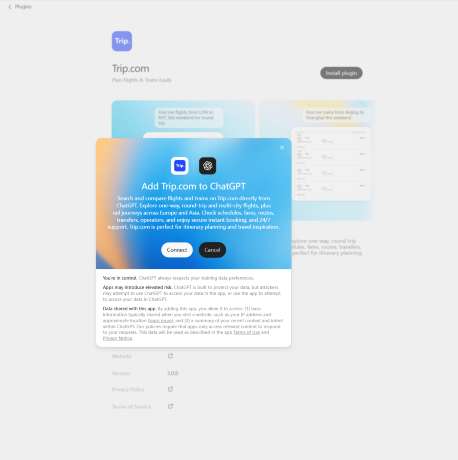
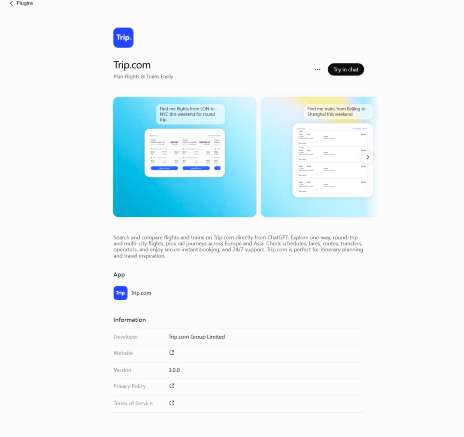
Is the Trip.com app available to use within ChatGPT right now?
Yes, many users can access the Trip.com app today, but there are a few things to keep in mind. First, you'll need to be logged into your ChatGPT account. Since ChatGPT offers different plans and features depending on your region and subscription level, the way you access the app might vary.
In some cases, you might need to "connect" or "enable" the Trip.com app from the ChatGPT store or your settings before you can start searching. If you're using ChatGPT at work, your workspace administrator may need to allow access to third-party apps first.
If you don't see Trip.com in your ChatGPT apps list, availability may depend on your region, account type, or workspace settings. It’s a good idea to check the "Explore GPTs" or "Apps" section of your ChatGPT sidebar to see if it’s available for you. Because AI tools are updated frequently, the entry point might look slightly different for everyone, so stay flexible as you explore the interface.
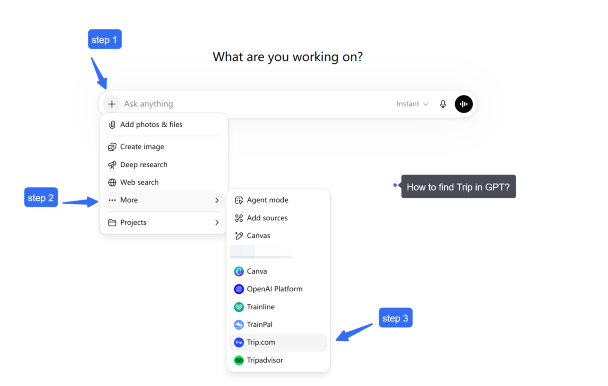
What exciting travel adventures can you plan with Trip.com in ChatGPT today?
With the Trip.com app on ChatGPT, you can effortlessly search and compare flights and trains—all without ever leaving your conversation.
You can use it to:
Search flights
- Discover one-way, round-trip, or multi-city flights for your next adventure
- Compare departure times, travel durations, airlines, and fares to find the perfect journey for you
- Explore flexible travel options for when your dates are open-ended
- Explore different routes based on your destination and preferences
Search trains
- Discover train routes and schedules across supported regions
- Compare departure and arrival times, travel duration, transfers, seat classes, and fares to find the perfect journey for you
- Plan your rail journeys across high-speed, intercity, and cross-border routes
Plan your journey naturally
Skip the hassle of juggling multiple filters and just ask questions like:
- “Discover flight options from London to Paris for next weekend”
- “Find me some trains from Paris to Amsterdam”
- “What’s the best way to make the journey from Tokyo to Osaka?”
- “Help me plan an adventure that mixes flights and scenic train rides”

eSIM 5G China Daratan/Hong Kong/Macau | Pelan Harian / Data Jumlah | Caj 24 Jam | Kod QR
4.6/5
21789 ulasanSaya sangat gembira dengan pengalaman saya menggunakan Trip.com. Mudah untuk membandingkan harga, mencari pilihan yang sesuai, dan menyelesaikan tempahan saya hanya dalam beberapa minit. Platform ini mudah dan mesra pengguna. Sudah pasti pilihan yang hebat untuk pelancong!

eSIM 5G/4G di 8 negara Asia | Sokongan berbilang rangkaian, menyokong ChatGPT & Peta Google | 500MB/hari - jumlah 50GB | 1-30 hari | Pengebilan 24 jam | Kod QR
4.6/5
6410 ulasanPembekal yang sangat baik. Pengaktifan adalah mudah dengan kod QR. Rangkaian berfungsi serta-merta sebaik sahaja mendarat di Seoul. Isyarat tidak pernah putus, sama ada di Korea atau Jepun. Kelajuan yang sangat baik. Saya mengesyorkannya.

eSIM 5G Cina continentale | Supporta Google Maps / ChatGPT | Piani dati giornalieri/totali | Fatturazione 24 ore | 1–365 giorni | Codice QR
4.6/5
29676 ulasanEsimnya sangat menakjubkan, sambungannya lancar dan keserasiannya sangat baik. Saya boleh menyediakannya untuk hotspot untuk saya dan rakan saya. Bahagian yang terbaik ialah kebanyakan tempat mempunyai Wi-Fi jadi lebih mudah untuk bertukar kepada Wi-Fi dan kembali kepada data dan ia mampu bertahan sepanjang perjalanan. Saya sangat mengesyorkan esim ini kepada mana-mana pelancong dan anda tidak akan menyesal.

Tanah Besar China 5G eSIM | Pas Harian/Pakej Data Keseluruhan | Pengebilan 24 Jam | 1–365 Hari | Kod QR
4.6/5
65132 ulasanSaya menggunakan eSIM ini semasa perjalanan saya ke China, dan ia menjadikan sambungan lebih mudah. Persediaannya mudah, dan mudah untuk mempunyai data mudah alih tanpa perlu membeli kad SIM fizikal. Ia berguna untuk menggunakan peta, pesanan dan menyemak maklumat semasa melancong. Secara keseluruhan, pilihan yang mudah untuk sesiapa sahaja yang melawat China!

eSIM China | 1-30 Hari | Sehingga 60GB Data Kelajuan Tinggi | Liputan di Rangkaian Utama
4.3/5
119 ulasanIsyaratnya sangat bagus, ia sangat mudah dibuka dan digunakan. Harganya agak lebih baik daripada membeli kedai biasa. Dan kualiti isyarat jauh lebih baik
What can I do with the Trip.com plugin today?
The Trip.com plugin can help you search and compare several key travel products within the same ChatGPT conversation.
Search flights
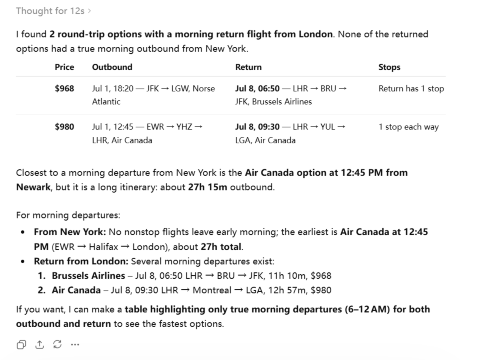
You can search for one-way, round-trip, and multi-city flights. Results may include airlines, departure and arrival airports, flight times, total journey duration, stopovers, and available fares. You can also refine the results by asking for nonstop flights, preferred departure times, shorter layovers, nearby airports, or more affordable dates.
Let's try:
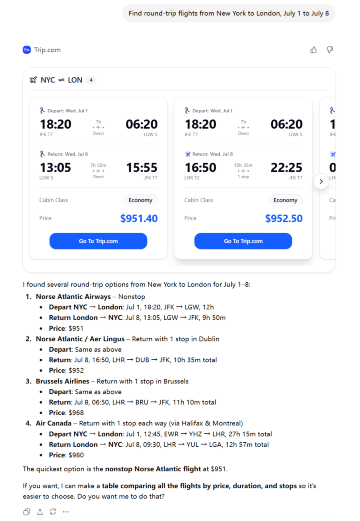
If you input "Show flights leaving in the morning," you will receive pre-screened information:
Find hotels
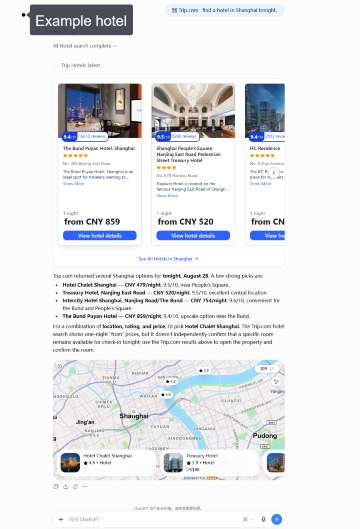
Search for hotels by destination, dates, number of guests, location, budget, star rating, or preferred facilities. You can ask for a hotel near a station, business district, beach, or attraction, then compare options using details such as price, guest rating, room type, breakfast, and available amenities.
For example, you can ask the Trip.com plugin to find a well-rated hotel in a specific neighborhood and compare the available rooms, prices, guest ratings, and amenities.
Search trains
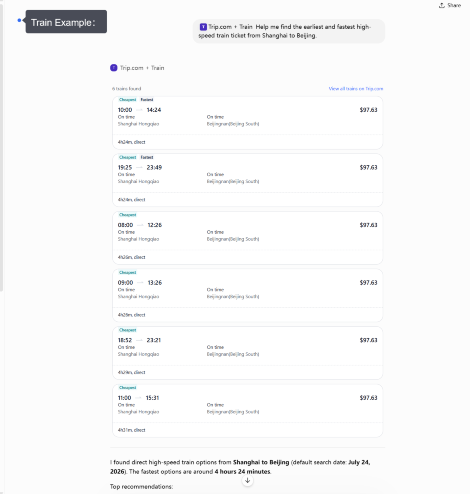
The plugin can help find train routes and schedules in supported destinations. Depending on the route, results may show departure and arrival stations, journey times, transfers, train types, seat classes, and fares. This is useful for high-speed, intercity, and cross-border rail journeys, as well as trips where you want to compare traveling by train with flying.
Discover attractions and tours
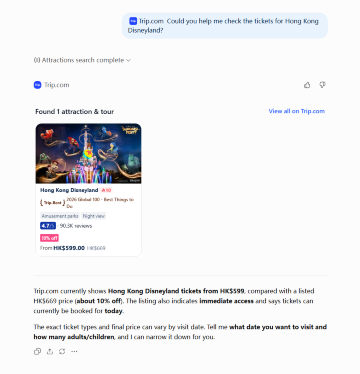
You can also use the plugin to explore things to do at your destination. Ask for popular attractions, theme parks, museums, observation decks, cultural experiences, day tours, or family-friendly activities. Available information may include opening times, ticket options, visitor ratings, tour duration, language, cancellation conditions, and whether transportation or hotel pickup is included.
You can also use the plugin to explore things to do at your destination...
Build a connected travel plan
These services do not have to be searched separately. You can ask ChatGPT to connect them into a practical trip—for example, a flight to Paris, a centrally located hotel, a train to Amsterdam, and attraction tickets for both cities. You can then refine each part without starting the search again.
eSIM 5G China Daratan/Hong Kong/Macau | Pelan Harian / Data Jumlah | Caj 24 Jam | Kod QR
4.6/5
21789 ulasanSaya sangat gembira dengan pengalaman saya menggunakan Trip.com. Mudah untuk membandingkan harga, mencari pilihan yang sesuai, dan menyelesaikan tempahan saya hanya dalam beberapa minit. Platform ini mudah dan mesra pengguna. Sudah pasti pilihan yang hebat untuk pelancong!
eSIM 5G/4G di 8 negara Asia | Sokongan berbilang rangkaian, menyokong ChatGPT & Peta Google | 500MB/hari - jumlah 50GB | 1-30 hari | Pengebilan 24 jam | Kod QR
4.6/5
6410 ulasanPembekal yang sangat baik. Pengaktifan adalah mudah dengan kod QR. Rangkaian berfungsi serta-merta sebaik sahaja mendarat di Seoul. Isyarat tidak pernah putus, sama ada di Korea atau Jepun. Kelajuan yang sangat baik. Saya mengesyorkannya.
eSIM 5G Cina continentale | Supporta Google Maps / ChatGPT | Piani dati giornalieri/totali | Fatturazione 24 ore | 1–365 giorni | Codice QR
4.6/5
29676 ulasanEsimnya sangat menakjubkan, sambungannya lancar dan keserasiannya sangat baik. Saya boleh menyediakannya untuk hotspot untuk saya dan rakan saya. Bahagian yang terbaik ialah kebanyakan tempat mempunyai Wi-Fi jadi lebih mudah untuk bertukar kepada Wi-Fi dan kembali kepada data dan ia mampu bertahan sepanjang perjalanan. Saya sangat mengesyorkan esim ini kepada mana-mana pelancong dan anda tidak akan menyesal.
Tanah Besar China 5G eSIM | Pas Harian/Pakej Data Keseluruhan | Pengebilan 24 Jam | 1–365 Hari | Kod QR
4.6/5
65132 ulasanSaya menggunakan eSIM ini semasa perjalanan saya ke China, dan ia menjadikan sambungan lebih mudah. Persediaannya mudah, dan mudah untuk mempunyai data mudah alih tanpa perlu membeli kad SIM fizikal. Ia berguna untuk menggunakan peta, pesanan dan menyemak maklumat semasa melancong. Secara keseluruhan, pilihan yang mudah untuk sesiapa sahaja yang melawat China!
eSIM China | 1-30 Hari | Sehingga 60GB Data Kelajuan Tinggi | Liputan di Rangkaian Utama
4.3/5
119 ulasanIsyaratnya sangat bagus, ia sangat mudah dibuka dan digunakan. Harganya agak lebih baik daripada membeli kedai biasa. Dan kualiti isyarat jauh lebih baik
What should I search for to unlock the best travel inspiration?
For the most spot-on recommendations, try adding a few key details like:
- Departure and destination cities
- Travel dates or flexible date preferences
- Flight or train preferences
- Number of travelers
- Any specific requirements?
Examples:
- “Discover direct flight options from New York to London for your trip in August.”
- “Show me the high-speed trains from Beijing to Shanghai.”
- “Discover the most budget-friendly way to journey from Paris to Rome.”
Travel goal | A better example of a prompt |
Find a basic round trip | “Discover round-trip flight options from New York to London for your trip from July 1 to July 8.” |
Search by airport | “Let’s find some flights from JFK to London—ideally landing at Heathrow!” |
Skip the long layovers | “Show me flights without long layovers or stops longer than 3 hours.” |
Find cheaper options | “Can you show me cheaper dates or nearby airports, like Newark?” |
Business travel | “Help me find nonstop flights from Singapore to Frankfurt for my business trip, departing Monday morning.” |
Keep in mind, you can start with a broad search! If you're not quite sure which London airport works best for you, just type "London." Our AI will pull up all the options, letting you easily narrow things down once you've had a peek at the prices and schedules.
When you're looking for travel tips, remember: the more detail you share, the better the recommendations you'll get!
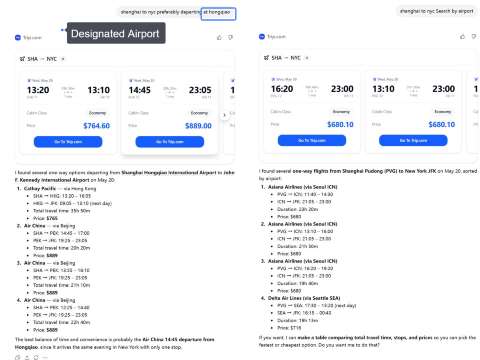
How can I easily compare flight and train options after my initial search?
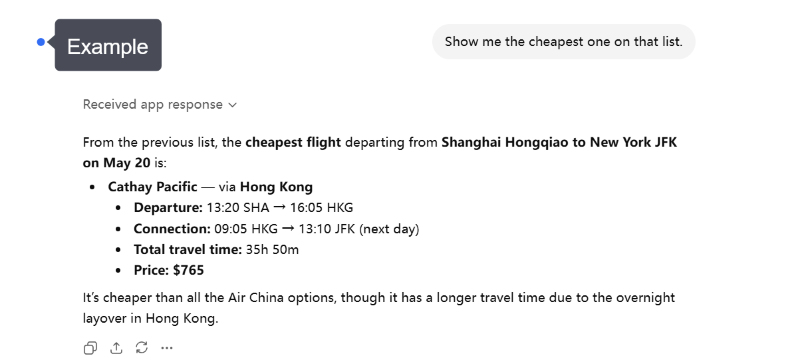
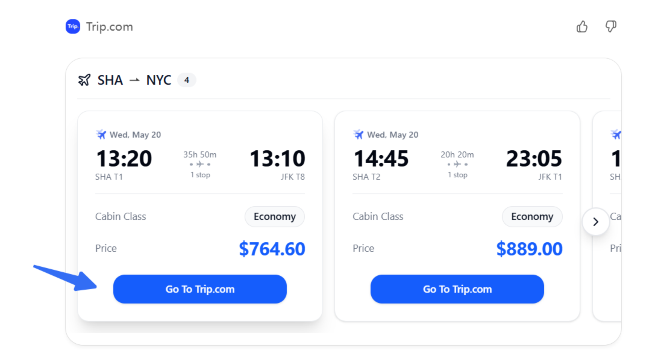
Once you've kicked off your search, keep the conversation going with Trip.com on ChatGPT to easily refine and compare your travel options.
For flights, you can compare:
- Departure and arrival times
- Travel time and stops
- Airlines and fares
For trains, compare:
- Departure and arrival times
- Travel duration and transfers
- Train types, seat classes, and fares to help you plan your perfect journey
Choose the option that fits your schedule, budget, and travel preferences best.
What should I double-check before booking my flight or train?
Before you finalize your booking, take a quick look at the key details to ensure everything aligns perfectly with your upcoming adventure.
For flights, check:
- Travel dates and passenger information
- Airport locations and flight schedules
- Baggage rules and fare conditions
For trains, check:
- Departure and arrival stations
- Train schedules and travel times
- Seat class and ticket conditions
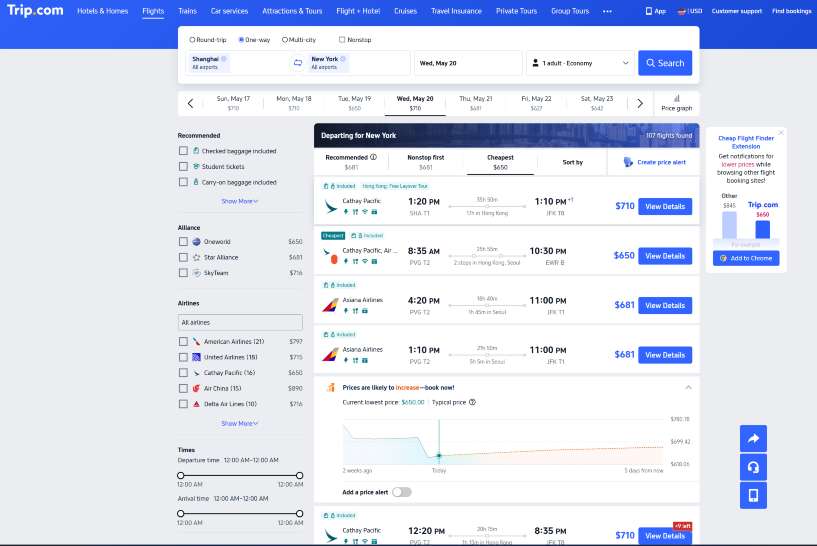
- Final Price: Double-check the total cost—taxes and fees included—before you finalize your booking.
Always keep in mind that flight rules and cancellation policies are determined by the airlines themselves. Be sure to check the fine print on Trip.com before you click that "buy" button!
More travel possibilities with Trip.com in ChatGPT
Trip.com on ChatGPT is making travel planning easier than ever, helping you explore transportation options through simple, natural conversations.
With both flights and trains at your fingertips, you can craft more comprehensive journeys, weigh different routes, and discover the perfect options to suit your travel style.
Stay tuned for even more ways to discover and organize your dream trips with Trip.com on ChatGPT!
Future travel inspiration | Things you might want to explore | An example of a future prompt |
Hotels | Compare locations, prices, and must-have amenities like "pet-friendly" stays or "free Wi-Fi" to find your perfect match. | “Looking for a cozy spot near Shinjuku? Let’s find the perfect hotel for two, complete with a delicious breakfast to start your day!” |
Car Rentals | Find your perfect ride—whether you're looking for a spacious SUV, an economical compact, or a touch of luxury—at convenient pickup locations near you. | “Looking to pick up a rental car at LAX for a long weekend getaway from Friday to Monday?” |
Attraction tickets | Book your museum tickets, theme park passes, or local tours today! | “Discover exciting attraction tickets in Singapore for this weekend!” |
Airport transfers | Arrange your ride from the airport to your hotel and get your adventure started! | “Help me find the best ways to get from Bangkok airport to my hotel!” |
Travel inspiration | Bundle everything into one package to save both time and money! | “Help me plan a 5-day Seoul getaway, including flights and a cozy hotel.” |
By laying the groundwork for flight searches today, Trip.com is paving the way for a future where planning your next trip feels like one seamless, ongoing conversation.
Conclusion: Start with one simple travel request
Using the Trip.com app in ChatGPT takes the stress out of planning your next trip. Instead of staring at empty search boxes and wrestling with complicated filters, you can simply start chatting about where you want to go. Whether you're dreaming of a quick getaway or planning a complex international journey, the AI helps you narrow down your flight options in seconds.
While the app is currently focused on flights, it's evolving into a powerful travel assistant that will eventually handle hotels, cars, and more. Give it a try for your next trip—start with a simple request like "Find me a flight to Paris in June," and see how easy travel planning can be.
[10% Off] Top China Hotel Recommendations
🔥 Hotel Coupons: Exclusive Hotels Deal for New Users
Discover the world with trip.com! Book the perfect hotel anywhere in the world and get an unbeatable 10% discount if you're a first-time user! If this is your second time using it, you will receive a 5% discount! Download our app now and start planning your next trip with ease.
Just click this link and download the Trip.com App, after successfully registering as a member, use it when you place an order!
🔥Save More with Up to 5% Off
Use our promo code to enjoy up to 5% OFF on your attraction tickets, tours and eSIMs!
10 Best Hotels Around the World
Lihat Semua Hotel
 NO.1
NO.1






FAQs about using the Trip.com app in ChatGPT
-
Is the Trip.com app in ChatGPT the same as the Trip.com mobile app?
-
Can I search for cheap flights with Trip.com in ChatGPT?
-
Can I book directly inside ChatGPT?
-
Can I change my flight search after seeing results?
-
Does Trip.com in ChatGPT show real-time flight prices?
-
What information should I include in my prompt?
-
What should I double-check before booking?
-
Can I search train tickets with the Trip.com app in ChatGPT?
-
Can I compare flights and trains for my trip?
Disclaimer: This article has been provided by an individual contributor or third party platform. If there is any discrepancy regarding the copyright, please contact us directly and we will delete the content immediately.