

Trip.com Gift Card - Best Last-Minute Gift for Travel


A Trip.com gift card is the perfect last-minute virtual gift! Discover how to buy and use your card, check the limits, and see why it’s totally worth it for your next adventure. 🎁
to Bangkok
to Manila
to Shanghai
to Tokyo
to Seoul
Lihat Semua Penerbangan


Unlocking Adventures: What is a Trip.com Gift Card?

A Trip.com Gift Card is your virtual ticket to the world! Issued by Trip Air Ticketing (UK) Limited, a subsidiary of Trip.com Group, this prepaid card comes preloaded with value, making it a breeze to book flights, hotels, car rentals, and exciting activities. Whether you're using the Trip.com website or our app, your next big adventure is just a gift card away!
Unlike physical gift cards, it’s 100% digital—making it the perfect choice for last-minute gifting or sending to friends and family all over the globe!
Unlock Adventures: Your Guide to Gifting and Using a Trip.com Gift Card
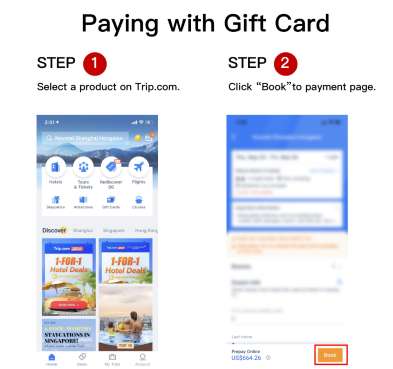
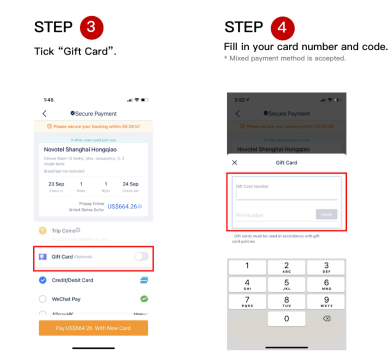
- Book Your Next Adventure: Simply head to Trip.com, pick your perfect flight or hotel, and breeze through the checkout to get your journey started!
- Redeeming your Gift Card: Once you're on the payment page, simply enter your gift card number and PIN, then click “Apply” to use your balance toward your next big adventure!
- Combine Payments: If your card balance is less than the booking cost, simply use another payment method (like a credit card or PayPal) for the remaining amount and get ready for your next adventure!
- Link Your Account for a Personalized Adventure (Optional, but a wonderful way to enhance your trip!)
- Head over to “My Gift Cards” and select “Search/Link Gift Card” to get started!
- Simply enter your gift card number and PIN to get one step closer to your next adventure! (Just a heads-up: you'll need to set up a Security PIN first.)
- Just a friendly note for your travel planning: Once your card is linked, it becomes a permanent part of your account, ready for all your exciting journeys ahead!
How to Buy a Trip.com Gift Card
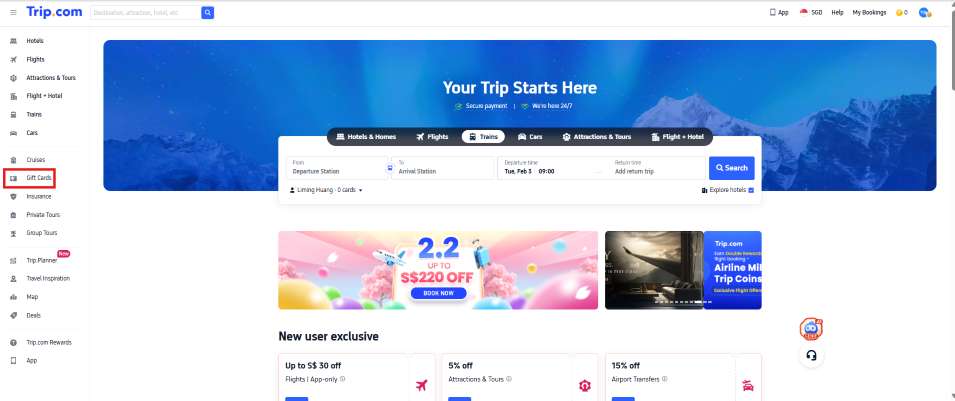
- Head over to the Gift Card page: Simply navigate to Trip.com’s official gift card section!
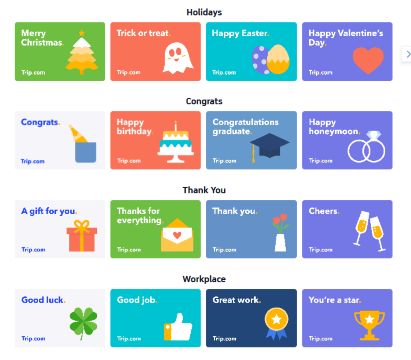
- Pick Your Design: Choose from styles for every occasion, like:
- Workplace: “Good luck!”, “Great job!”, “Fantastic work!”
- Saying Thanks: “A little treat for you,” “Thanks for everything!”
- Time to celebrate! From "Happy birthday" adventures to "Congratulations, graduate" trips and "Happy honeymoon" escapes, let's make those milestones shine.
- Holidays: "Merry Christmas," "Trick or Treat," "Happy Easter"
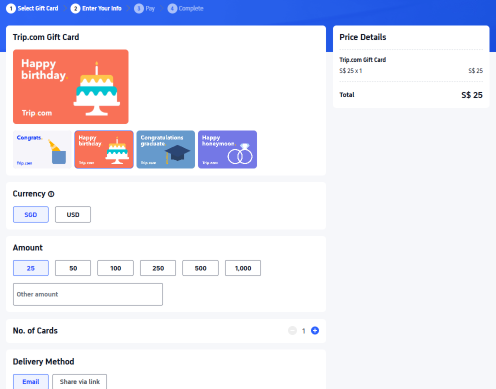
- Choose Your Currency and Amount: Pick the currency that suits your locale! (Gift cards are available in USD, AUD, SGD, GBP, HKD, JPY, or THB. This amount can be converted and paid for using other currencies). Select a fixed denomination ($25, $50, $100, $250, $500, $1,000) or enter a custom amount of your choice (up to $4,000 per card) to fuel their next big adventure!
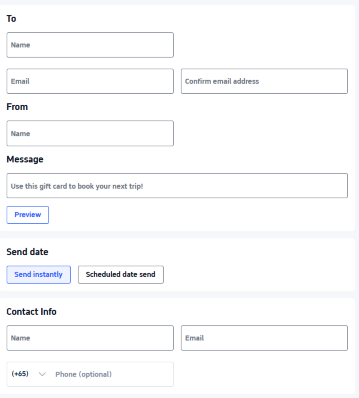
- Delivery Details: Simply add the recipient’s name, email, and a personalized message. You can choose to send it instantly or schedule the delivery for a special date, like a birthday surprise!
- Ready to share the gift of travel? Complete your payment using any currency—we'll show you the exchange rates right at checkout. You'll receive an electronic receipt, and the gift card will be delivered straight to the recipient's inbox. Just a quick heads-up: there's a daily purchase limit of $10,000 USD per user.
Trip.com Gift Cards: What's the Scoop on Currency Differences for Your Next Adventure?
- Trip.com Gift Card Currencies: Discover which currencies are available for gift cards in your local area!
- Trip.com Payment Currencies: Ready to start your next adventure? You can purchase gift cards using any currency you like! To switch to your preferred currency, simply select the option in the top right corner of the information entry page.
- Trip.com Currencies: Your gift cards are ready for any adventure! You can use them across all Trip.com locales, and we'll automatically convert the amount for you based on the current exchange rate.
How Does a Trip.com Gift Card Unlock Your Travel Dreams?
- Prepaid Value: Simply load your card with a fixed or custom amount in currencies like USD, AUD, or GBP right when you purchase it!
- Digital Delivery: Your card (complete with its unique number and PIN) will be sent straight to your email instantly or on a date you choose (like Feb 5, 2026).
- Flexible & Easy: Use your balance for multiple bookings! If your card balance isn't quite enough for your next adventure, you can simply combine it with other payment methods.
Is a Trip.com Gift Card Worth It?
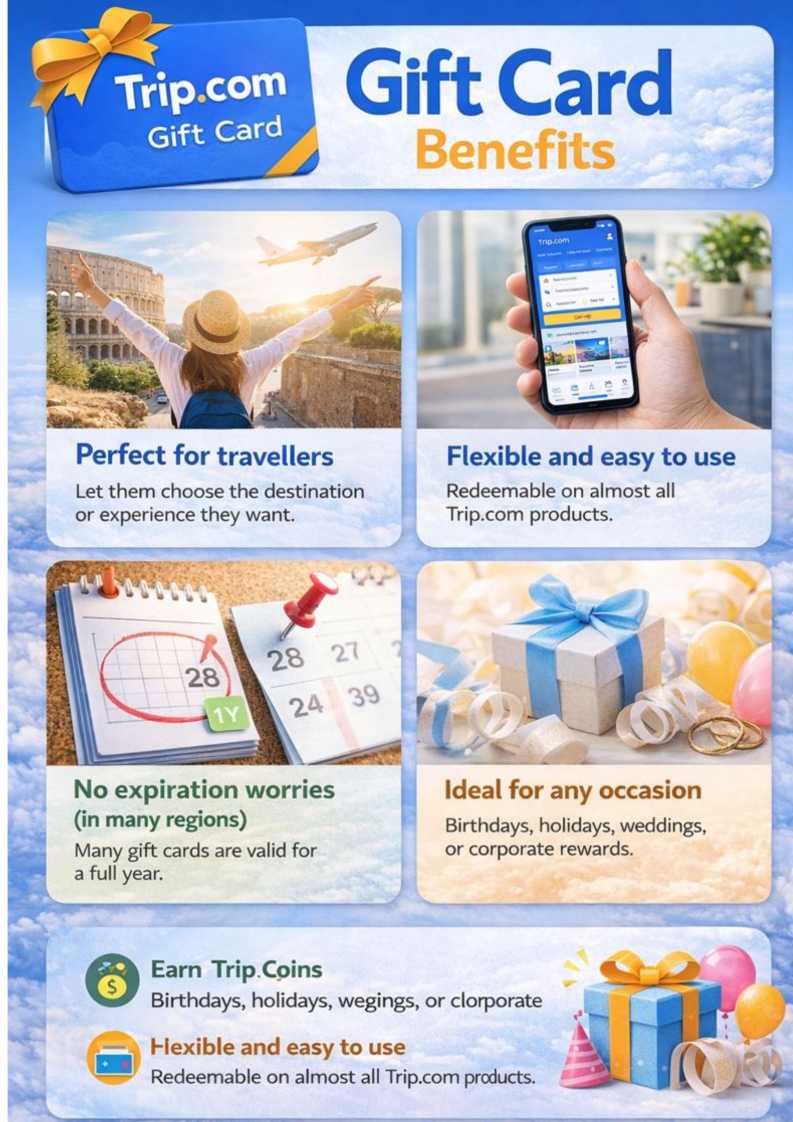
✅ Pros
- Flexible Gifting: The ultimate treat for travelers, giving them the freedom to choose their own adventure!
- Global Access: Use it with Trip.com’s massive selection of travel options all around the world!
- No Fees: Enjoy zero extra costs for holding or using your card.
- Earn Rewards: Get Trip Coins when you buy a gift card and save on your next adventure!
Starting July 1, 2026, Trip Coins are no longer awarded for gift card purchases. Check the Trip.com loyalty program page for the latest reward information.
❌ A few things to ponder
- Non-refundable: This booking is final, but residents of the UK, EU, or Turkey can request a refund within 14 days of purchase.
- A Quick Note on Exchange Rates: If you use your card in a currency different from the one you purchased it in, keep in mind that exchange rate fluctuations might affect its value.
- Heads up, fellow traveler! Once your card is linked to your account, it's a permanent connection for seamless adventures – you won't be able to unlink it.
The Final Word
This is a must-have for any travel lover or anyone looking to give a gift that’s both meaningful and flexible. It’s the perfect solution for those last-minute surprises, especially when you’re not quite sure where their next adventure will take them!
Lihat Semua Tarikan
 2561 ditempah






Unlock Your Next Adventure: How to Check Your Trip.com Gift Card Balance
- Via the Website: Ready to see your travel funds? Simply head to the Trip.com Gift Card homepage, then click on 'My Balance' to unveil your exciting credit!
- Ready for your next adventure? Simply enter your gift card number and PIN to check your balance!
- Linked Accounts: If your card is linked to your Trip.com account, simply head over to the “My Gift Cards” section for real-time balance updates!
Trip.com Gift Cards: Your Essential Guide to Limits, Refunds & Policies
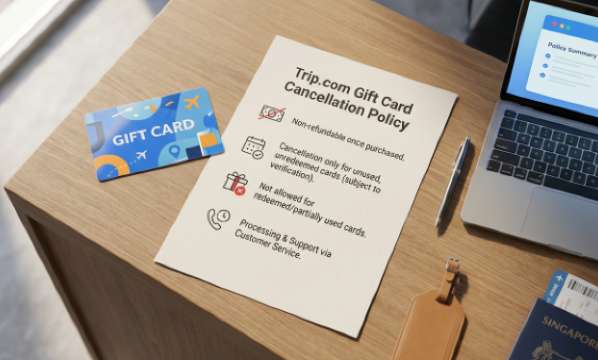
- Non-refundable (except for residents of the UK, EU, and Turkey, who can enjoy a 14-day refund for unused cards!)
- Refunds for your bookings are simple! Your refund will go right back to your gift card (and any extra amount to your original payment method if you combined them). If you used multiple gift cards, we'll refund the one with the longest validity, so you have even more time to plan your next getaway!
- No Trip Coins on bookings paid with gift cards (you'll earn your coins when you purchase the card!)
- Please note that any gains or losses from currency conversion are the responsibility of the cardholder or purchaser.
- Usage Rules: This card is for your personal adventures only and cannot be used for commercial purposes, to buy other gift cards, or for cash withdrawals.
- Liability: Trip.com isn't responsible for lost or stolen cards, changes in exchange rates, or user errors (e.g., incorrect email addresses). We're here to help you explore the world, so let's keep your journey smooth and worry-free!
Check out the full terms and conditions for Trip.com Gift Cards.
Score [10% Off] on Hotels with Trip.com Promo Codes!
Explore top hotels around the world
Lihat Semua Hotel







FAQs about Trip.com Gift Card
-
Where Can You Use a Trip.com Gift Card?
-
What's the difference between Trip.com gift card currencies, payment currencies, and usage currencies?
-
How do I link a Trip.com Gift Card to my account?
-
How long are gift cards valid for?
-
Can I refund a gift card after purchase?
-
Are there any limits when making bookings with Trip.com Gift Card?
-
What are Trip.com gift cards?
-
What happens if my booking is cancelled?
Disclaimer: This article has been provided by an individual contributor or third party platform. If there is any discrepancy regarding the copyright, please contact us directly and we will delete the content immediately.