

Trip.com E-Receipt | Fast Digital Receipt for Bookings


What is a Trip.com E-Receipt?
A Trip.com e-receipt is a digital document that serves as proof of your bookings—whether it’s flights, hotels, or tours made through Trip.com. It’s especially useful for international and business travellers who need official records of their travel expenses for reimbursements, visa applications, or insurance claims.
Below is an explanation of how to retrieve an e-receipt from Trip.com, using a flight booking as an example.
How to Get Trip.com E-Receipt
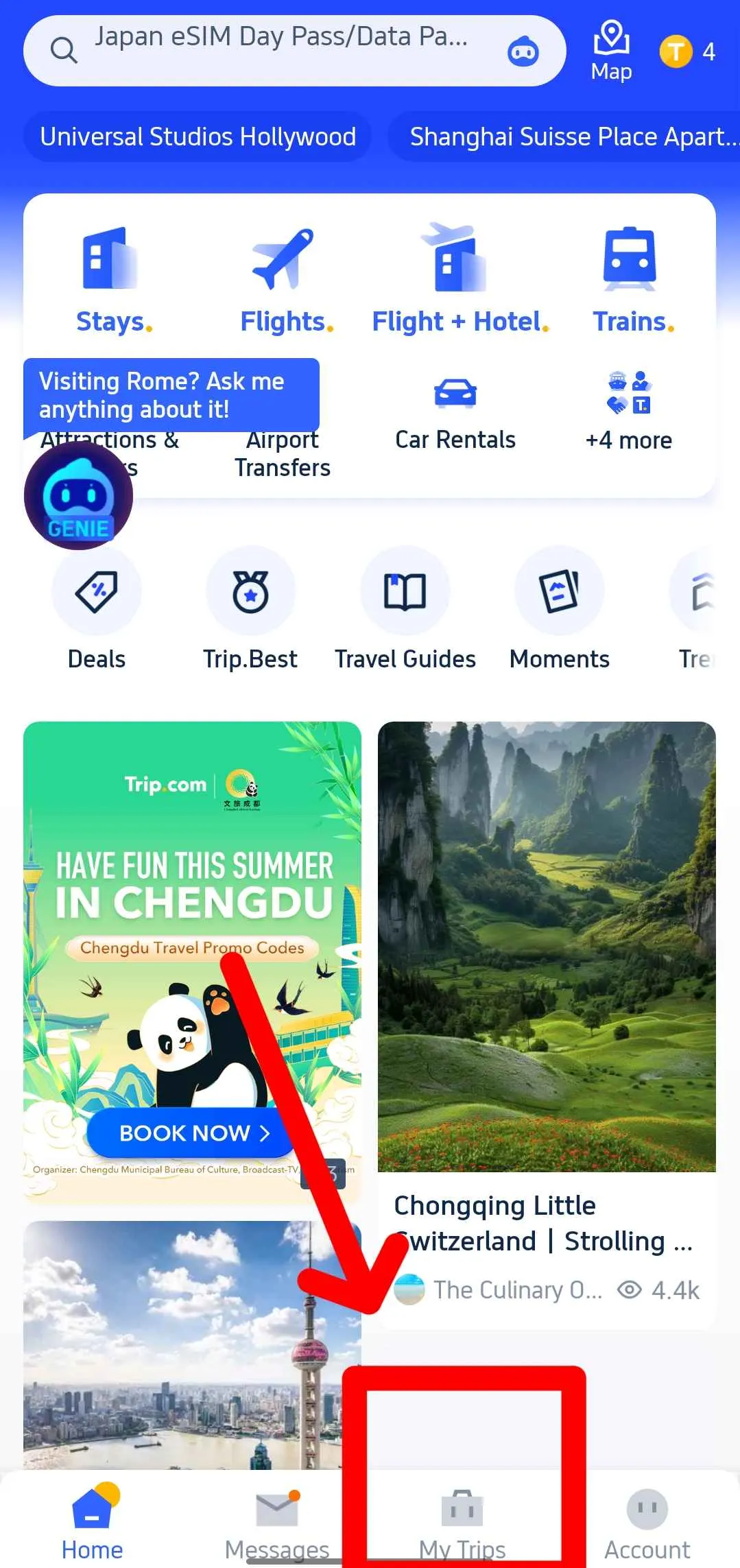
Step 1: Access 'My Trips'
Open the Trip.com app and tap 'My Trips' at the bottom of the screen. This area stores all your booking details.
Step 2: Manage My Booking
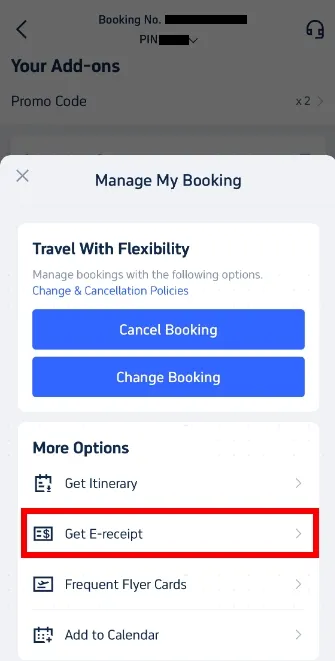
Go to the booking for which you need a receipt and select it. On the booking page, click on “Manage My Booking.” This lets you view further details and adjust your reservation if needed.
In the ‘Manage My Booking’ section, find and select ‘Get E-receipt’.
Step 3: Choose and Confirm Receipt
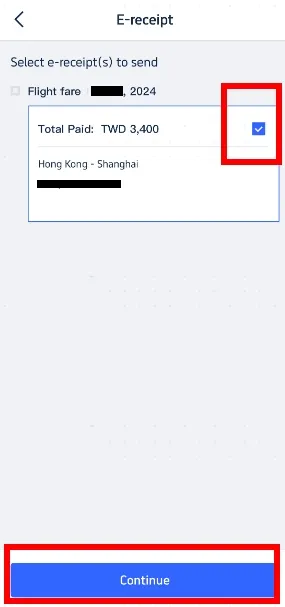
From the available options, choose the specific e-receipt you require and click the ‘Continue’ button.
Step 4: Submit Your Details
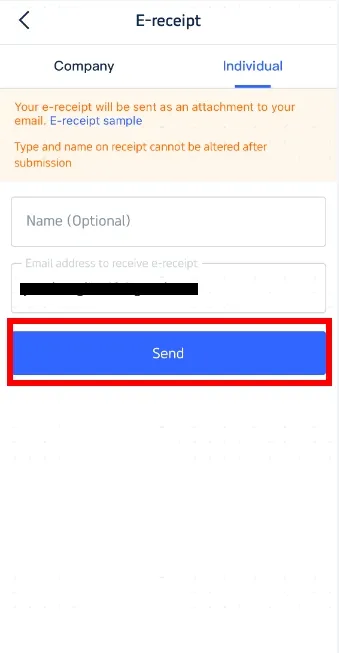
If necessary, decide whether the receipt should be for a corporation or an individual.
Enter your email address and any other required information.
Check that the details are correct and click on the ‘Send’ button to have your e-receipt emailed to you.
Step 5: Confirmation of Receipt
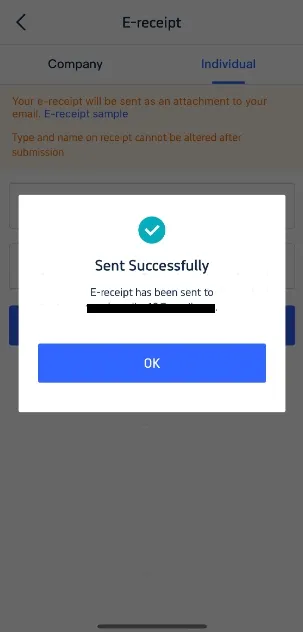
After submitting your details, a pop-up window will confirm that the e-receipt has been sent to the email address you entered. Just click the 'OK' button to complete the process and check your email to make sure you've received the document.
Getting an e-receipt from Trip.com is quick and easy. It keeps all your travel bookings neatly documented and ready whenever you need them—whether for reimbursements, insurance claims, or simply keeping track of your trips.
Why Choose Trip.com for Your Travel Bookings?
Trip.com isn’t just convenient—it’s a dependable choice for all your travel needs. Here’s what makes it stand out:
- Wide Range of Options: From flights and hotels to full tour packages, Trip.com offers choices to suit every type of traveller.
- Safe and Simple Booking: Trip.com is a major online travel agency operated by Trip.com Group, offering convenient booking services for flights, hotels, and other travel products. It uses standard security measures for online bookings.
- Great Prices and Deals:Trip.com offers competitive prices, promotional discounts, and exclusive deals that can help travellers save on flights, hotels, and other travel bookings
- Reliable Support: Trip.com provides customer service for booking assistance and e-receipt requests. Support is available 24/7 for selected services such as flights, hotels, trains, and car rentals, while support hours for tours and attractions may vary.
- Digital Convenience: Trip.com’s e-receipts keep all your travel documents in one place—perfect for last-minute changes, claims, or reimbursements.
For hassle-free travel planning and easy record-keeping, Trip.com makes every trip smoother.
Tips for Using Your Trip.com E-Receipt
- Keep a Backup: Save a copy of your e-receipt in your email or on a cloud storage service so it’s always accessible during your trip or for future reference.
- Verify the Details: Double-check that all information—such as dates, amounts, and services—is accurate. If you spot any errors, contact Trip.com support right away.
- Use When Needed: Your e-receipt can help speed up travel insurance claims or expense reimbursements from your company.
FAQs: Trip.com E-Receipts
-
How long does it take to receive a Trip.com e-receipt?
-
Can I get a printed copy of my e-receipt?
-
Is a Trip.com e-receipt accepted for visa applications?
-
What should I do if I don’t receive my e-receipt?