


Trip.com Hotel Refund Guide: Policy, Status & How Long It Takes

Gambar Profil Penulis
How to Get a Trip.com Hotel Refund

Booking a hotel on Trip.com is a breeze, but we all know that travel plans can change in an instant. Whether it’s an unexpected schedule shift, a missed flight, or simply a change of heart, it’s essential to understand how the Trip.com hotel refund policy works. This guide breaks down the cancellation rules, shows you how to track your refund status, and explains how long it takes to get your money back.

Trip.com Hotel Refund Policy

Hotel Refund

Not all hotel bookings are created equal! Your Trip.com refund depends on the hotel’s cancellation policy:

Hotels with Free Cancellation

Hotels with this option allow you to cancel before the deadline for a full Trip.com refund. The cutoff time is usually shown in your booking details.

Partially Refundable Hotels

You may still receive a partial refund, but the hotel may charge a cancellation fee depending on how close to your check-in date you cancel.

Non-refundable Hotels

These bookings offer the least flexibility. The room cost is typically non-refundable, but you may still be able to get a refund for taxes or service fees.

💡 Always check the Trip.com cancellation policy in your booking confirmation before making changes.

How to Cancel Your Hotel Reservation on Trip.com

Step 1: Log in to your Trip.com account

Head over to the Trip.com website or open the Trip.com app. Log in to your Trip.com account using your email and password.

Step 2: Access your bookings

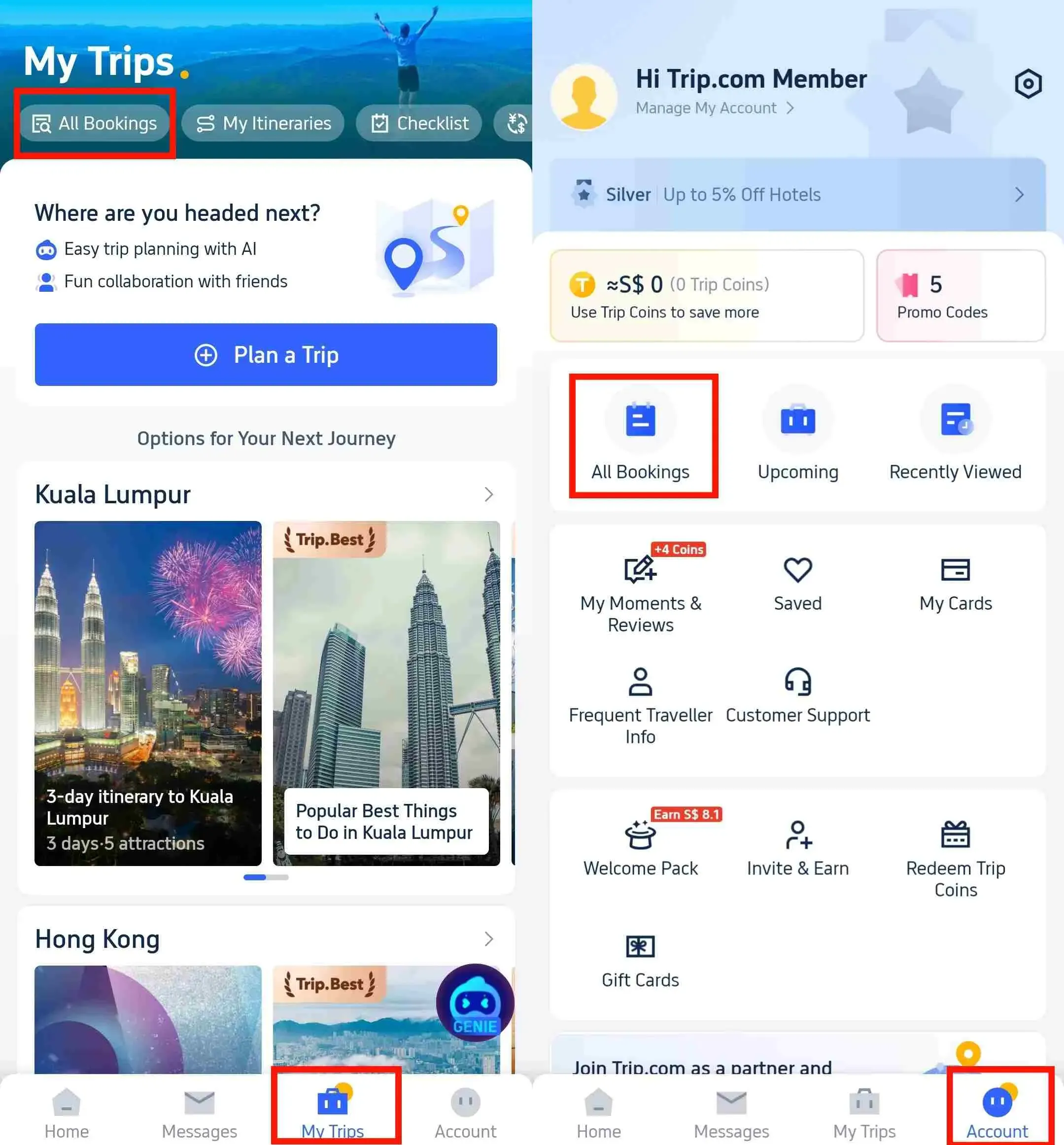
Once you've logged in, head to "My Trips-All Bookings" or "Account-All Bookings" on the Trip.com app. You'll find these in the app's main menu. Then, simply locate the hotel booking you'd like to refund.

Trip.com Hotel Refunds

Step 3: Choose a hotel cancellation policy

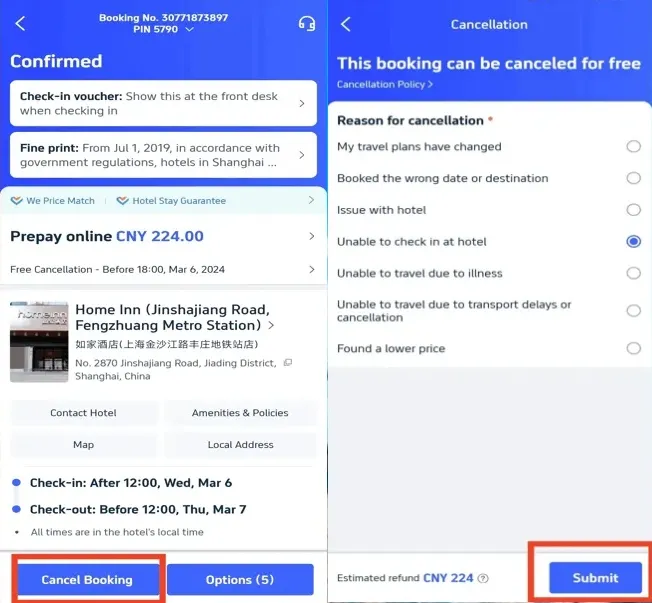
If your hotel booking is eligible for a refund, simply click "Cancel Booking." You'll be prompted to select the reason for your cancellation request. Then, just click "Submit" to confirm your hotel refund.

Trip.com Hotel Refunds

Step 4: Confirm your hotel cancellation and refund

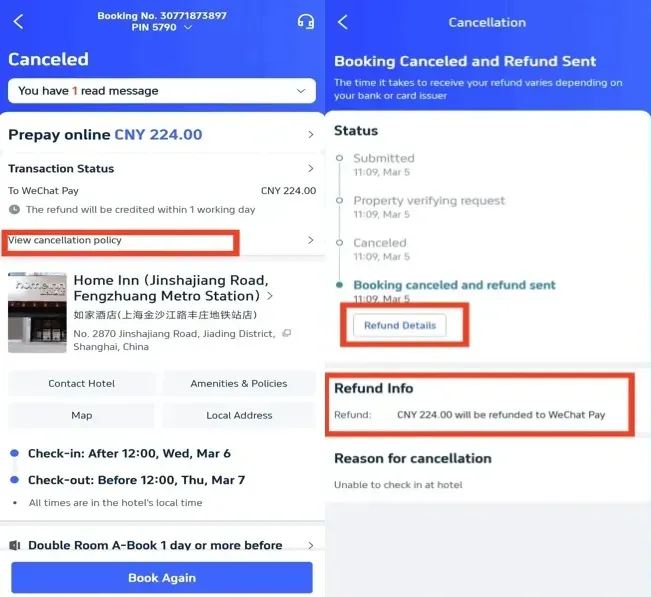
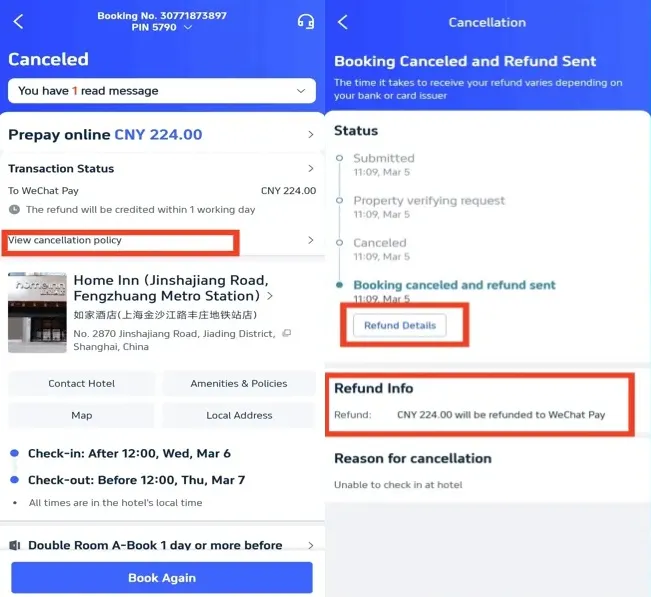
Once you've submitted your hotel cancellation request, you'll receive a confirmation from Trip.com. You can click "View cancellation policy" to check the details of your refund.

Step 5: Track your hotel refund status

You can easily track your refund status by clicking "Refund Details" in the Trip.com app. You can also find your refund info right here. If you run into any delays or need a hand, feel free to reach out to Trip.com customer service for assistance!

Trip.com Hotel Refunds
✅ Please note: Refunds are typically processed back to your account. It usually takes one day for the refund to appear in your account.

🔥 Hotel Coupons: Exclusive Hotels Deal for New Users

Discover the world with trip.com! Book the perfect hotel anywhere in the world and get an unbeatable 10% discount if you're a first-time user! If this is your second time using it, you will receive a 5% discount! Download our app now and start planning your next trip with ease.

Just click this link and download the Trip.com App, after successfully registering as a member, use it when you place an order!

🔥Save More with Up to 10% Off

Use our promo code to enjoy up to 10% OFF on your attraction tickets, tours and eSIMs! There is also a 5% OFF (up to S$3) for new users!

🔥New User Coupon: Save More with an Extra 5% Off

Use our promo code to enjoy an extra 5% off (up to S$4) on your attraction tickets, eSIMs, and tours! ⏳Redeem within 3 days of claiming

How to Check Your Trip.com Refund Status

Refund Processing Time

Once you've canceled, you can check your Trip.com refund status:

Hotel Booking Status
  • Log in and open My Bookings.
  • Select your canceled hotel reservation.
  • Trip.com will display your current refund status: Processing, Refunded, or Completed.
  • You’ll also receive email updates once your refund is issued.

How long does a Trip.com hotel refund take?

Processing Time

Curious about your refund? At Trip.com, the processing time typically depends on your original payment method:

  • Credit/Debit Cards – 7–15 business days
  • PayPal / Digital Wallets – 3–7 business days
  • Bank transfer – up to 30 days
✅ Just a heads-up: Some refunds may process faster, but hotel policies and banks can sometimes cause delays.

Trip.com Hotel Cancellation Fees

Trip.com usually doesn't charge extra fees, but hotels may apply their own penalties. Trip.com hotel cancellation fees depend on:

  • The timing of your cancellation (the closer to check-in, the higher the fees).
  • The room type (promotional rates are often non-refundable).
  • Seasonal rules (peak holiday bookings may be stricter).

Information on Trip.com Hotel Refunds

Hotels in India

Getting a refund on Trip.com is a breeze once you understand your hotel’s cancellation policy! To keep your travel plans flexible, always look for hotels that offer free cancellation. After you cancel, you can easily track your refund status right in the app. By following these simple steps, you’ll avoid those pesky cancellation fees and get your money back even faster.

How to Get Trip.com Hotel Refund

  • How long does a Trip.com hotel refund take?

    Refunds usually take 7–15 business days for credit or debit cards, 3–7 business days for PayPal and e-wallets, and up to 30 days for bank transfers. Actual processing depends on both the hotel and your payment provider.
  • What should I do if my Trip.com refund is delayed?

    If your refund takes longer than the expected time, contact Trip.com customer service via live chat, the 24/7 hotline, or email. They can confirm your refund status with the hotel or payment provider.
  • How do I know if my Trip.com hotel booking is refundable?

    Check the booking confirmation under Cancellation Policy. Hotels with Free Cancellation will show the last date and time you can cancel for a full refund.
Disclaimer: This article has been provided by an individual contributor or third party platform. If there is any discrepancy regarding the copyright, please contact us directly and we will delete the content immediately.
Amal

Amal

Traveller, Writer, Sea Lover, Travel Guide, Explore the world

Hi, nice to meet u~ I love traveling and exploring the world, and my dream is to travel around the world! Forever free and happy, I'll be sharing some travel tips that I hope will be helpful.

276 artikel
ChinaMalaysiaTravel TipsTravel Guide
>>
trip.com hotel refund
aaaa