























Trip.com Itinerary Planner: Organize Flights, Hotels & Activities Seamlessly

Gambar Profil Penulis
Trip.com Itinerary Planner

Planning a trip can be overwhelming, from choosing flights and hotels to mapping out activities and transportation. The Trip.com Itinerary Planner is designed to make this process effortless by combining all your travel details in one smart, easy-to-use platform.

Whether you’re traveling solo or with a group, it helps you stay organized from start to finish.

Hotels in Beijing

Lihat Semua Hotel

🧭 What Is the Trip.com Itinerary Planner?

Trip.com Planner

The Trip.com Itinerary Planner is a built-in feature on the Trip.com app and website that lets users plan, organize, and customize their entire trip—from flights to attractions—all in one place.

You can manually import bookings, get activity recommendations based on your destination, and receive route guidance for your daily plans.

💡 Key Features of the Trip.com Itinerary Planner

Feature

Description

Manually Import Bookings

Manually import bookings; if you have existing bookings on the Trip.com platform, you can easily add them to your itinerary.

Smart Recommendations

Suggests top attractions, tours, and dining options based on your location, travel dates, and interests.

Customizable Daily Itinerary

Easily add, edit, or rearrange your activities. You can plan your itinerary by the hour or by the day.

On the Platform Map

Users can preview it right on the in-platform map and easily visualize their routes

Share with Friends

Share and upload itineraries with your travel companions in 'Trip.com Moments' posts so everyone stays in the loop.

Cross-Device Sync

Accessible on your phone, tablet, and desktop for seamless planning wherever you go.

🌍 Why Use the Trip.com Itinerary Planner?

Plan Your Trip

✅ All-in-One Travel Organizer

Keep all your travel essentials—flights, hotels, car rentals, and attractions—organized in one smart timeline.

No more juggling between booking emails or separate apps; Trip.com automatically compiles everything into a single, easy-to-read itinerary.

✅ Time-saving convenience

Forget about manually tracking bookings or creating spreadsheets.

The Trip.com Itinerary Planner auto-syncs your reservations and suggests activities that fit your schedule, saving you hours of planning time. You can also duplicate or edit past itineraries to reuse for future trips.

✅ Personalized Experience

The planner uses intelligent recommendations to match your travel preferences.

Whether you love local food, hidden gems, or family-friendly attractions, Trip.com curates suggestions tailored to your interests, destination, and trip duration.

✅ Real-Time Updates

Receive instant notifications for flight changes, gate updates, or hotel check-in reminders directly within the app.

You’ll also receive weather alerts and local travel advisories to help you adjust your plans on the fly.

Top Hotels in Kuala Lumpur

Lihat Semua Hotel
NO.1
Renaissance Kuala Lumpur Hotel & Convention Centre
8.9/101459 reviews
Renaissance Kuala Lumpur Hotel & Convention Centre
Hotel di Kuala Lumpur
NO.2
W Kuala Lumpur
9/10655 reviews
W Kuala Lumpur
Hotel di Kuala Lumpur
NO.3
The Majestic Hotel Kuala Lumpur, Autograph Collection
9.2/101798 reviews
The Majestic Hotel Kuala Lumpur, Autograph Collection
Hotel di Kuala Lumpur
NO.4
Concorde Hotel Kuala Lumpur
9/101317 reviews
Concorde Hotel Kuala Lumpur
Hotel di Kuala Lumpur
NO.5
ibis Kuala Lumpur City Centre
8.8/103204 reviews
ibis Kuala Lumpur City Centre
Hotel di Kuala Lumpur
NO.6
Pavilion Hotel Kuala Lumpur Managed by Banyan Tree
9.1/101218 reviews
Pavilion Hotel Kuala Lumpur Managed by Banyan Tree
Hotel di Kuala Lumpur
NO.7
Hotel Indigo KUALA LUMPUR ON THE PARK by IHG
9.1/10903 reviews
Hotel Indigo KUALA LUMPUR ON THE PARK by IHG
Hotel di Kuala Lumpur
NO.8
Hotel Sentral KL @ KL Sentral Station
7.6/101352 reviews
Hotel Sentral KL @ KL Sentral Station
Hotel di Kuala Lumpur

✅ Perfect for Multi-City or Group Trips

Whether you’re backpacking across Europe or exploring multiple cities in Japan, the Trip.com Itinerary Planner helps you visualize complex routes easily.

Add stops, rearrange cities, and share your entire itinerary with your travel buddies in just a few taps.

✅ Seamless Cross-Device Access

Your itinerary syncs across all your devices—phone, tablet, or desktop—so you can view or update your plans anytime, anywhere.

✅ Offline Access

Download your full itinerary for offline use—perfect for those destinations where internet access is a little spotty.

You’ll still have access to key booking details, maps, and contact numbers, even when you’re offline.

🧳 How to Use the Trip.com Itinerary Planner

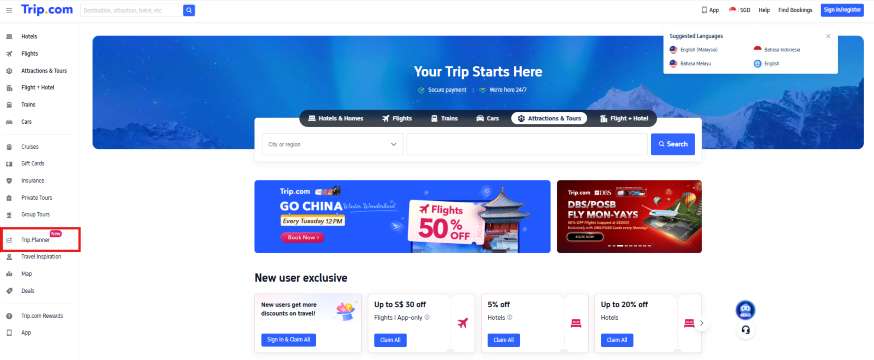
On the Trip.com website

Step 1: Open the Trip.com website and click "Trip Planner"

Trip.com website

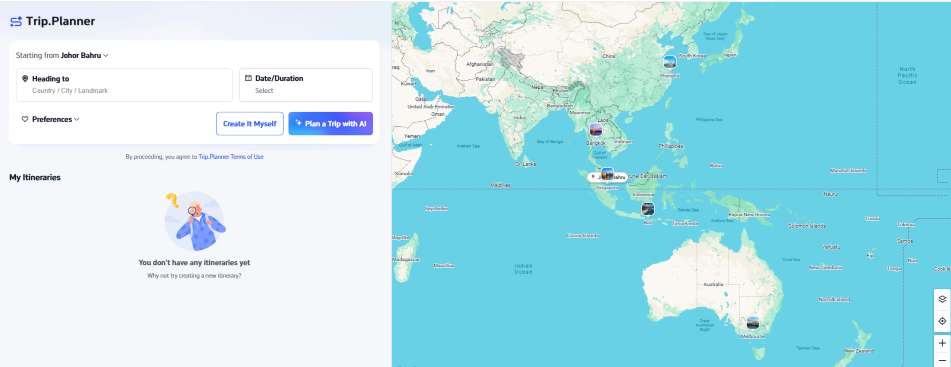
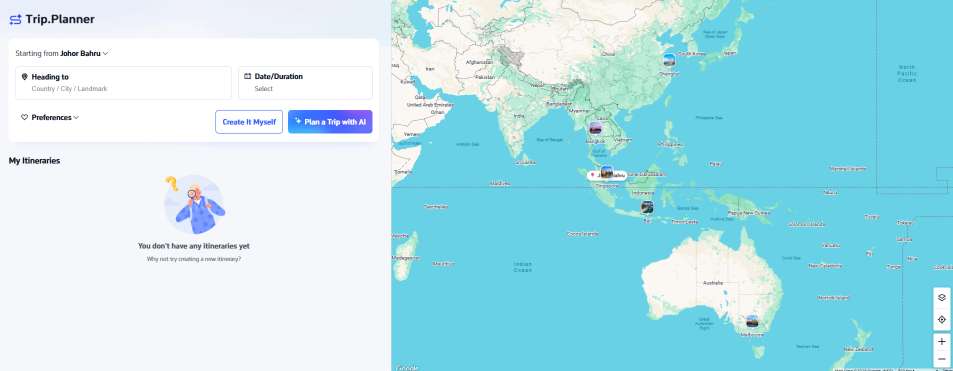
Step 2: Choose your starting point, destination, and travel dates

  • You can also customize your preferences, including who you travel with, your travel style, pace, accommodation, and any other specific needs.
  • Click the 'Create It Myself' button if you want to build your own itinerary, or 'Plan a Trip with AI' to make planning your trip even easier.

Trip.com AI Trip Planner

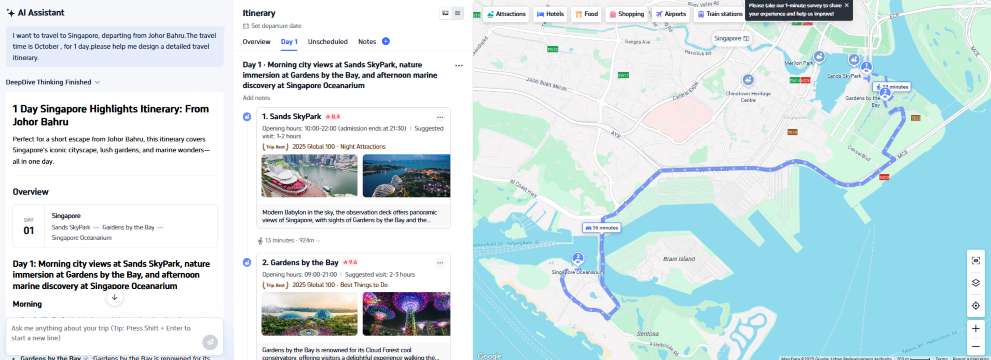
Step 3: AI-generated itinerary

Trip.com Itinerary
Singapore Itinerary 1
Singapore Itinerary 2

Step 4: View itinerary

  • You can either share it with others or delete your itinerary to create a new one
Singapore Itinerary 3
Singapore Itinerary 4

On the Trip.com app

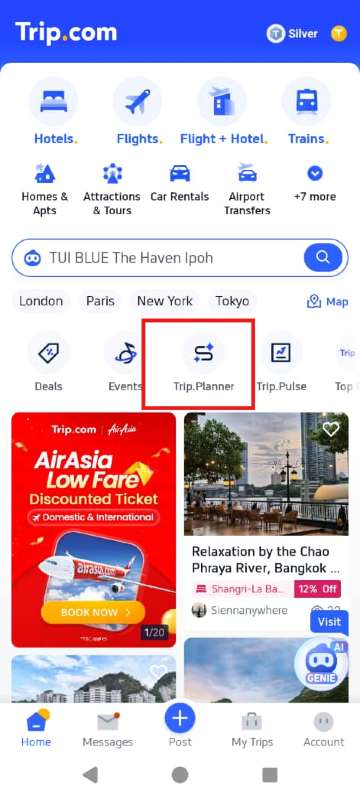
Step 1: Open the Trip.com app and click "Trip Planner"

Trip.com app 1

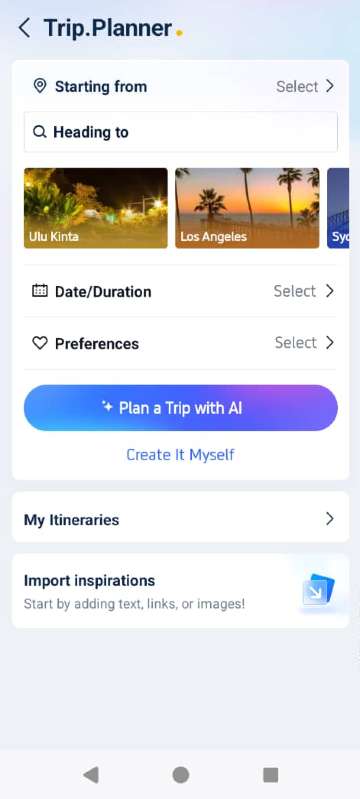
Step 2: Choose your starting point, destination, and travel dates

  • You can also customize your preferences, including who you travel with, your travel style, pace, accommodation, and any other specific needs.
  • Click the 'Create It Myself' button if you want to build your own itinerary, or 'Plan a Trip with AI' to make planning your trip even easier.
Trip.com app 2

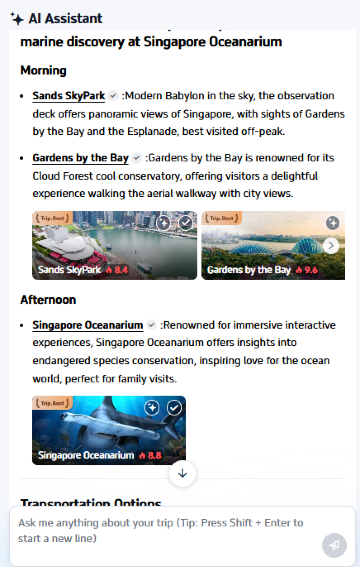
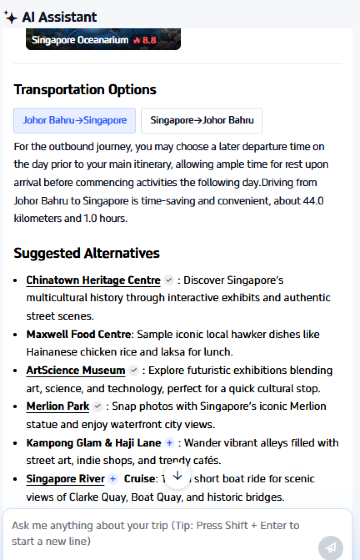
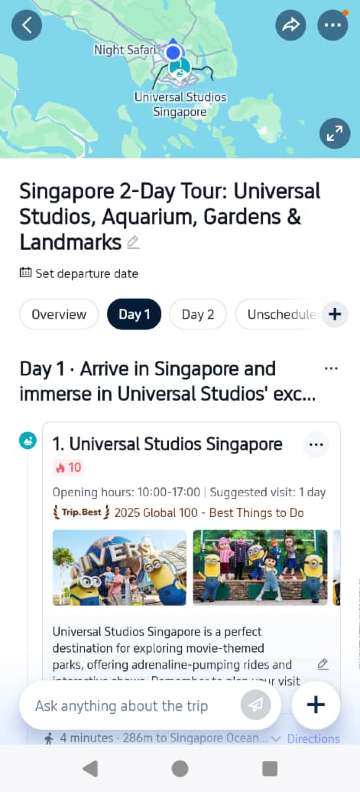
Step 3: AI-generated itinerary

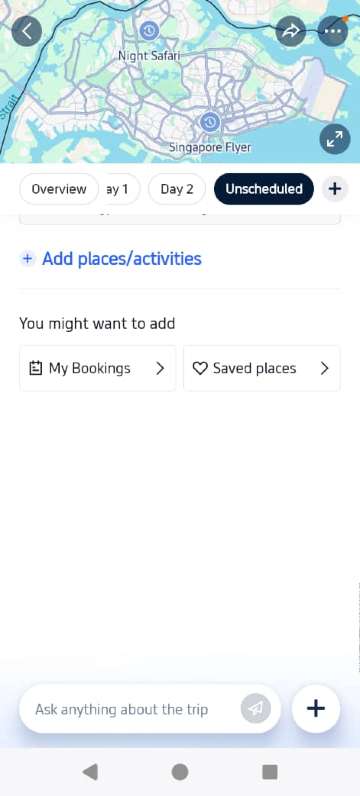
  • You can also add places or activities
  • You might want to add your hotel bookings or saved places
Trip.com app 3
Trip.com app 4

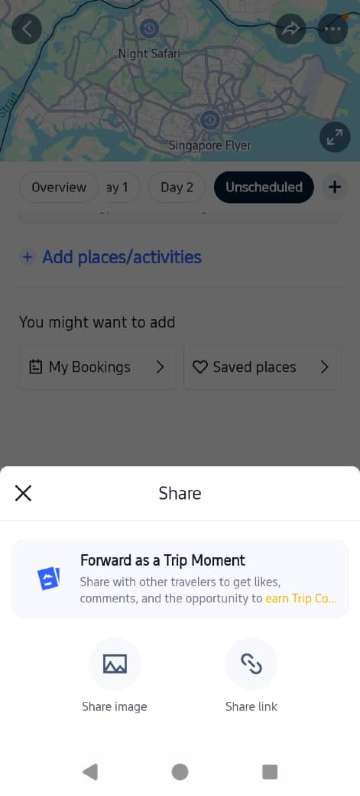
Step 4: View itinerary

  • You can also share it with others as a Trip Moment
Trip.com app 5
🔥Pro Tips: You can also get help with your travel planning—like checking the weather, getting recommendations, or asking general travel questions—by using the AI Travel Assistant, TripGenie, on Trip.com.

💬 A Review of the Trip.com Itinerary Planner

Plan Your Vacation

Many travelers praise the Trip.com Itinerary Planner for its convenience and user-friendly design. The tool automatically compiles bookings, suggests must-see attractions, and helps users optimize their time efficiently.

It’s especially handy for travelers who want to visualize their day-by-day plans without having to juggle multiple apps.

User Reviews:

⭐ “Trip.com’s itinerary planner saved me hours of research. Everything from my flights to sightseeing was perfectly scheduled!”

🎁 Bonus Tip: Use Promo Codes

🔥 Hotel Coupons: Exclusive Hotels Deal for New Users

Discover the world with trip.com! Book the perfect hotel anywhere in the world and get an unbeatable 10% discount if you're a first-time user! If this is your second time using it, you will receive a 5% discount! Download our app now and start planning your next trip with ease.

Just click this link and download the Trip.com App, after successfully registering as a member, use it when you place an order!

🔥Save More with Up to 10% Off

Use our promo code to enjoy up to 10% OFF on your attraction tickets, tours and eSIMs! There is also a 5% OFF for new users!

🔥New User Coupon: Save More with an Extra 5% Off

Use our promo code to enjoy an extra 5% off on your attraction tickets, eSIMs, and tours! ⏳Redeem within 3 days of claiming

Before confirming your bookings, check for a Trip.com promo code to save on flights, hotels, or airport transfers, all of which can be linked directly to your itinerary.

🧭 Final Thoughts

Planning Your Vacation

The Trip.com Itinerary Planner is more than just a travel tool; it’s your digital trip assistant. With automatic syncing, smart recommendations, and flexible customization, it ensures every journey is smooth and stress-free.

So whether you’re planning a short city getaway or a long multi-destination adventure, let Trip.com take care of the details while you focus on creating memories.

🔥Great news! The official list of regions supported by Trip.Planner at launch includes: the United States, Canada, the UK, Australia, New Zealand, Hong Kong, Malaysia, Saudi Arabia, the UAE, Israel, Thailand, Indonesia, the Philippines, India, Pakistan, Belgium, and Ireland.

FAQ: Trip.com Itinerary Planner

Disclaimer: This article has been provided by an individual contributor or third party platform. If there is any discrepancy regarding the copyright, please contact us directly and we will delete the content immediately.
Amal

Amal

Traveller, Writer, Sea Lover, Travel Guide, Explore the world

Lihat profil

Hi, nice to meet u~ I love traveling and exploring the world, and my dream is to travel around the world! Forever free and happy, I'll be sharing some travel tips that I hope will be helpful.

394 artikel
China Malaysia Travel Tips Travel Guide
> >
Trip.com Itinerary Planner