


If you’re a Malaysian heading to China and used to relying on Google Maps, get ready for a bit of a surprise—Google Maps doesn’t work well there. That’s where Baidu Maps comes in. It’s one of the most popular navigation apps in China and widely used by locals.
In this guide, I’ll walk you through how to download, set up, and use Baidu Maps, so you can explore China with confidence—even if you don’t speak the language!
Can Use Baidu Maps in English?
Baidu Maps doesn’t have a full English version, which can make it a bit challenging for Malaysians who don’t read Chinese. But don’t worry—with the help of translation tools and a bit of practice, you can still use the app to find your way around. Once you get used to the layout, Baidu Maps can be a very useful tool for exploring China like a local.
How to Download and Set Up Baidu Maps

Step 1: Download Baidu Maps App
Whether you’re using an iPhone or Android device, here’s how to get Baidu Maps:
- iPhone users: Go to the Apple App Store.
- Android users: Go to the Google Play Store.
- Search for “Baidu Maps” or “百度地图”.
- Download and install the app (it’s free!)
Note: ✅ Good news: You don't need a VPN to download the app from Malaysia.
Step 2: Set Up Baidu Maps
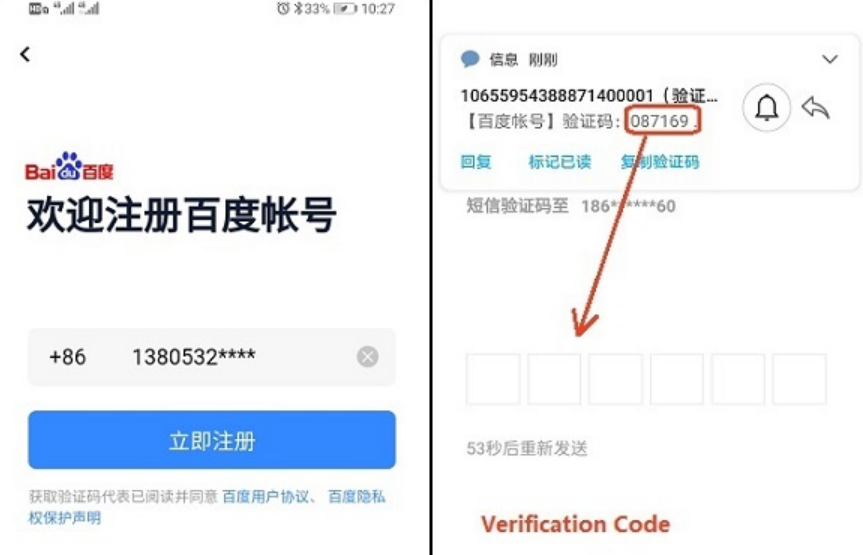
You can register with your mobile number or email address, but if you're just using it for directions, you can skip the login and use the app as a guest.
⚠️ If you skip login, some features like ride-hailing (e.g., Didi) won’t work, since a Chinese phone number is usually required.

Step 3: Can You Change Baidu Maps to English?
Unfortunately, Baidu Maps doesn’t have a full English version. Most of the interface is in Chinese because it’s designed mainly for locals.
But don’t worry—here are a few tips to help you navigate the app without needing to read Chinese fluently:
✅ Use Google Translate’s Camera
Open the Google Translate app, select the Camera mode, and point it at your phone screen. It will translate Chinese text instantly (like buttons and menus).
❗ Note: You’ll need a VPN in China to access Google Translate.
✅ Learn These Useful Terms
- 开始导航 = Start Navigation
- 收藏夹 = Favorites
- 周边 = Nearby (e.g. ATMs, hotels, restaurants)
✅ Search Using Pinyin
Instead of typing in Chinese characters, just use Pinyin. For example, type “Tiananmen” instead of 天安门. This works well for most major landmarks and popular tourist spots.
Buy Cheap China eSIM
How to Use Baidu Maps App in China
If you're travelling to China from Malaysia, Baidu Maps can be a powerful tool for navigating cities, finding places to eat, and getting around without getting lost. Here's a simple step-by-step guide on how to use it:
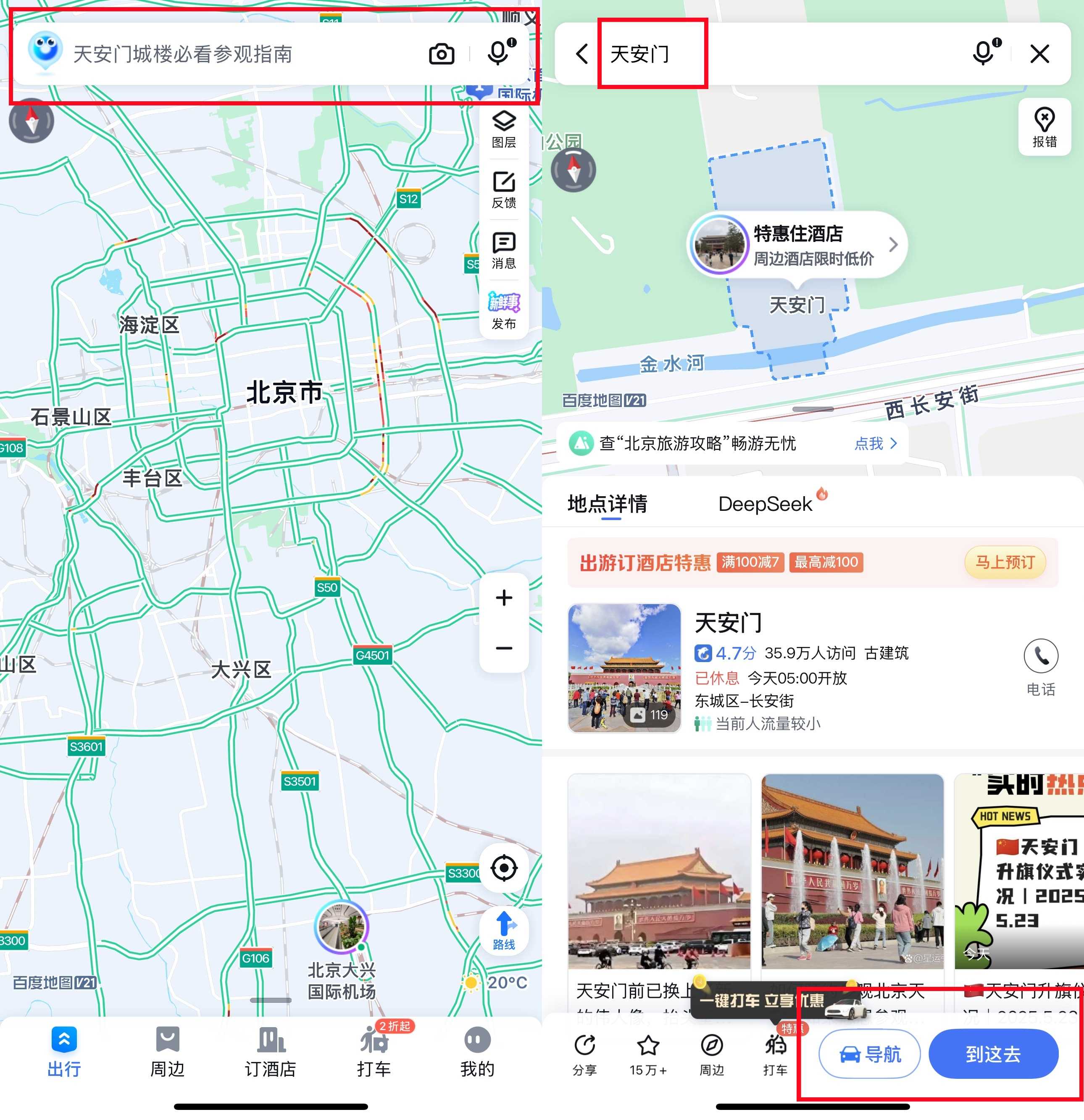
1. Find the Search Bar
When you open Baidu Maps, you’ll see a search bar at the top. Tap it to enter the name of your destination.
2. Enter Your Destination
You can type in Pinyin (e.g. “Zhongshan Park”) or Chinese characters if you know them. Suggestions will appear as you type.
- Once you find your destination, tap “到这去” (Go here) to start planning your route.

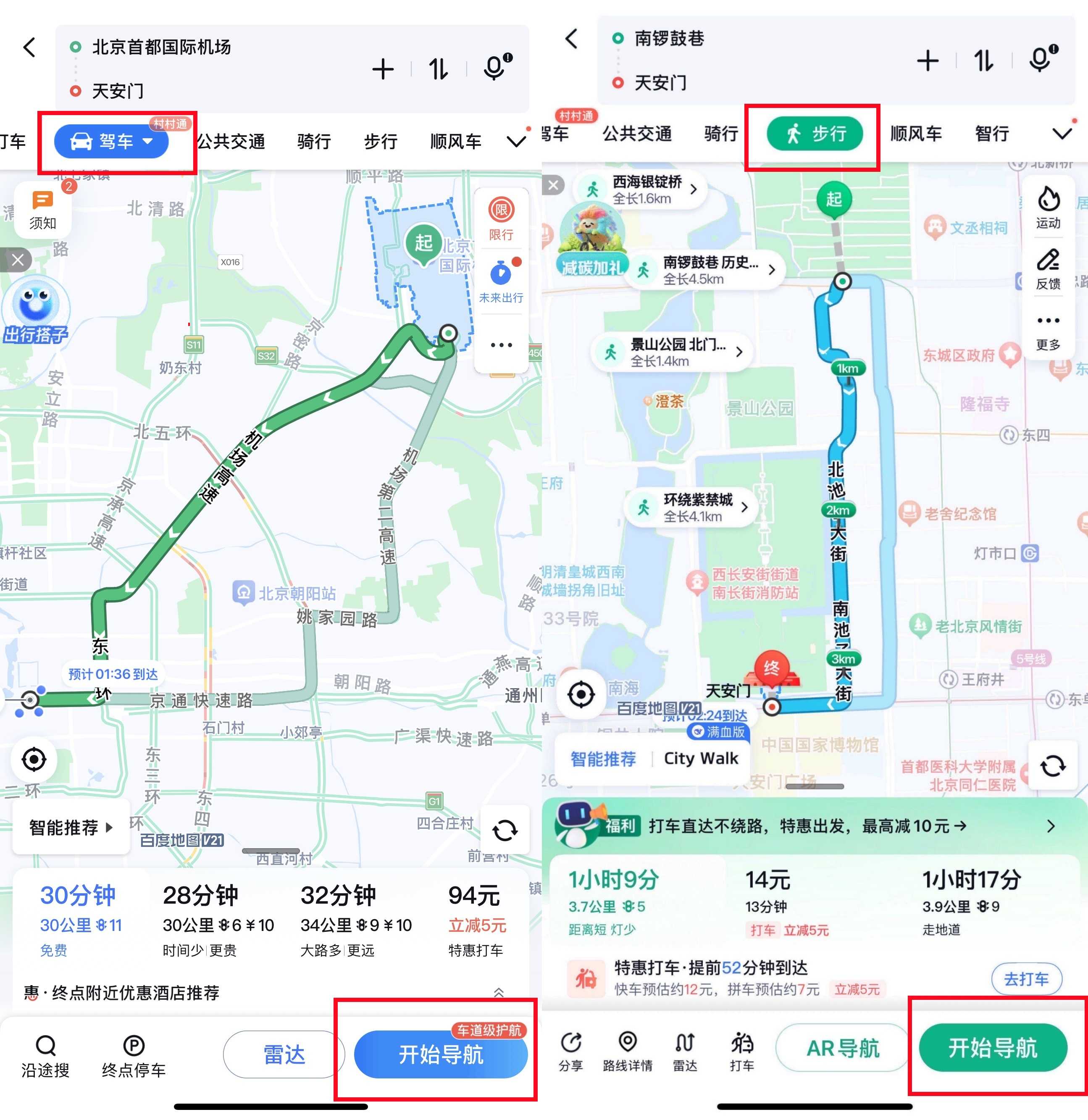
3. Choose Your Route and Mode of Transport
Baidu Maps will show different route options depending on how you want to travel:
- 🚗 Driving (驾车)
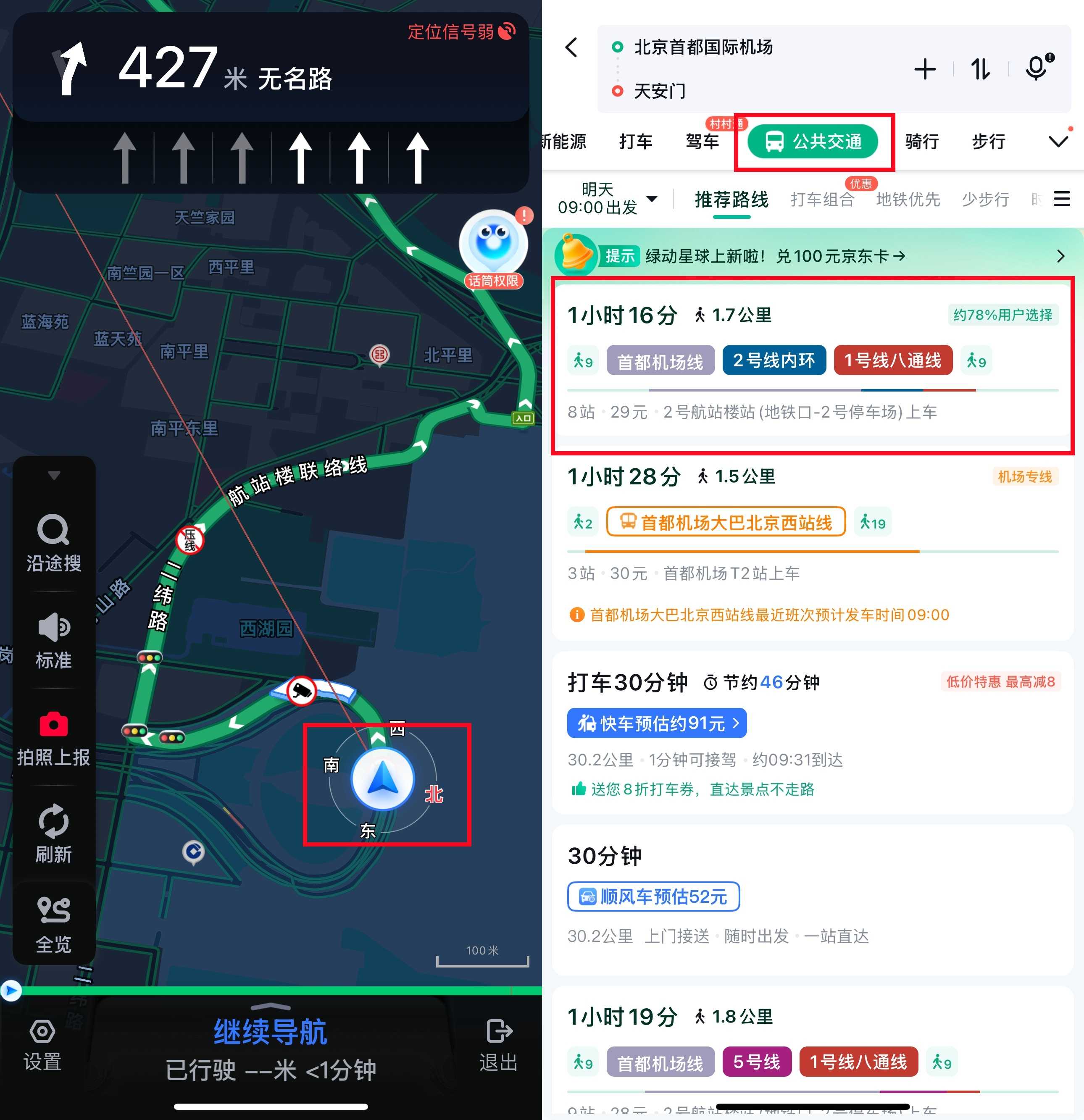
- 🚇 Public Transit (公共交通)
- 🚴♀️ Cycling (骑行)
- 🚶 Walking (步行)
4. Start Navigation
After selecting your route, tap the blue button “开始导航” (Start Navigation).
- If you chose public transit, select your preferred route and the app will guide you step-by-step.

5. Follow Real-Time Directions
- Your current location appears as a blue dot.
- Arrows show upcoming turns or directions.
- Voice guidance (in Chinese) will alert you when to turn or stop.
6. Check Traffic and Travel Time
At the top of the screen, Baidu Maps displays estimated travel time and current traffic:
- 🟢 Green = Smooth traffic
- 🟡 Yellow = Moderate traffic
- 🔴 Red = Heavy traffic or jams
7. Use Public Transit
If you're taking buses or the metro:
- Baidu Maps lists bus numbers, train lines, stops, and transfer points.
- You’ll also see estimated fares and walking routes between stations.

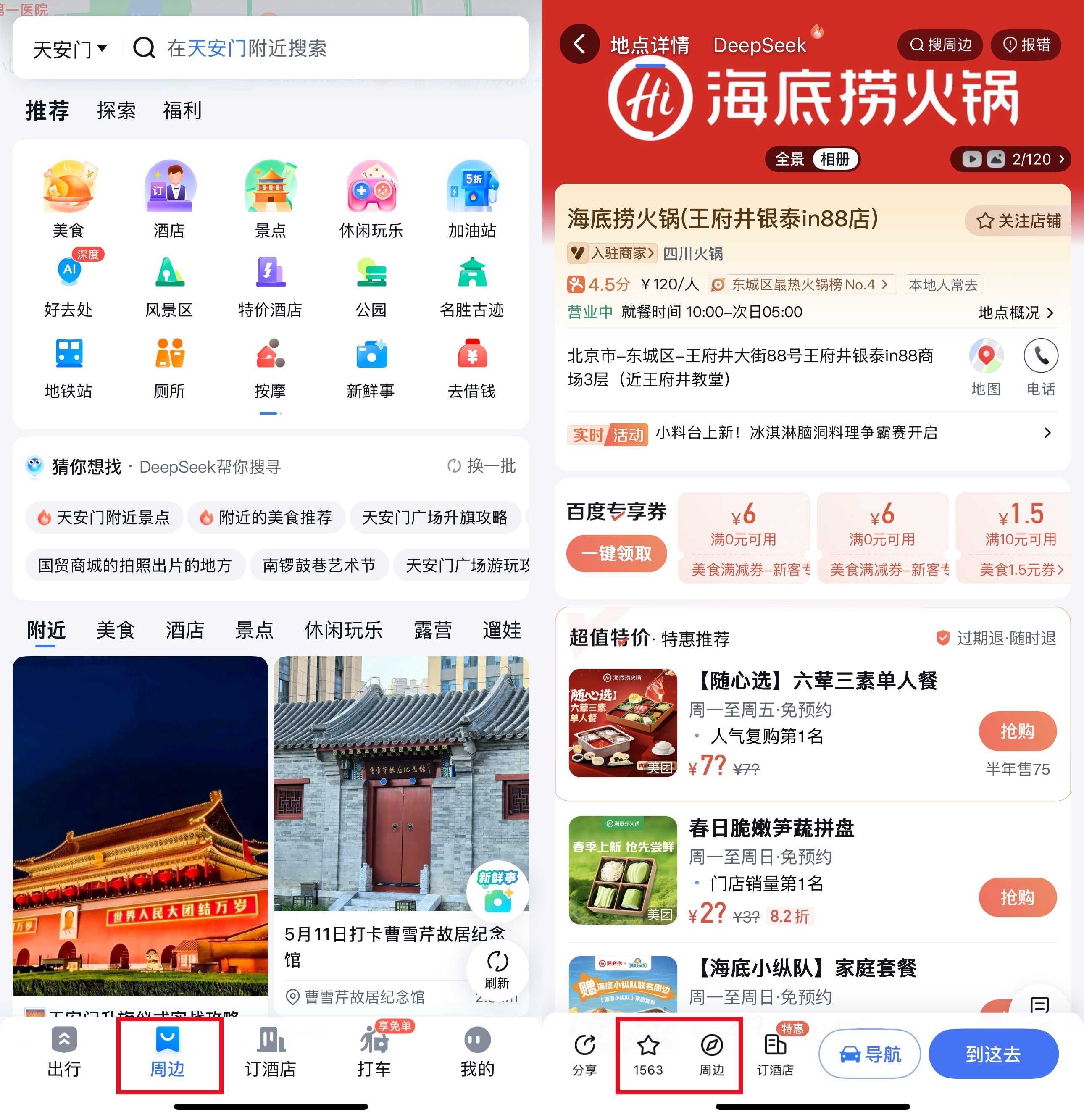
8. Explore Nearby (周边)
Tap the “周边” (Nearby) icon to find:
- Restaurants 🍜
- Hotels 🏨
- ATMs 🏧
- Petrol stations ⛽
- Shops and more
9. Save Places to Favorites
If you find a place you like, tap the ⭐ icon to add it to your “收藏夹” (Favorites) for easy access later.

10. Use Offline Maps
Before your trip, you can download offline maps for the cities you'll visit. This way, you can still navigate even without internet access.
Alternatives to Baidu Maps in China

While Baidu Maps is the most widely used navigation app in China, it’s not the only choice. Depending on your needs—especially if you prefer better English support—you may find some alternatives more convenient during your trip.
Here’s a quick comparison of popular map apps you can consider while travelling in China:
| Feature | Baidu Maps | Amap (Gaode Map) | Apple Maps | Google Maps |
|---|---|---|---|---|
Language Support | Mainly Chinese, limited English | Mainly Chinese, some English | English, limited China data | English, very limited in China |
Offline Maps | ✅ Available | ✅ Available | ⚠️ Limited | ⚠️ Limited |
Public Transit Info | ✅ Comprehensive | ✅ Comprehensive | ⚠️ Limited | ⚠️ Limited |
Walking & Cycling | ✅ Yes | ✅ Yes | ✅ Yes | ✅ Yes |
Taxi / Ride-Hailing | ✅ Integrated | ✅ Integrated | ⚠️ Limited | ⚠️ Limited |
Friendly for Foreigners | ⚠️ Moderate (language barrier) | ⚠️ Moderate (some English) | ✅ High (English UI) | ✅ High (English UI) |
Need VPN in China? | ❌ No | ❌ No | ❌ No | ✅ Yes |
Tips:
- Baidu Maps and Amap are best for local accuracy and transit info but expect a language barrier.
- Apple Maps works better for iPhone users but may lack local details.
- Google Maps is not reliable in China without a VPN.
Tips for Foreigners Using Baidu Maps App in China

Planning a trip to China from Malaysia? Baidu Maps can help you get around like a local—even if you don’t speak Chinese. Here are some helpful tips to make the most of the app during your travels:
1. Use Pinyin for Searching
If you’re not familiar with Chinese characters, just type place names in Pinyin. For example, type “Beijing Railway Station” as “Beijing Huochezhan.” Baidu Maps will still recognize major landmarks.
2. Leverage Translation Tools
Use apps like Google Translate (Camera Mode) to scan and translate buttons or menus on Baidu Maps. It’s a handy way to understand what each function does.
Tip: Make sure you have a VPN if you're using Google services in China.
3. Download Offline Maps Before Your Trip
Before leaving Malaysia, download offline maps for the cities you’ll be visiting. This allows you to use Baidu Maps even without internet access and saves mobile data.
4. Save Favorite Locations
Bookmark key places like your hotel, train station, or meeting points in the “收藏夹” (Favorites). This makes it easy to access them quickly without searching again.
5. Check Traffic Conditions Early
Traffic in major Chinese cities like Beijing, Shanghai, or Guangzhou can get very busy. Use Baidu Maps to check live traffic conditions and plan your travel time more efficiently.
Ready to Explore China with Confidence? Download Baidu Maps before your trip and get familiar with the interface. With offline maps saved and your favorite spots bookmarked, you’ll be ready to explore China with ease. Try it out—and see just how useful Baidu Maps can be for your journey!
Read More
FAQs About Baidu Maps App
How do I change the language in Baidu Maps?
Baidu Maps doesn’t offer a full English interface at the moment. However, you can search using Pinyin (the Romanized spelling of Chinese words), and use apps like Google Translate to help translate menus and buttons.Do I need a VPN to use Baidu Maps in China?
No, you don’t need a VPN. Baidu Maps is a local Chinese app and works perfectly without a VPN inside China.Does Baidu Maps support offline navigation?
Yes, Baidu Maps lets you download offline maps for specific cities. This is helpful when you don’t have internet access or want to save mobile data during your trip.Can I get public transport directions using Baidu Maps?
Definitely! Baidu Maps provides detailed bus and metro routes, including transfer points, estimated travel time, and walking directions between stations.Is Baidu Maps reliable for taxis or ride-hailing?
Yes, Baidu Maps integrates with popular local ride-hailing apps like Didi, making it easier for you to book a ride and navigate to your destination.

384349 ditempah