

Best China eSIM Plans for Travelers | Stay Connected Instantly

Gambar Profil Penulis
China eSIM

Planning a Trip to China? China is a country rich in history, culture, and breathtaking natural landscapes 🌄, but are you facing internet access issues when traveling there? With a China eSIM, you can enjoy hassle-free internet access not just in China, but in other countries too—just download it onto your smartphone 📱. Whether you're visiting Beijing, Shanghai, Guangzhou, or other popular destinations, there's an eSIM plan that fits your needs. It’s compatible with iPhones, Samsung, and many other devices!

In this article, we’ll explain how to choose the right eSIM, even for beginners, along with the pros and cons of using a China eSIM.

🔥 Right now, there are discounts on flights and hotels to China from Malaysia! Explore Beijing, Shanghai, Guangzhou, Hangzhou, Kunming, Chengdu and more—get your China travel deal now!

🔥2025 Years New Customer Coupon

Use our promo code to enjoy an additional 5% discount (up to RM12). Save even more on your attraction tickets and tours!

  • 🎉Validity period: From 1 Jan 2025 at 00:00:00 to 30 June 2025 at 23:59:59
  • 🤗Voucher validity period: Within 3 days after collection

Popular China eSIM Plans

3GB/day 3 Days

  • Data3GB Daily
  • Validity3 Days
  • PriceFrom RM17.83

20GB 5 Days

  • Data20GB
  • Validity5 Days
  • PriceFrom RM37.57

20GB 7 Days

  • Data20GB
  • Validity7 Days
  • PriceFrom RM40.72
  • Validity: 30 days from purchase, one-time use
  • After purchase: Please provide a valid email address and receive your QR code
  • Coverage: Mainland China
  • Supports hotspot sharing

What is an eSIM?

An eSIM is a digital SIM that lets you activate a cellular plan in China without a physical SIM card. It’s built right into your device—be it a smartphone, smartwatch, or tablet.

With eSIM, you can easily switch between network providers or data plans without physically changing the SIM card. This is especially helpful for travelers who want to avoid roaming fees by using a local data plan during their stay in China.

Must-Have Apps for Travelers in China

Having the right apps in China can make a huge difference. Due to restrictions on apps like Google Maps and WhatsApp, local apps are essential for navigation, communication, and services. Also, Chinese payment methods like Alipay and WeChat Pay may feel unfamiliar, but getting used to them before your trip will help you stay connected and enjoy local conveniences.

CategoryRecommended Apps

Payment Apps

Alipay, WeChat Pay

Transport Apps

Didi, Baidu Maps, China Railway 12306

Navigation Apps

Baidu Maps, Gaode Maps

Translation

Baidu Translate

Food Delivery/Discovery

Meituan, Ele.me, Dianping

Attraction Booking

Trip.com

Train Booking

Trip.com

Communication

WeChat, QQ

Other Useful Local Apps

Taobao, JD.com

💡 Pro Tip: Most apps in China are in Chinese. If possible, set the app language to English. You can use international credit cards with Alipay or WeChat Pay in some cases. Always download your necessary apps before arrival, and activate your eSIM as soon as you land for smooth connectivity throughout your trip.

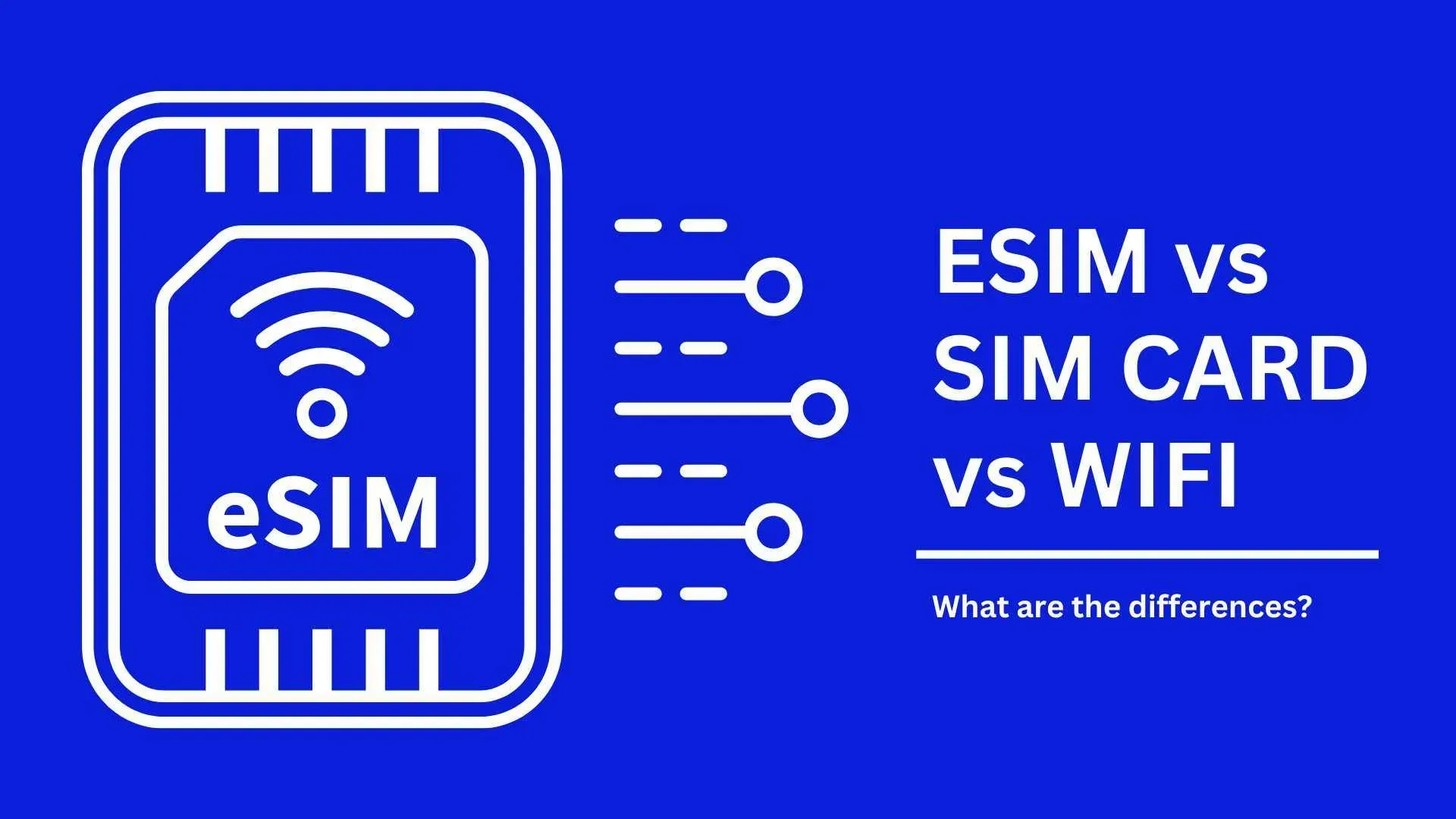
Comparing eSIM, SIM Card, and Wi-Fi Router

eSIMSIM CardWi-Fi Router

Pros

No risk of loss/damage, easy setup, immediate use upon arrival

No charging required, compact, many plans

Shareable, connects multiple devices, usable on arrival

Cons

Limited compatible devices, no phone number

Setup required, needs eject pin, phone must be SIM-free

Battery life concerns, handover hassle, higher cost

Top China eSIM Options

You can get China eSIMs from MYR3.72 to MYR205 from providers like Airalo, Alosim, Holafly, Nomad, and SimOptions. These providers offer between 1GB and unlimited data plans, covering China, Asia, or globally.

Airalo

  • Chinacom eSIM: 5 plans (1GB–10GB)
  • Asialink eSIM: 6 plans (1GB–100GB) for China + 13 other Asian countries
  • Discover+ eSIM: 12 plans (1GB–20GB) for global use

Alosim

  • 1 China plan with five eSIMs (1GB–20GB)

Holafly

  • Unlimited data plans for many Asian countries
  • 8 eSIM options (5–90 days)

Nomad

  • China eSIM: 9 plans (1GB–50GB)
  • APAC eSIM: 11 plans (1GB–20GB) for China + 14–19 Asia-Pacific countries
  • Global eSIM: 6 plans (1GB–5GB) for China + 108–138 other countries

SimOptions

  • 1 China plan: 6GB for 8 days

Differences Between China eSIM and SIM Card

Difference between eSIM and SIM card
ItemSIM CardeSIM

Form

Physical card

Embedded (digital)

Replacement Complexity

Needs to be physically swapped

Set via device settings

Device Requirement

Needs a SIM slot

Requires eSIM support

Carrier Switch

Must buy a new SIM

Switch via device screen

Size/Form Factor

Various sizes (e.g., nano, micro)

Not applicable

How to use China eSIM - 5 steps to get connected

How to use China eSIM

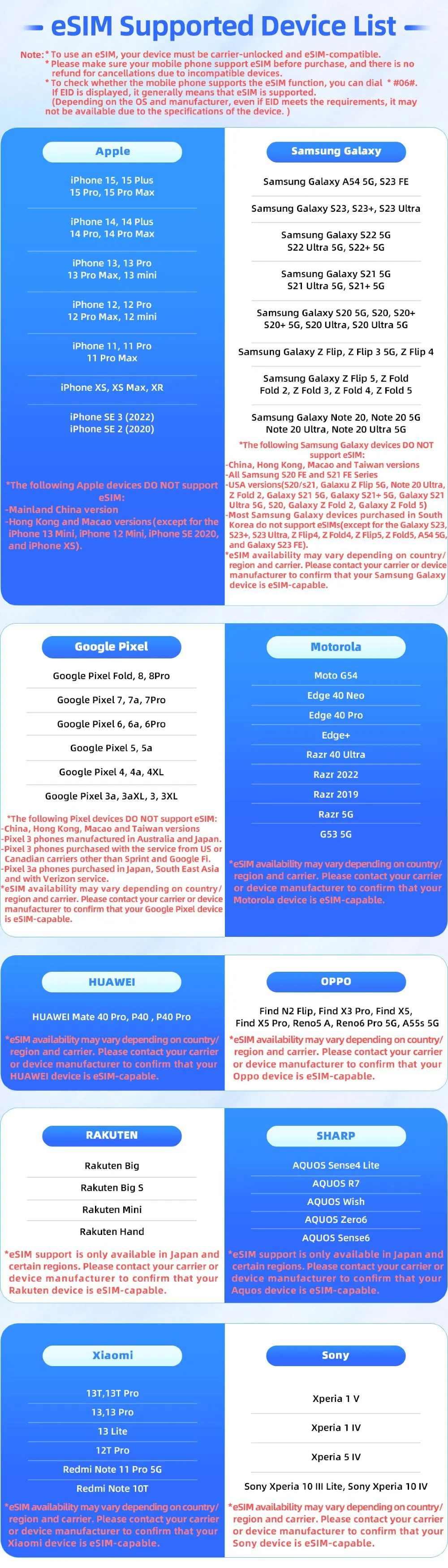
Before setting up: Check whether your phone can use eSIM

Mobile phones vary from country to country. Please make sure your mobile phone supports eSIM before purchasing. This ensures a seamless experience when activating and managing your eSIM, allowing you to enjoy the benefits without any compatibility issues.

Check the compatible models below. 👇

China eSIM compatible plan

Step 1: Choose the best eSIM plan

How to use China eSIM Step 1: Choose the best eSIM plan

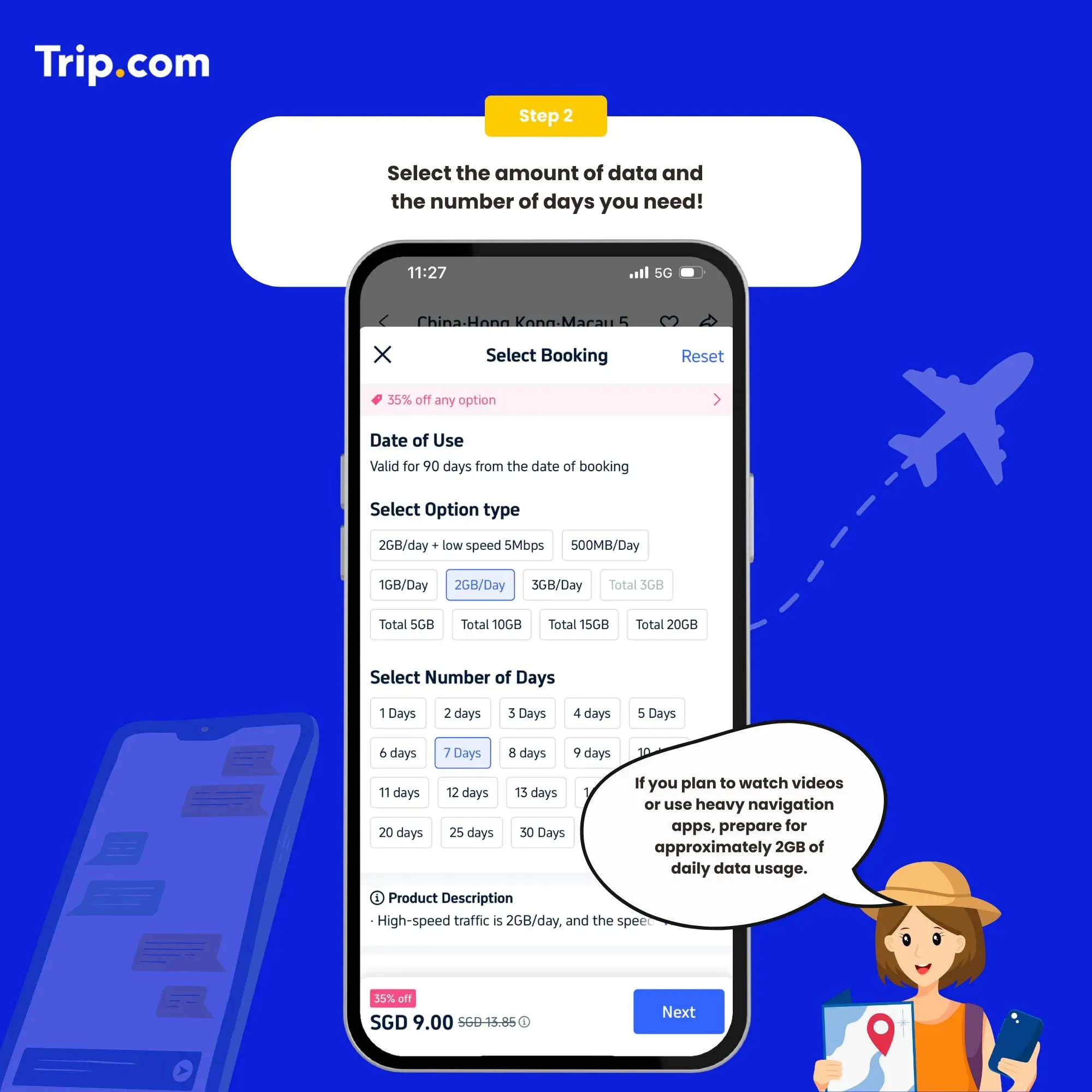
Step 2: Select the data package

How to use China eSIM Step 2: Select the data package

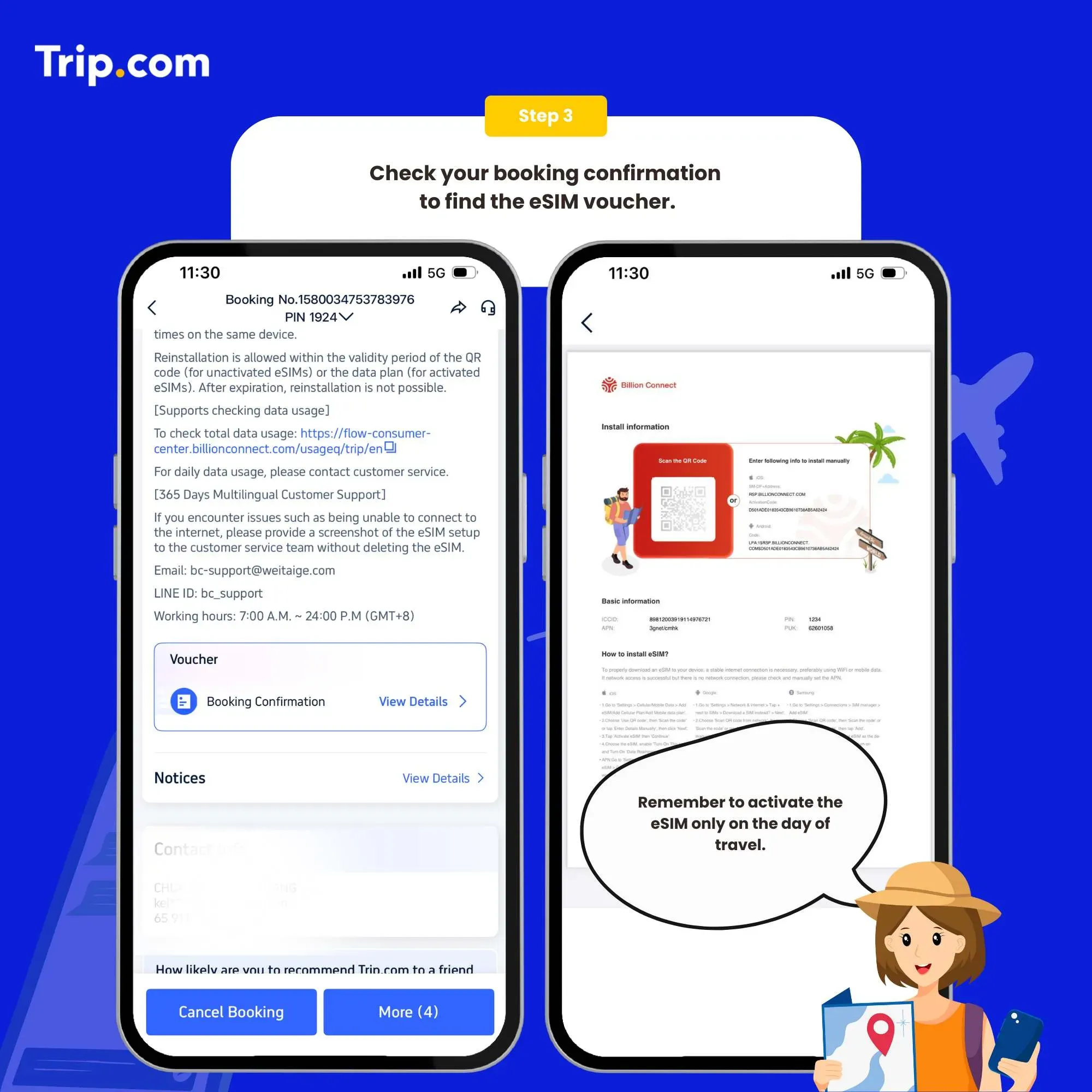
Step 3: Receive activation email

You’ll receive the eSIM activation email and a QR code with installation instructions. You must have a network to install eSIM. Please ensure that there is available WiFi or mobile data before installation.

How to use China eSIM Step 3: Receive activation email

Step 4: Add your eSIM

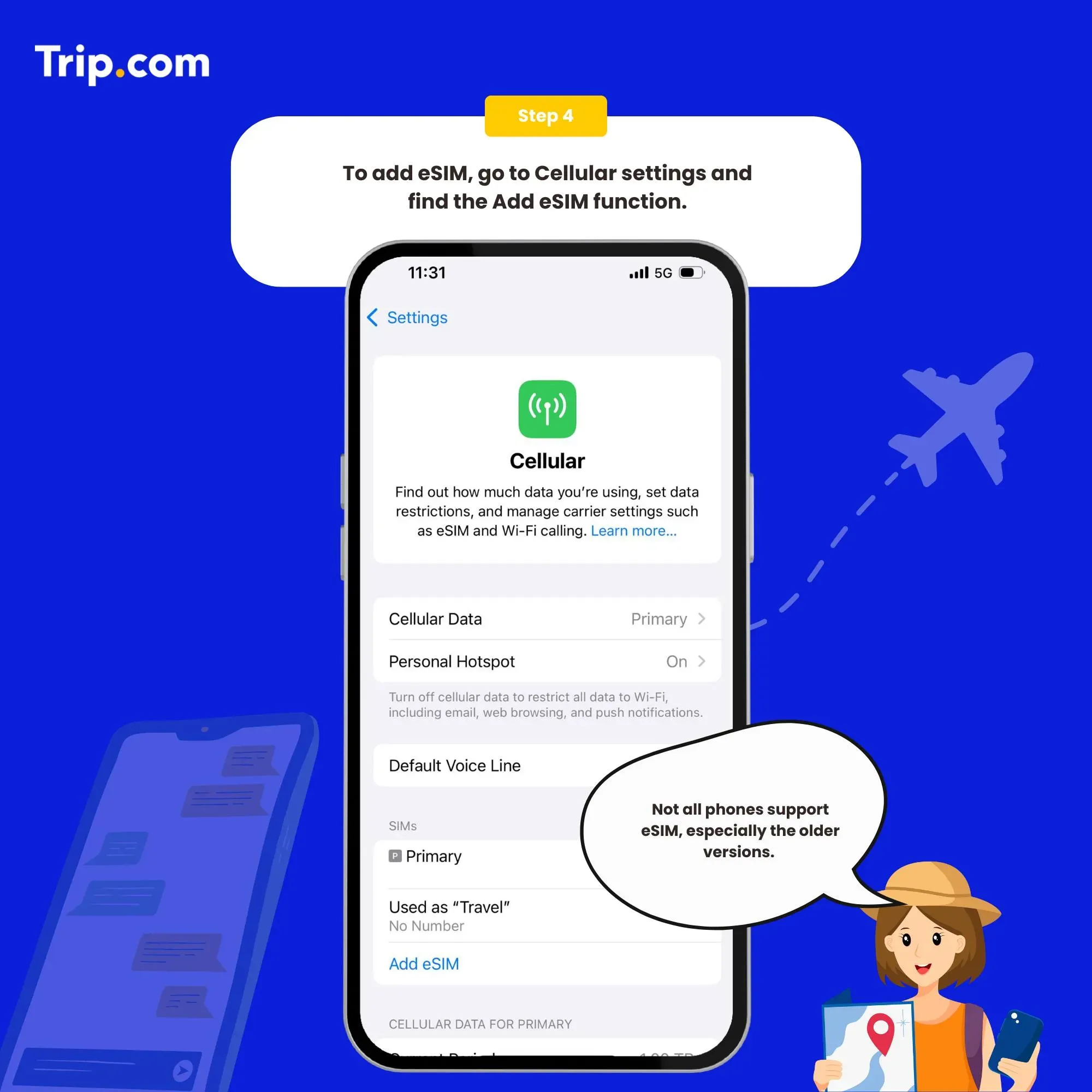
Set as the instructions: System - Settings - Cellular (iOS) / SIM Card Management (Andriod) - add a Cellular Plan (iOS) / SIM Card (Android) - agree to download Cellular Plan (iOS) or SIM Card (Android), and then scan the QR code for activation (or enter SM-DP +Address and Activation Code manually).

How to use China eSIM Step 4: Add your eSIM

Step 5: Connect the Internet

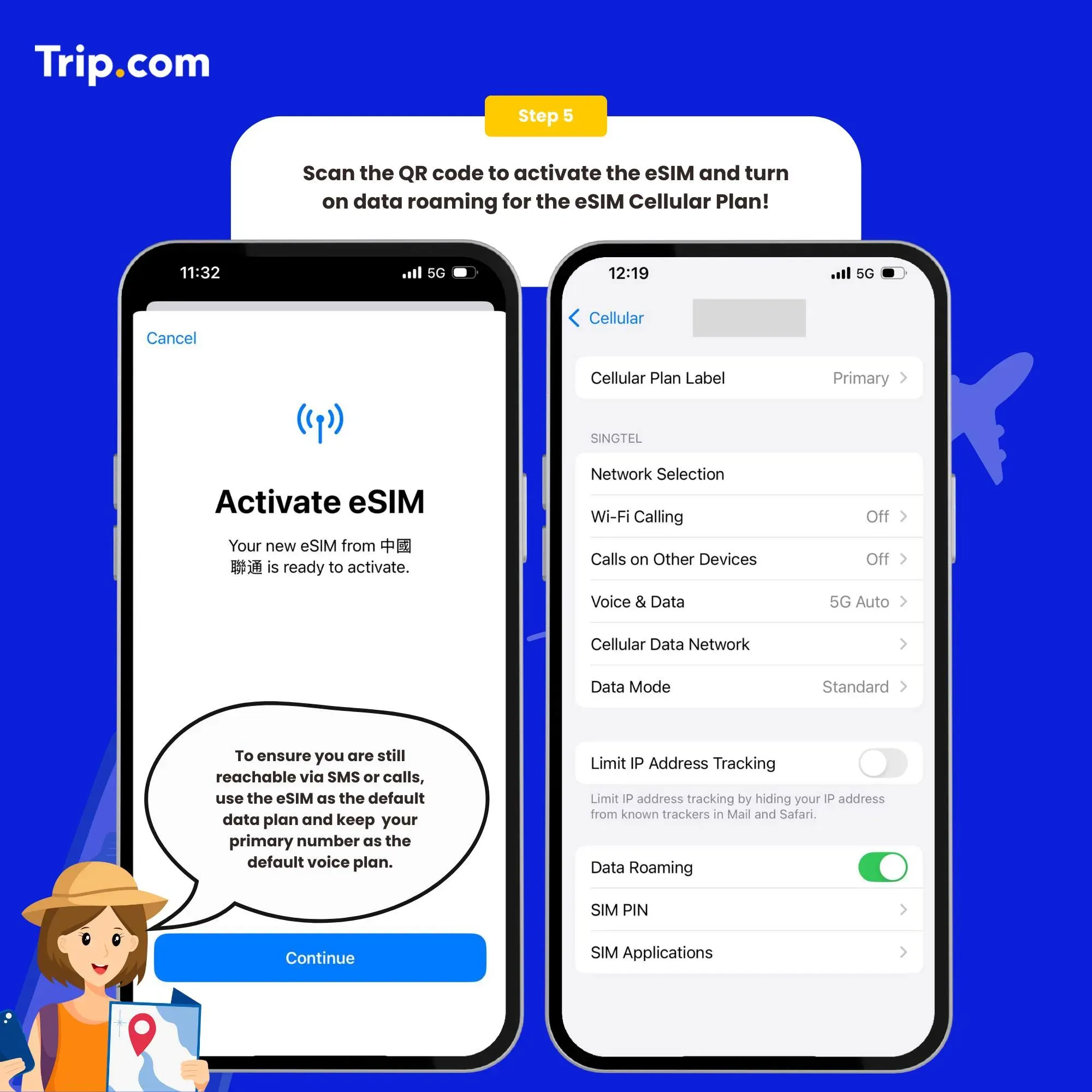
  1. After the download is successful, close the primary card if you already have. Enable the Cellular Plan (iOS) or SIM Card (Android).
  2. We recommend that you disable eSIM until you reach your destination. After arriving at the destination, please open your eSIM, turn on roaming to connect to the network and then surf the Internet normally.
How to use China eSIM Step 5: Connect the Internet

How to close?

Open the open Cellular (iOS) or SIM Card Management (Android), and click to turn off the Cellular Plan (iOS) or SIM Card (Android) (the steps of enabling and disabling are the same).

Note

  1. If there is no network after enabling, please turn on the airplane mode and then turn off or restart the phone.
  2. The eSIM can only be installed one time by one phone or one device. If removed, it cannot be added again and must be purchased again.
  3. If there are problems such as activation failure, please contact Customer Service without deleting the eSIM.

You can now connect to the Internet and enjoy the convenience of eSIM as per your selected plan.

Recommended eSIM Options for China Travel!

3 Days - 3GB/Day

  • Data3GB/Day
  • Validity3 Days
  • PriceFrom RM17.83

5 Days - 20GB

  • Data20GB
  • Validity5 Days
  • PriceFrom RM37.57

7 Days - 20GB

  • Data20GB
  • Validity7 Days
  • PriceFrom RM40.72

10 Days - 50GB

  • Data50GB
  • Validity10 Day
  • PriceFrom RM89.37

15 Days - 3GB/day

  • Data3GB/day
  • Validity15 Days
  • PriceFrom RM85.55

30 Days - 3GB/Day

  • Data3GB Daily
  • Validity30 Days
  • PriceFrom RM171.09

Need more flexible options? Customize & choose from our top China eSIM products!

China eSIM

  • CoverageChina
  • Data1 to 100 GB
  • Validity1 to 30 Days
  • Pricefrom MYR2.2
  • Reviews (4.6 ★)1871 reviews
  • Bookings59k+ bookings

China, Hong Kong, Macau 5G eSIM

  • CoverageChina, Hong Kong, Macau
  • Data500MB/day – Total 20GB
  • Validity1 to 30 Days
  • PriceFrom MYR2.25
  • Reviews (4.6 ★)1322 reviews
  • Bookings35k+ bookings

Mainland China eSIM 5G

  • CoverageSingapore, Malaysia, Indonesia, Thailand
  • Data500MB-30GB
  • Validity1 to 30 Days
  • PriceFrom MYR2.45
  • Reviews (4.6 ★)531 reviews
  • Bookings7k+ bookings

What If eSIM Data Doesn’t Work?

  • Check your APN settings (provided in the QR email)
  • Go to Settings > Cellular > Network Selection and configure the APN manually

⚠️ Important: Only scan the QR on the device you’ll use the eSIM on.

China eSIM User Reviews

There are no problems at all in using it. The setup is easy, the signal is good, and the price is cheap. It was really helpful this time.
It's a great product that works like a "VPN" service, so you can access all Western apps. The only problem is that in the end, there is an issue with payment apps like Alipay and WeChat, and you need a local WiFi connection to complete the payment.
After canceling another eSIM that didn't work for me in China, this one worked fine. It worked as expected, and I had seamless access during my stay.

China eSIM Benefits

3 benefits of using China eSIM

Instant Connectivity: Start browsing the internet as soon as you land
No Physical Card Handling: No SIM tray needed, less risk of loss
Dual SIM Support: Keep your original number while using China data

3 Tips for Choosing a China eSIM

  1. Is it affordable? Don’t just go for the cheapest—check data speed, support, and provider reliability
  2. Is the data capacity enough? China has fast internet, so unlimited plans are great for streaming
  3. Are there good reviews? Real user feedback helps you avoid poor-performing eSIMs

eSIMs Are a Must for Other Countries Too!

  • Malaysia, Singapore, Indonesia, Vietnam, India, China, Japan, Thailand, Korea – all support eSIM!

If you want to enjoy your trip to China, an eSIM is a must-have item!

eSIM is a must-have item for a fun trip to China!

If you’re planning to travel to China, having a reliable eSIM is a must-have. It ensures you stay connected, from hotel bookings to map usage and food delivery. Many travelers love Trip.com’s eSIM for its reliability and ease of use. Why not give it a try?

Disclaimer: This article has been provided by an individual contributor or third party platform. If there is any discrepancy regarding the copyright, please contact us directly and we will delete the content immediately.