Trip.com Flight Cancellation Guide | Trip.com

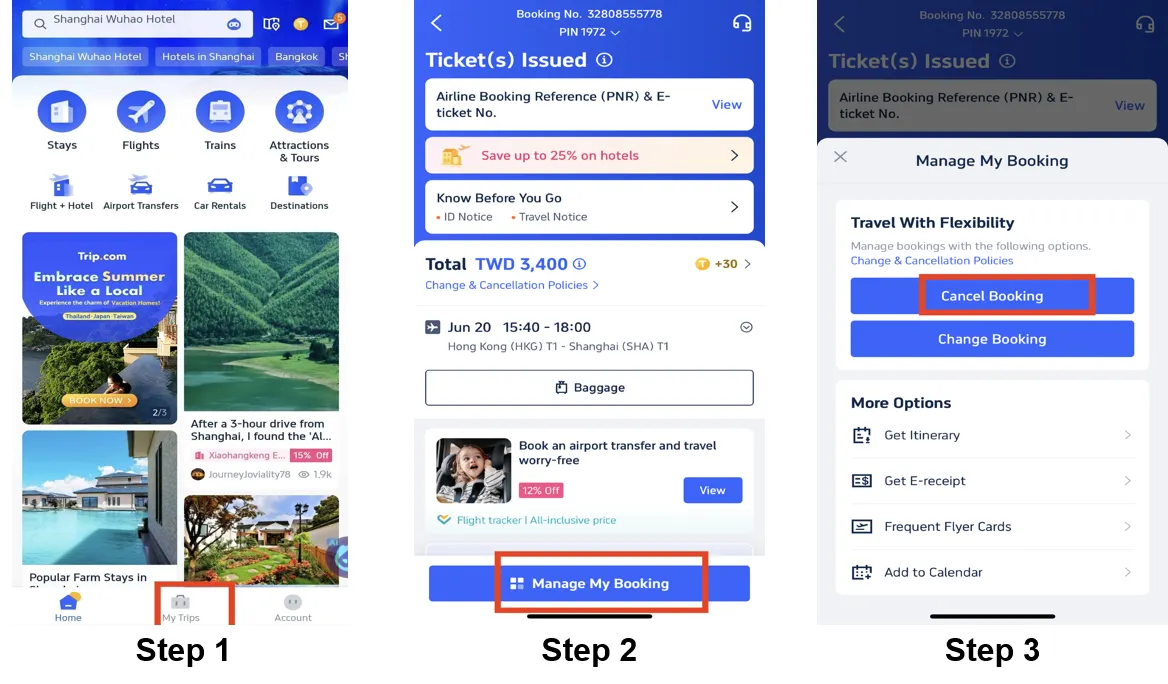
Step 1: Log In to the Trip.com App to Cancel Your Flight
Log into your Trip.com account on your mobile device and go to the "My Trips" section. This is where you'll find all your bookings.
Step 2: Find Your Flight Booking
Click on "Manage My Booking" to locate the flight reservation you want to cancel.
Step 3: Request Flight Cancellation on Trip.com
Tap the "Cancel Booking" button to cancel your flight reservation. According to Trip.com's Flight Cancellation Policy, cancelling a flight may incur service fees and cancellation charges.
Step 4: Confirm Your Trip.com Flight Cancellation
Review the refund details and confirm the processing fees charged for the flight cancellation, then click the "Next" button to proceed to the details page.
Step 5: Submit Your Trip.com Flight Cancellation
Check the refund details and your refund information, then tap "Submit" to complete the process.
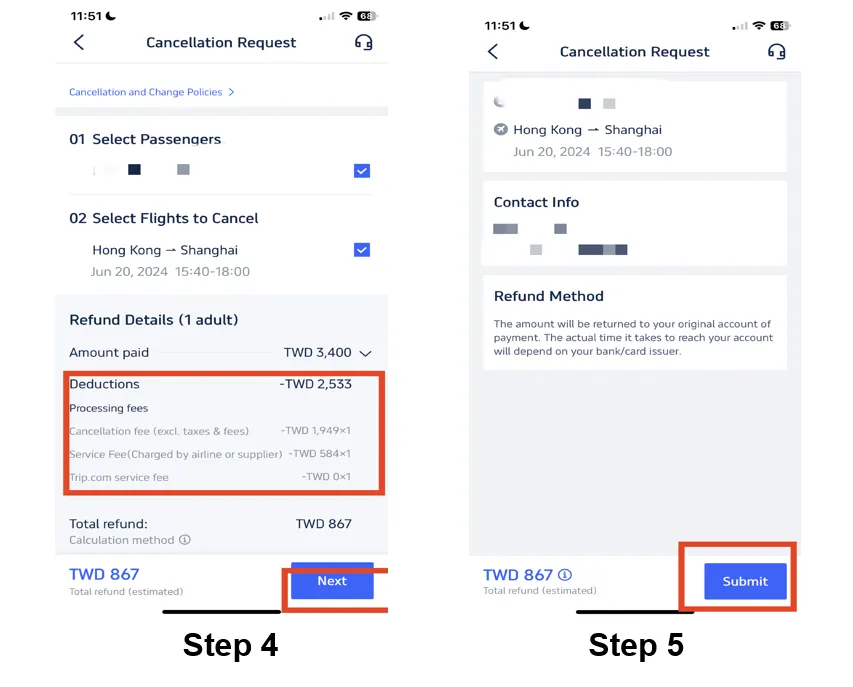
*The screenshot is for reference only.
You Might Also Like:
Cara Mengakses Ruang Menunggu VIP Trip.com
Akses ruang menunggu VIP Trip.com memeriahkan perjalanan anda. Akses ahli berbeza-beza dan ini ialah panduan am bagi menikmati kemudahan premium.
22 Oktober 2026
How to Check & Add Baggage Allowance on Trip.com
Learn how to check and add baggage allowance on Trip.com after booking your flight.
22 Oktober 2026
Contact Trip.com Malaysia – 24/7 Call Center & Customer Service Help
Contact Trip.com customer service via Malaysia hotline +603 8408 1076 or International hotline at +603 4065 2708. Support for flights, hotels, trains & cars is available 24/7.
22 Oktober 2026
Step-by-Step Guide to Trip.com Check-In
This article offers a step-by-step guide on how to check in with Trip.com. With Trip.com's smart check-in, travelers can enjoy quick access to board their flight.
22 Oktober 2026
Trip.com Flight Cancellation Guide | Trip.com
Need to cancel your Trip.com flight? This guide makes the process easy. Learn about Trip.com's flight cancellation rules and policies.
22 Oktober 2026
Disclaimer: This article has been provided by an individual contributor or third party platform. If there is any discrepancy regarding the copyright, please contact us directly and we will delete the content immediately.