







Trip.com’s “Afterpay” feature isn’t your typical buy-now-pay-later service like Afterpay itself. Instead, it’s a clever way to lock in your hotel stay now and defer the payment, as long as the room offers free cancellation!
Essentially, this means you can lock in your stay without paying a cent upfront, keeping your travel plans nice and flexible! You’ll only pay when you arrive at the hotel or shortly before your trip, depending on their specific policy.
This gives travelers total peace of mind for those moments when plans might change, though please note it isn’t an installment or credit service.
What exactly *is* Trip.com Afterpay, and how can it unlock your travel dreams?

Photo credit: Unsplash, naipo.de
Trip.com Afterpay lets you book your dream stay now and pay later at the hotel when you choose a room with Free Cancellation. It’s the ultimate way to snag your spot without any upfront costs! Whether your plans are still a bit up in the air, you’re busy comparing options, or you just want that extra peace of mind, we've got you covered. No need to tie up your cash until you’re 100% sure.
Highlight | Description |
|---|---|
Book Now, Pay Later (Usually at Check-in) | Ready to secure your perfect getaway? You can easily reserve your room online, and here's the best part: you won't pay Trip.com upfront! |
Your Free Cancellation Window | You’ll have a flexible window—whether it’s a day, three days, or even weeks before check-in—to cancel your booking for free, with absolutely no charges at all! |
Payment timing | Just a heads up—if you don't cancel within the free window, you'll typically pay the hotel directly upon arrival. Occasionally, Trip.com might charge your card closer to your stay date, so it's always a good idea to double-check the policy details! |
Just a quick heads-up for your next adventure! Trip.com doesn't currently accept Afterpay. You might see a "Pay Later" option, but this actually refers to our flexible free cancellation policies rather than installment payments.
🔥 Hotel Coupons: Exclusive Hotels Deal for New Users
Discover the world with trip.com! Book the perfect hotel anywhere in the world and get an unbeatable 10% discount if you're a first-time user! If this is your second time using it, you will receive a 5% discount! Download our app now and start planning your next trip with ease.
Just click this link and download the Trip.com App, after successfully registering as a member, use it when you place an order!
🔥Save More with Up to 10% Off
Use our promo code to enjoy up to 10% OFF on your attraction tickets, tours and eSIMs! There is also a 5% OFF (up to S$3) for new users!
🔥New User Coupon: Save More with an Extra 5% Off
Use our promo code to enjoy an extra 5% off (up to S$4) on your attraction tickets, eSIMs, and tours! ⏳Redeem within 3 days of claiming
How to Find Hotels with Afterpay on Trip.com

Follow these simple steps to find Trip.com Afterpay and start planning your next adventure!
Looking for hotels where you can book now, pay later, and enjoy free cancellation? It’s easy! Just follow these exact steps:
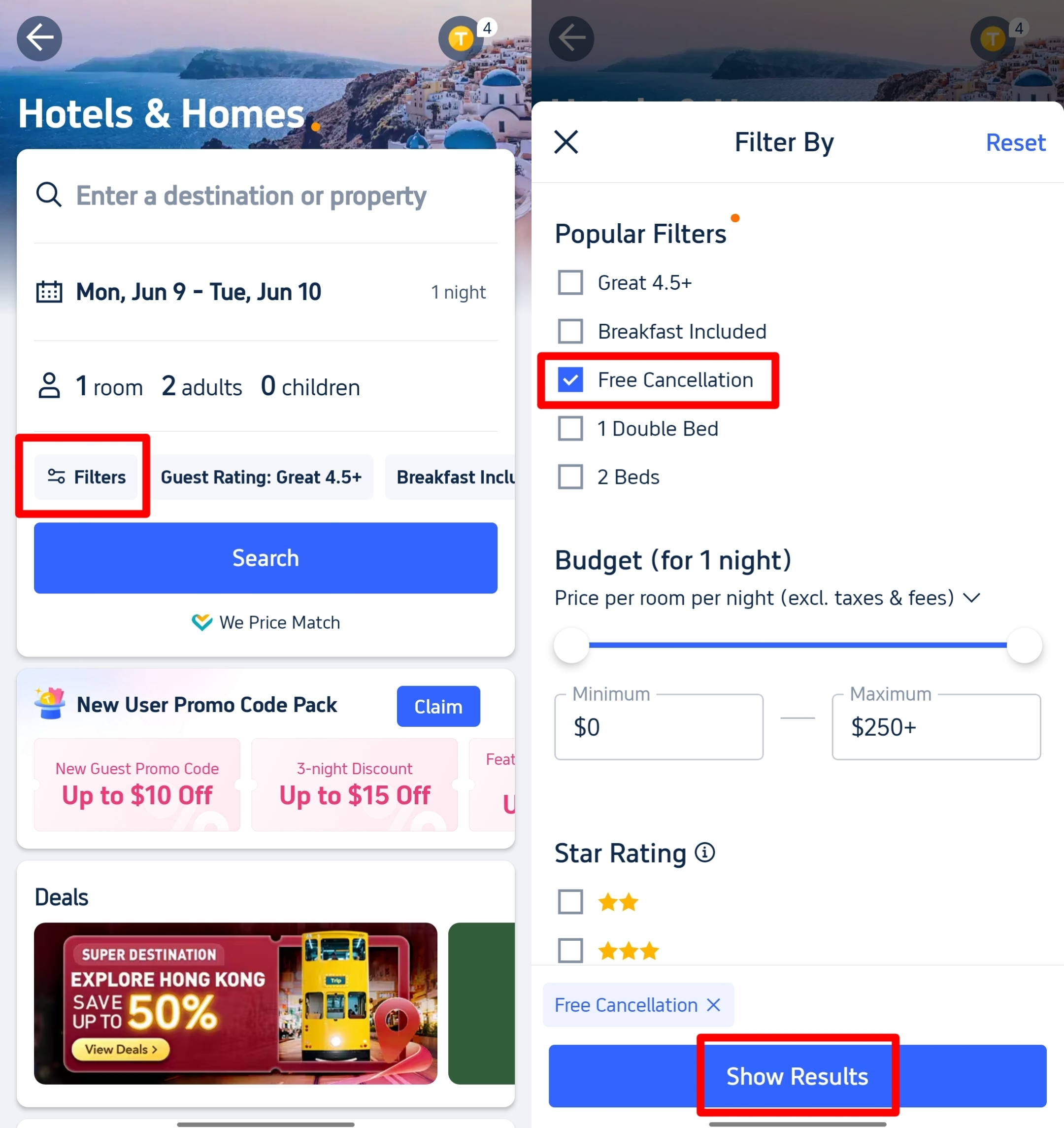
- Ready to explore? Head over to Trip.com, enter your city, dates, and guests, then simply hit "Search" to start your next adventure!
- Ready to fine-tune your search for that perfect getaway? Keep an eye out for the "Filter" button, usually waiting for you near the top of your hotel list results. Give it a click to unlock more options!
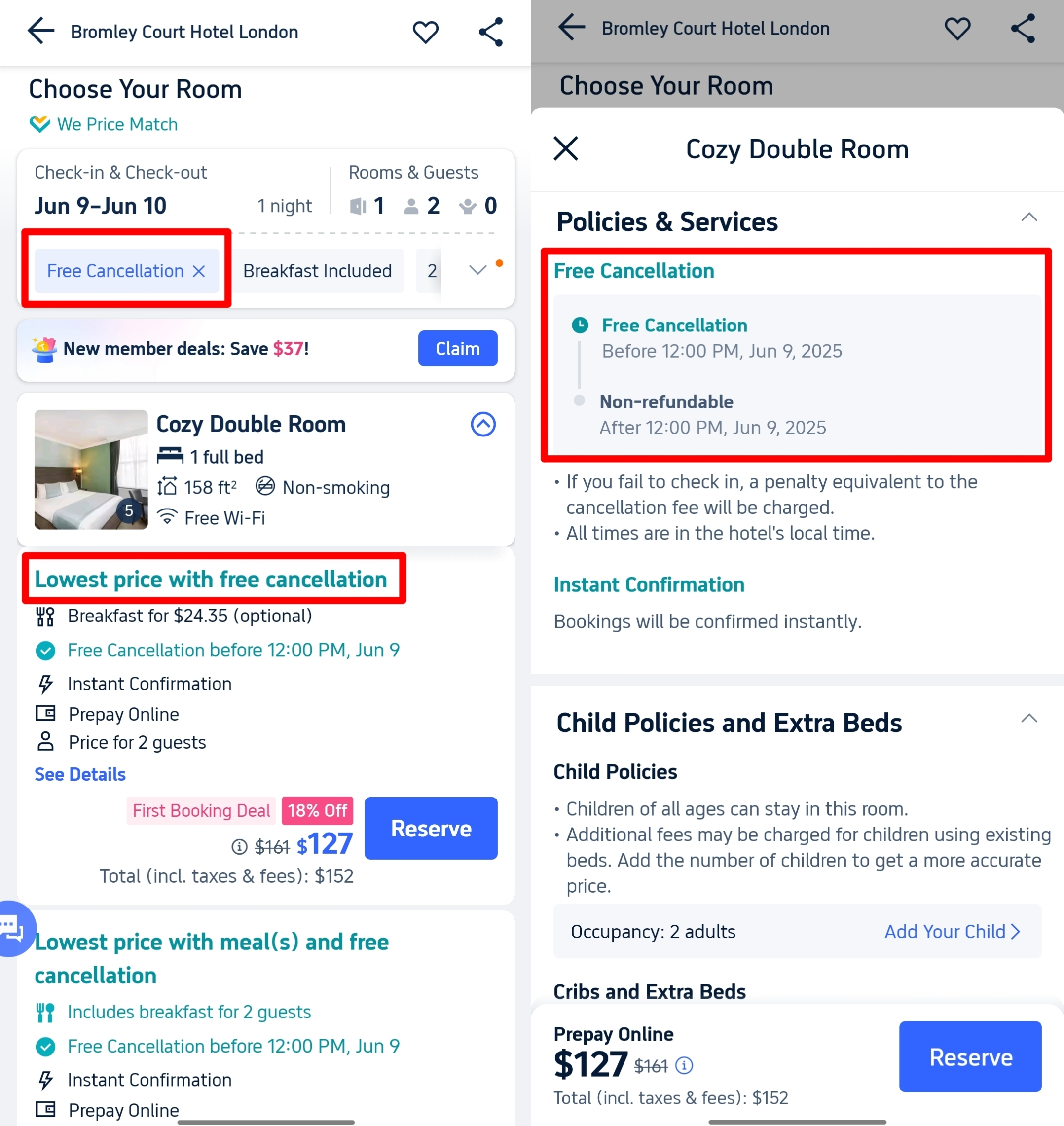
- Looking for flexibility? To find "Free Cancellation," just scroll down to "Cancellation Policy" in the pop-up menu. Simply tick the box under "Popular Filters" and you're all set for a worry-free adventure!
- Show Results: Ready to explore? Click "Show Results" or "Apply" to unveil your perfect trip!
- Spot the Tag: Travel with total peace of mind! Now, only hotels offering free cancellation will show up. Just look for the "Free Cancellation" badge on the hotel listing and in the room type details to book your next adventure worry-free.
How to Use Afterpay on Trip.com for Your "Pay Later" Room?
Found your dream hotel? Here’s how to lock it in today without paying a cent upfront!
- Picking the RIGHT room is key! Make sure to choose a room type that clearly shows:
- Free cancellation
- Keep your travel plans flexible with options like 'Pay at Property' or the added convenience of 'Pay Later'!
- The exact deadline for your cancellation (for example, "Free cancellation before Jan 15")

Choose a room that offers free cancellation
- Always double-check the policies! Pop into the room details and keep a close eye on the "Policies & Services" section. It’ll show you exactly when the free cancellation window closes and how the "pay later" option works (usually right at the hotel). Be sure to mark that date!
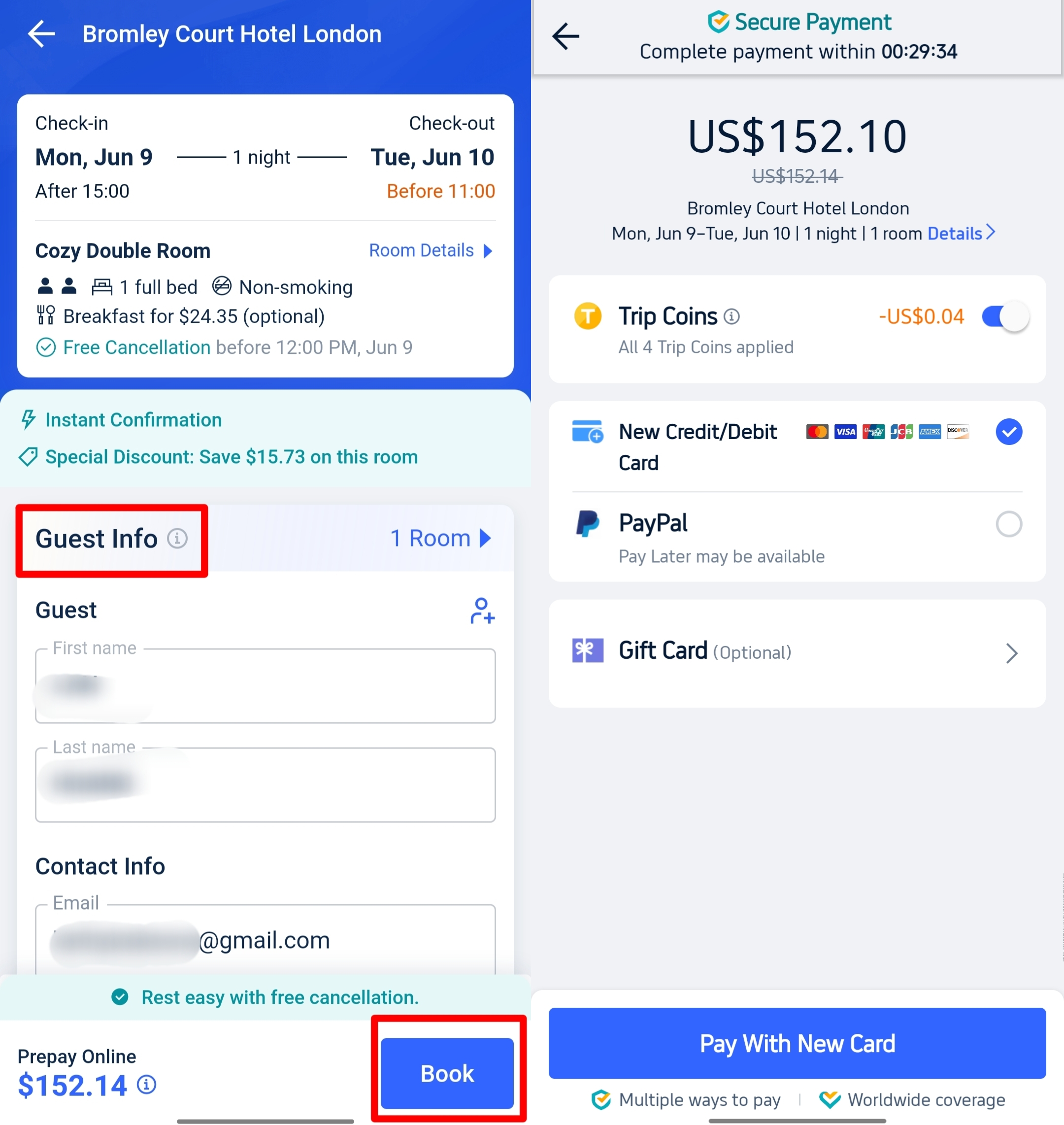
- Ready to make your travel dreams a reality? Just hit that 'Reserve' button!
- Enter Guest Info: Who's joining the adventure? Just make sure to accurately list the names of all your travel companions for a seamless experience!
- Ready for your next great escape? Let's just triple-check everything to ensure a smooth journey!
- Dates
- Room type
- That cancellation deadline
- Price
- Don't forget to add any promo & coupon codes you have!

Confirm your booking with Trip Coins
- Reserve now, pay later! Simply click "Book" to secure your stay. For Pay Later rooms, you won't need to enter any payment details just yet—your next adventure is just a click away!
- Confirmation: You'll receive a booking confirmation email shortly! To help you stay flexible, Trip.com will also send a friendly reminder as your cancellation deadline approaches.
Wondering about the Trip.com Afterpay payment period? Let's dive into the details!

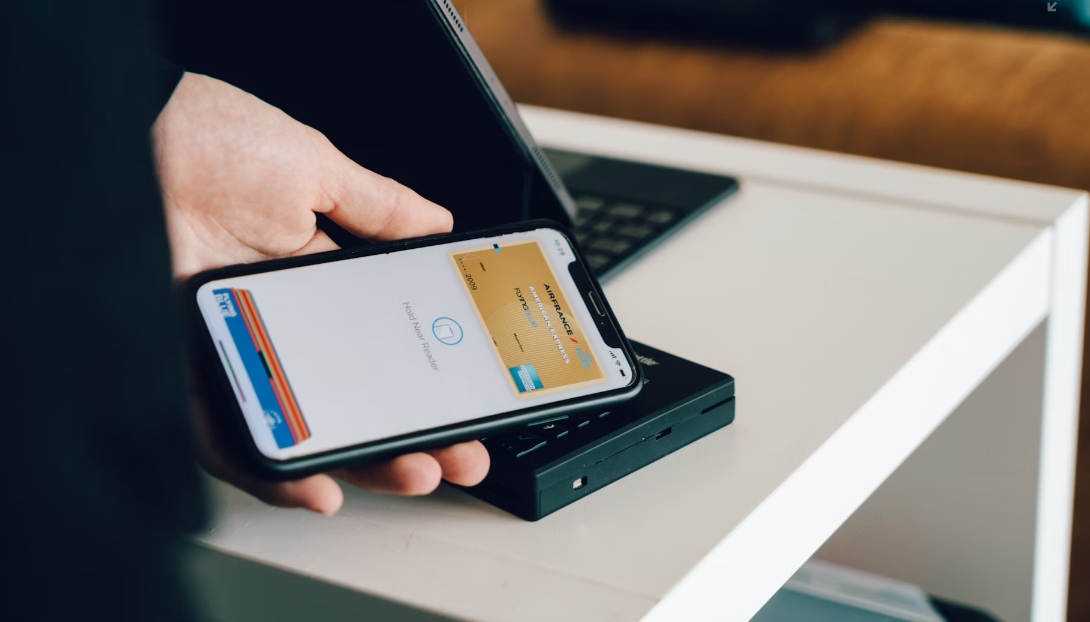
Photo credit: Unsplash, CardMapr.nl
There’s no one-size-fits-all answer! Free cancellation policies for Trip.com Afterpay bookings can vary quite a bit from hotel to hotel. To keep your travel plans smooth and stress-free, always be sure to check the specific policy for your booking. Here are some common examples:
Free cancellation period | Notes |
|---|---|
Up to 1 day before check-in | Our standard option, offering you the freedom of last-minute flexibility for all your spontaneous adventures! |
Up to 3 days before check-in | Gives you more time to dream up and plan your next amazing adventure. |
Up to 7 days before check-in | Perfect for those who love to plan ahead! |
On your check-in day | These are the truly unique finds – consider them a delightful surprise if you're lucky enough to encounter them! |
The Golden Rule: The cancellation deadline listed in your chosen room's "Policies" section is the only one that counts! Keep a close eye on it to ensure your adventure stays stress-free and avoid any unexpected charges.
FAQs about Trip.com Afterpay
What is Trip.com Afterpay?
It’s Trip.com’s “book now, pay later” option where you reserve a hotel room with free cancellation and only pay later, usually at check‑in. It isn’t the Afterpay installment service.Does Trip.com actually accept Afterpay payments?
No — Trip.com does not currently accept traditional Afterpay buy‑now‑pay‑later payments.How do I find hotels with the “pay later” feature on Trip.com?
Search hotels, open Filters, select Free Cancellation, and choose rooms showing Pay Later or Pay at Property.When do I pay for the booking on Trip.com?
You usually pay the hotel directly at check‑in, or Trip.com might charge your card shortly before your stay — check the policy.Can I cancel for free on Trip.com?
Yes — as long as you cancel before the deadline listed in the room’s free cancellation policy.


NO.1