
Trip.com Cancellation Policy: Your Detailed Guide to Canceling Flights, Hotels, and Trains

Gambar Profil Penulis

Oleh Amal

10 Februari 2026

Planning a vacation can be exciting, but unexpected situations can sometimes change our travel plans. If you've purchased the flights, hotels, and trains via Trip.com and need to cancel, you may be curious about Trip.com Cancellation Policy. This article will offer a detailed guide on how to cancel your flight, hotel, and train reservations!

🔥 Hotel Coupons: Exclusive Hotels Deal for New Users

Discover the world with trip.com! Book the perfect hotel anywhere in the world and get an unbeatable 10% discount if you're a first-time user! If this is your second time using it, you will receive a 5% discount! Download our app now and start planning your next trip with ease.

Just click this link and download the Trip.com App, after successfully registering as a member, use it when you place an order!

🔥Save More with Up to 10% Off

Use our promo code to enjoy up to 10% OFF on your attraction tickets, tours and eSIMs! There is also a 5% OFF for new users!

🔥New User Coupon: Save More with an Extra 5% Off

Use our promo code to enjoy an extra 5% off on your attraction tickets, eSIMs, and tours! ⏳Redeem within 3 days of claiming

Fast Access to Trip.com Cancellation Policy: Flight & Hotel & Train

Tap the following buttons to learn how to get Trip.com refund of flights, hotels, and trains!

Book Cheapest Flights Worldwide, Search Best Hotels! Get fast & reliable eSIM.
Kuala Lumpur to Manila
Bangkok to Phuket
Taipei to Manila
Lihat Semua Penerbangan

How to Get Trip.com Flight Cancellation

Step 1: Enter the Trip.com App to Cancel the Flight Booking

  • Log in to your Trip.com account on your mobile device.

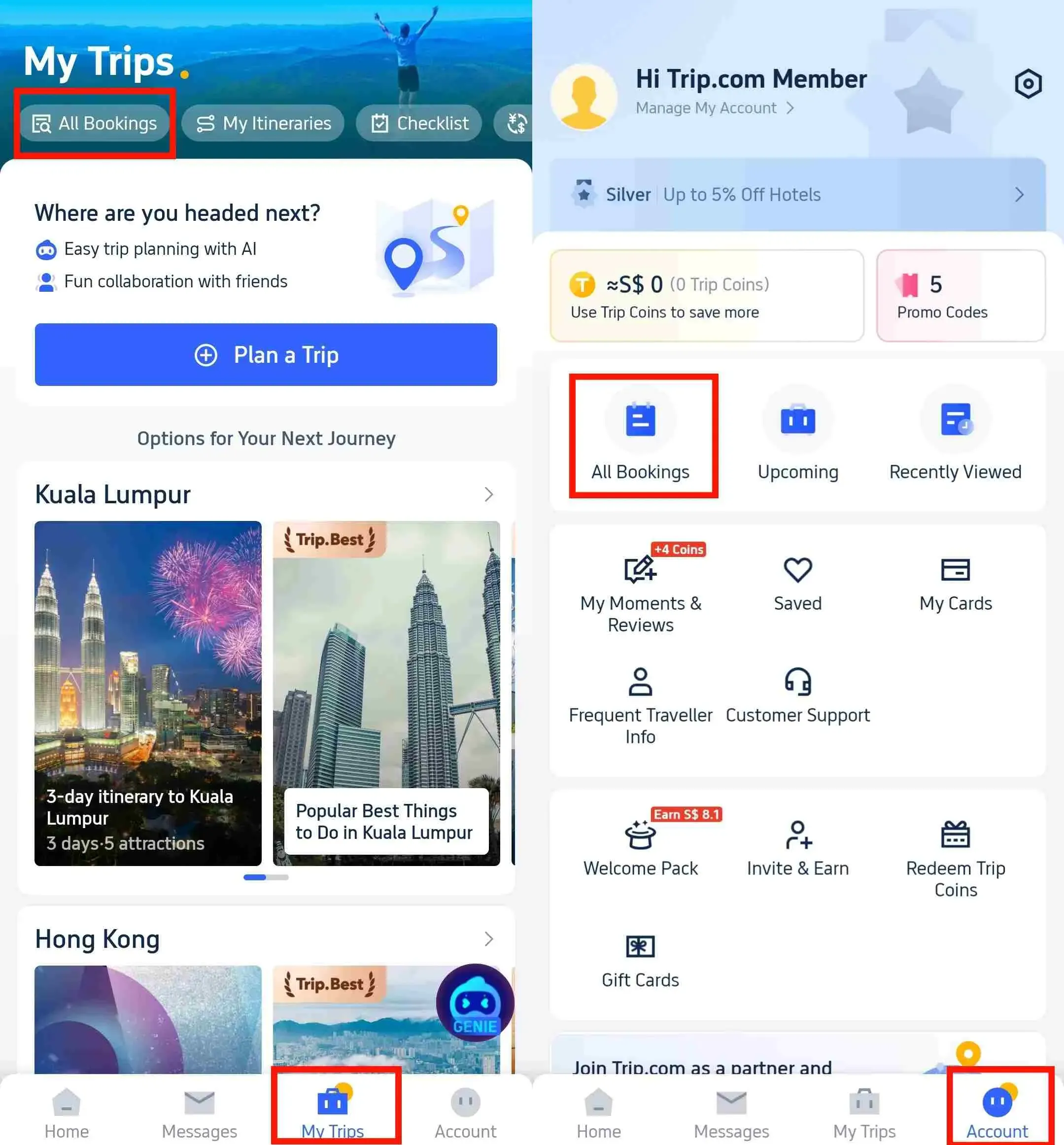
Step 2: Find the Flight Booking

  • Go to "My Trips->All Bookings" or go to “Account->All Bookings” on the Trip.com app once logged in.
Enter the Trip.com App to Cancel the Flight Booking

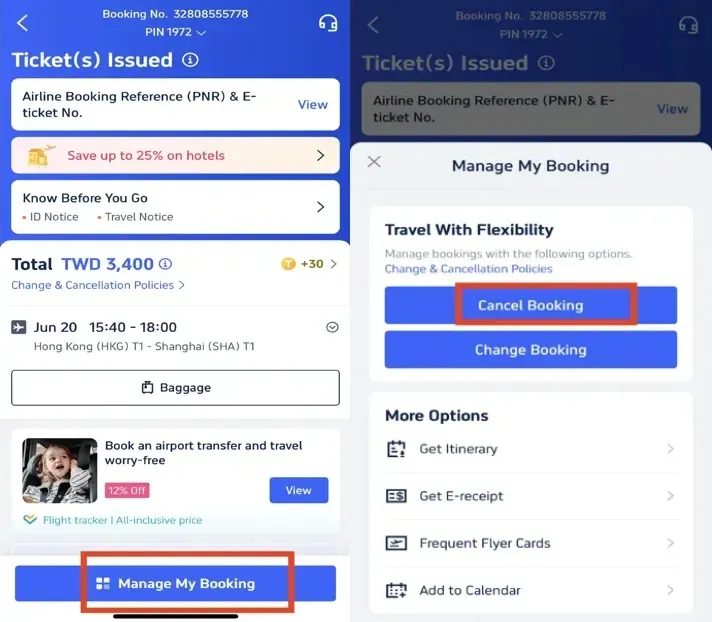
Step 3: Request the Trip.com Flight Cancellation

  • Click on "Manage My Booking" and tap the button "Cancel Booking" to cancel the flight booking. According to Trip.com Flight Cancellation Policy, cancelling flight will request service fee and cancellation fee.
Request the Trip.com Flight Cancellation

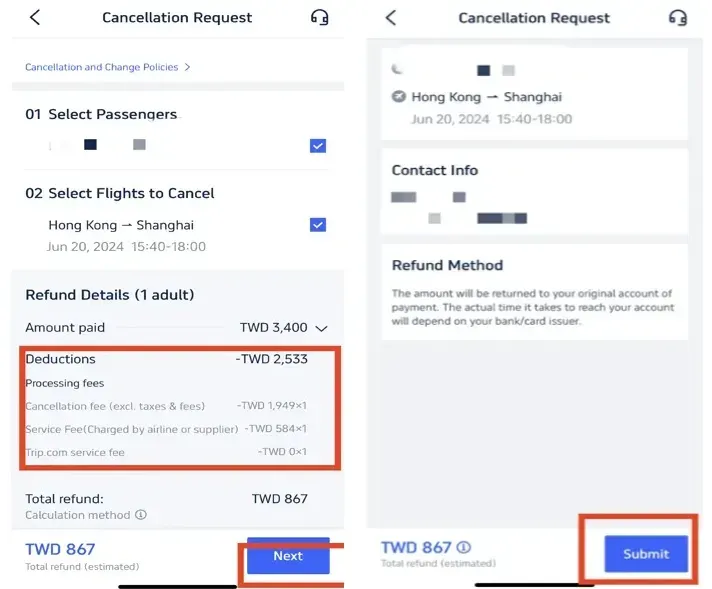
Step 4: Confirm the Trip.com Flight Cancellation

  • Check out the refund detail and confirm the Processing fees that making by cancelling flights, then click on the button "Next" to enter the detail page.

Step 5: Submit the Trip.com Flight Cancellation

  • Check your refund detail and refund info and tap "Submit" to complete the procedure.
Confirm the Trip.com Flight Cancellation
✅Special note: It should take some day for the refund to reach your account.

How to Get Trip.com Hotel Cancellation

Step 1: Enter the Trip.com App to Cancel the Hotel Booking

  • Log in to your Trip.com account on your mobile device.

Step 2: Find the Hotel Booking

  • Go to "My Trips->All Bookings" or go to “Account->All Bookings” on the Trip.com app to find your hotel booking.
Enter the Trip.com App to Cancel the Hotel Booking

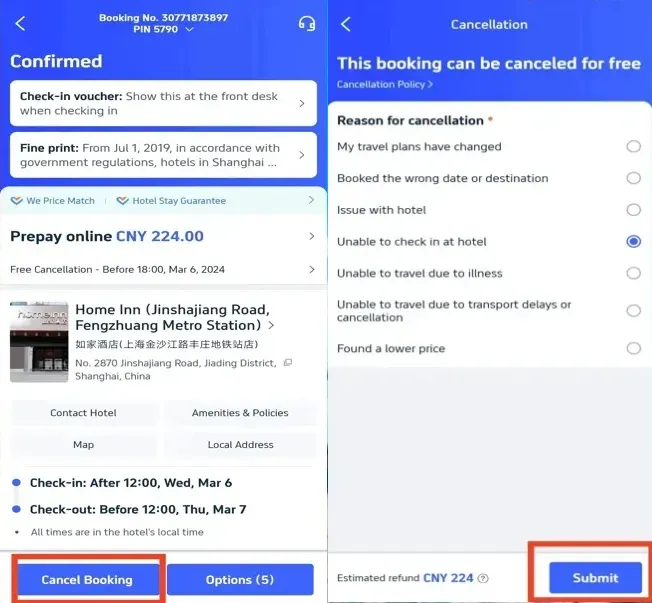
Step 3: Request the Trip.com hotel refund

  • Tap "Cancel Booking" to cancel the hotel reservation. Some hotels may have non-refundable policies, while others may offer full or partial refunds if you cancel by a certain date.

Step 4: Provide a resaon for cancellation

  • Give the reason why you need to cancel the hotel booking and click on the button "Submit" to confirm your cancellation.
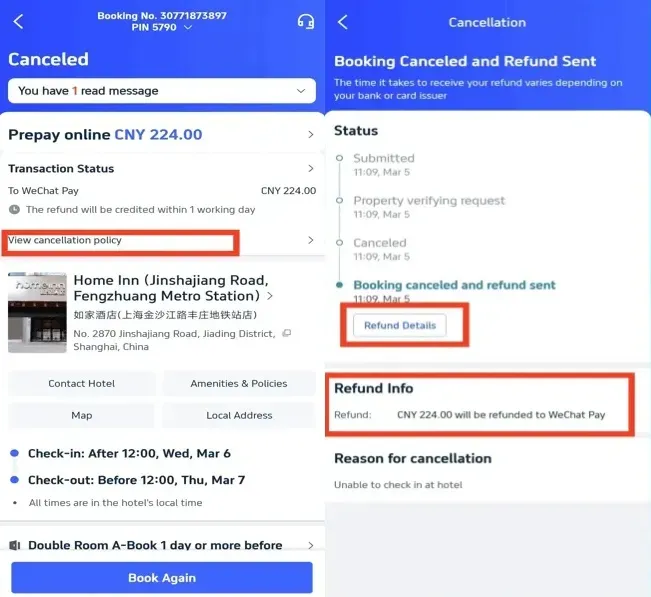
Request the Trip.com hotel refund

Step 5: Confirm the Trip.com hotel refund

  • Once you've submitted your request, click "View cancellation policy" to check the detail of your refund.

Step 6: Check your Trip.com hotel refund status

  • Check your refund detail and refund info to complete the procedure. ✅Special note: It should take 1 working day for the refund to reach your account.
Confirm the Trip.com hotel refund
Book Cheapest Flights Worldwide, Search Best Hotels with easy refund access! Get fast & reliable eSIM.
Top 10 Global Hotels
Lihat Semua Hotel
NO.2
Shanghai Xiangyun Resort Hotel
9.7/104073 reviews
Shanghai Xiangyun Resort Hotel
Hotel di Shanghai
NO.3
KOKO HOTEL Osaka Shinsaibashi
9/101601 reviews
KOKO HOTEL Osaka Shinsaibashi
Hotel di Osaka
NO.4
The Mulia - Nusa Dua, Bali
9.6/1049 reviews
The Mulia - Nusa Dua, Bali
Hotel di Bali
NO.5
J Hotel Shanghai Tower
9.5/104001 reviews
J Hotel Shanghai Tower
Hotel di Shanghai
NO.6
HOSHINOYA Fuji
9.4/10130 reviews
HOSHINOYA Fuji
Hotel di Fujikawaguchiko

How to Get Trip.com Train Cancellation

Step 1: Enter the Trip.com App to Cancel the Train Booking

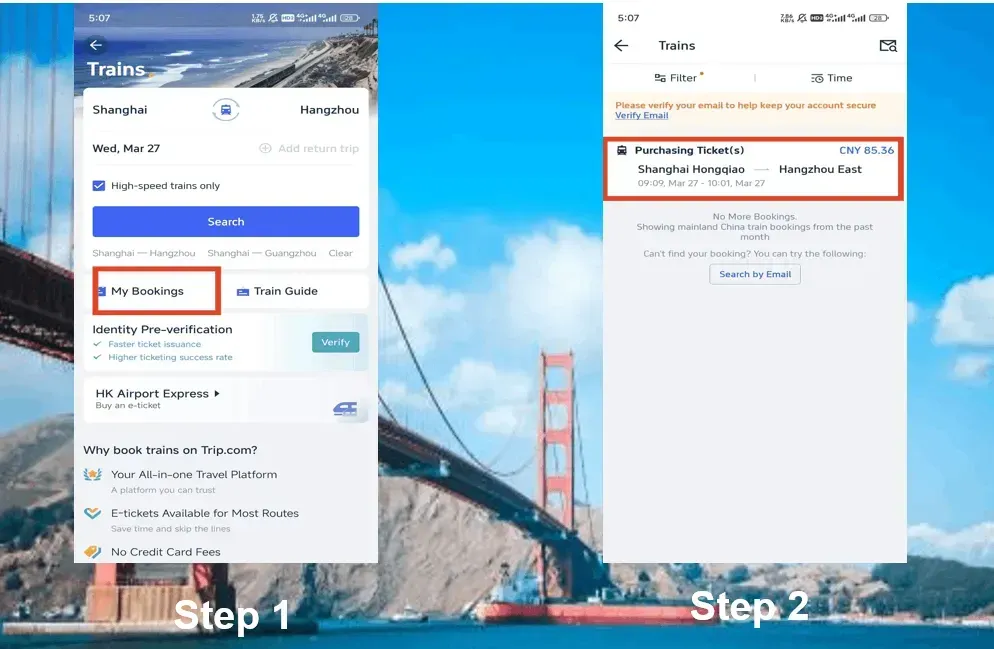
  • Logging in Trip.com account, click on "Train" section, then go to "My Bookings" to cancel the train booking.

Step 2: Choose the train You Need to Cancel

  • Select the China High Speed train booking you need to cancel and click on it, which will go to the booking page.
Enter the Trip.com App to Cancel the Train Booking

Step 3: Request Trip.com Train Cancellation

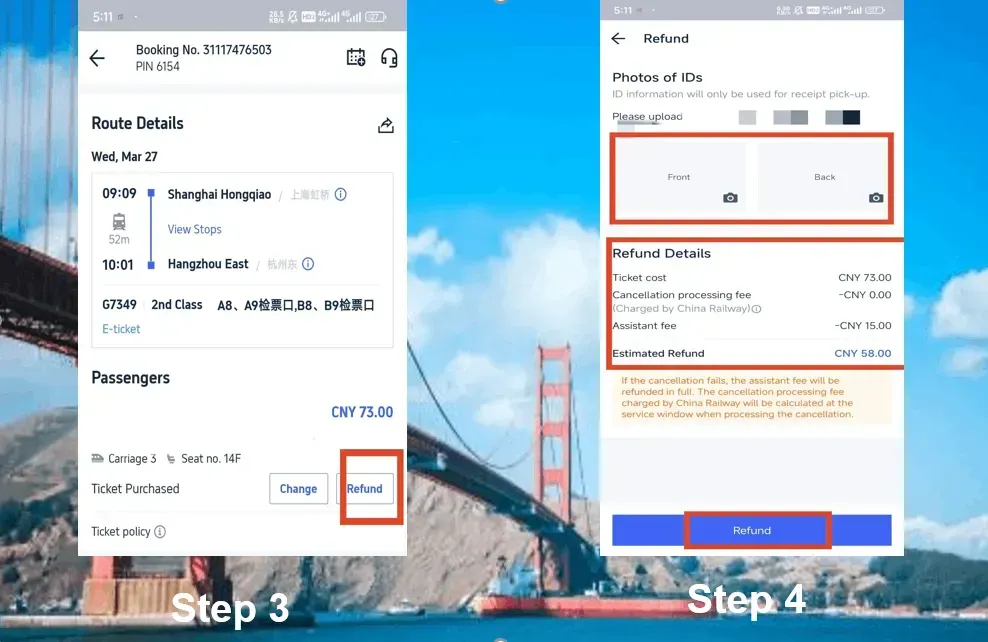
  • Click on the button "Refund" to cancel the China bullet train booking. Remember it will deduct certain assistance fee for train refund.

Step 4: Complete Trip.com Train Cancellation

  • Provide the front and back of your ID information and check the refund detail. Then click on the button of "Refund" to complete the procedure.
Complete Trip.com Train Cancellation

China Bullet Train Refund Fee

The refund fee of China bullet trains often depends on how far in advance of the train's departure you cancel your ticket. Here is the overview of the refund fee:

✅Special Note: Your refund will be returned to your original payment account within 7-15 workin days.

Refund Time

Refund Fee

More than 8 days

No fee

48 hours-15 days

5% of the ticket fare

24 hours-48 hours

10% of the ticket fare

Less than 24 hours

20% of the ticket fare

Book Cheapest Flights Worldwide, Search Best Hotels on Trip.com! Get fast eSIM to stay connected abroad.

🔥Exclusive Europe Train Coupon: Get 5% OFF Now!

Book European train tickets as a new user on Trip.com App and enjoy a special 5% Off 🎁! Use our exclusive coupon to save big on your first trip in Europe!!👀

Start Your Travel with Trip.com

Trip.com is an international online travel agency that offers 24/7 customer service in multiple languages. It offers easy booking services for flights, hotels, trains, and tours and activities. With 3+ booking, visitors can enjoy a free airport lounge, earn more Trip coins, save more on hotel booking, reduce refund fees for trains, etc.

Book Cheapest Flights Worldwide, Search Best Hotels on Trip.com! Grab New User Coupon for eSIM, Attraction Tickets & Tours Below!
Disclaimer: This article has been provided by an individual contributor or third party platform. If there is any discrepancy regarding the copyright, please contact us directly and we will delete the content immediately.
>
trip.com cancellation policy