

Trip.com Trip Coins Guide: How to Earn, Redeem & Check Expiry Dates

Oleh Tom
20 November 2026

Planning your next holiday and looking for ways to save more on Trip.com? ✈️ Besides promo codes and special discounts, did you know you can also collect Trip Coins when using Trip.com? These rewards can help you enjoy extra savings on eligible bookings, making your travel budget go a little further!
If you're new to Trip Coins or not sure how to use them, don't worry! I've put together this simple guide to show you how to earn free Trip Coins, redeem them for discounts, check your balance and avoid letting your hard-earned coins expire. Let's get started! 🪙
🪙 What are Trip.com Trip Coins?

If you've booked hotels, flights or other travel services on Trip.com, you might have come across something called Trip Coins! 🪙 Simply put, Trip Coins are reward points that Trip.com gives members for making eligible bookings and participating in activities on the platform. You can collect these coins in your Trip.com account and use them to enjoy discounts on eligible prepaid bookings. It's a nice little bonus that helps you save more on your next holiday! ✈️
Here are a few things worth knowing about Trip Coins:
- Earn rewards: Collect Trip Coins through eligible bookings, hotel reviews, Trip Moments activities and special promotions.
- Redeem for discounts: Use your accumulated coins to reduce the payment amount for eligible bookings.
- Keep track of your coins: Check your balance and transaction history through your Trip.com account.
- Check their validity: Different ways of earning Trip Coins may come with different expiry periods, so remember to use them before they expire!
💡 Good to know: Trip Coins aren't actual cash, and you can't withdraw or transfer them to another person. Their redemption value and usage conditions are subject to Trip.com's latest terms and conditions.
🎁 How to Earn Trip Coins on Trip.com?

Here are some ways I recommend checking out if you want to build up your Trip Coins balance:
1. ✈️ Book Eligible Travel Services
One of the easiest ways to earn Trip Coins is by booking eligible travel services through Trip.com. Depending on the booking type and promotion, you may collect coins when booking:
- Hotels: Earn Trip Coins from eligible hotel stays after completing your stay.
- Flights: Collect coins from eligible flight bookings.
- Train Tickets: Earn rewards when booking eligible train journeys.
- Tours & Attractions: Get Trip Coins from selected attraction tickets and travel activities.
- Car Rentals: Earn coins from eligible car rental bookings.
Do remember that not every booking automatically qualifies for Trip Coins. I recommend checking the reward details before confirming your booking so you know what to expect!
2. ⭐ Write Reviews After Your Trip
You can also earn Trip Coins by writing reviews about your hotel stays and attraction visits. To make the most of your reviews:
- Write detailed and helpful feedback about your experience.
- Add photos to make your reviews more useful to other travellers.
- Submit your review after completing your stay or activity.
- Check the review requirements to see how many Trip Coins you can earn.
3. 📸 Share Your Travel Stories on Trip Moments
Trip Moments is Trip.com's community platform where you can post holiday photos, travel guides, recommendations and personal experiences. You can try:
- Posting beautiful photos from your recent trips.
- Sharing useful travel tips and destination recommendations.
- Writing about your favourite hotels, restaurants and attractions.
- Joining eligible creator activities and special content campaigns.
4. 🎉 Join Special Promotions & Referral Campaigns
Don't forget to keep an eye on Trip.com's promotions! From time to time, Trip.com runs special campaigns where members can collect extra Trip Coins by completing certain tasks. Some opportunities include:
- Member Day Promotions: Look out for exclusive rewards and bonus coin campaigns.
- Seasonal Campaigns: Join special activities during holidays and shopping festivals.
- Referral Rewards: Invite friends to join or book through eligible referral campaigns to earn rewards.
- Limited-Time Activities: Complete selected tasks in the Trip.com app before the campaign ends.
💎 Bonus Tip: Enjoy More Trip Coins with a Higher Membership Tier
Here's something worth knowing! Your Trip.com membership tier may also affect how many Trip Coins you earn. Higher membership levels can enjoy additional earning bonuses on eligible bookings. According to Trip.com's published membership reward information, the bonus rates include:
| 💡 Membership Tier | 🔥 Extra Trip Coins |
|---|---|
Gold | +20% |
Platinum | +50% |
Diamond | +100% |
Diamond+ | +150% |
Black Diamond | +200% |
🌐 Top 10 Global Hotels
Lihat Semua Hotel
 NO.1







💡 My little tip: Don't forget to add your frequent flyer number when booking eligible flights if you want to collect airline miles too. This way, you may enjoy both airline rewards and Trip Coins, subject to the airline and booking conditions.
💰 How to Redeem Trip Coins on Trip.com?
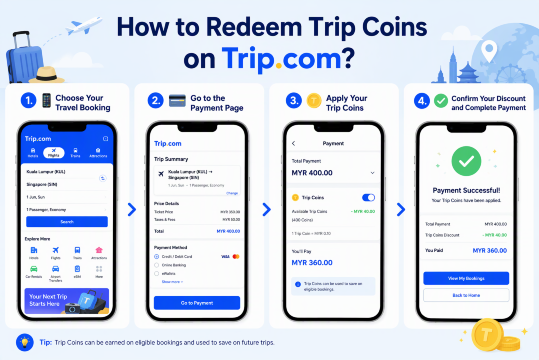
1. Choose Your Travel Booking
First, open the Trip.com app and log in to your account. Browse for your preferred hotel, flight, train ticket or other travel service. Once you've found what you need, select your travel dates and complete the booking details as usual.
2. Go to the Payment Page
After selecting your booking, proceed to the checkout or payment page. Look for the "Save with Trip Coins" option. If your booking is eligible, you'll see the option to apply your available Trip Coins towards the payment.
3. Apply Your Trip Coins
Select the Trip Coins option to use your accumulated rewards. The discount will be deducted from your eligible booking amount.
For reference, 100 Trip Coins can be redeemed for approximately US$1 in savings (the equivalent amount in RM may vary depending on the exchange rate). You may not be able to use all your coins for every booking, as the maximum discount and redemption conditions can vary depending on the booking and ongoing promotions.
4. Confirm Your Discount and Complete Payment
Before making payment, double-check your booking summary to make sure the Trip Coins discount has been applied correctly. Once everything looks good, pay the remaining balance using your preferred payment method and confirm your booking. That's it! You've successfully used your Trip Coins to save on your next trip. 🎉
📱 How to Check Your Trip Coins Balance on Trip.com?
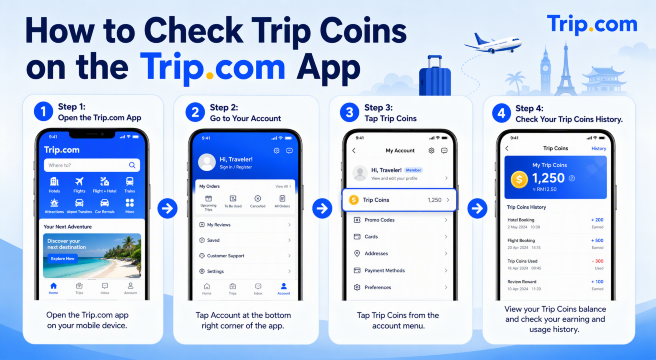
Here's a quick step-by-step guide to help you check your Trip Coins balance and keep track of your rewards.
Step 1: Open the Trip.com App
Open the Trip.com app on your phone and log in to your account.
Step 2: Go to Your Account
Tap "Account" at the bottom of the app homepage to access your membership details and account settings.
Step 3: Tap Trip Coins
Look for the "Trip Coins" option and tap it. You'll be able to see your current Trip Coins balance.
Step 4: Check Your Trip Coins History
Want to know where your coins came from? Tap "History" to view your Trip Coins transactions, including coins earned, redeemed and other account activities.
✈️Flights to China!
Kuala Lumpur to ChongQing
Kuala Lumpur to ShangHai
Kuala Lumpur to GuangZhou
Kuala Lumpur to ShenZhen
Kuala Lumpur to ZhengZhou
Kuala Lumpur to Xi'an
Lihat Semua Penerbangan


⚠️ What Happens When Your Trip Coins Expire?
Here's something you don't want to overlook! ⏳ Just like some travel vouchers and promo codes, Trip Coins don't last forever. The validity period actually depends on how you earn your Trip Coins. According to Trip.com's official rewards programme, here's how long they last:
🔍 How You Earn Trip Coins | 🕛 Validity Period |
|---|---|
Eligible travel bookings | 18 months from the date credited |
Hotel reviews | 6 months from the date credited |
Special promotions | Depends on the promotion's terms and conditions |
What If Your Trip Coins Have Already Expired?
Unfortunately, once your Trip Coins expire, you can no longer use them to enjoy discounts on future bookings. According to Trip.com's rules, expired coins cannot be extended or reactivated. Here are a few things to remember:
- Expired coins cannot be redeemed: You won't be able to use them for hotel, flight or other eligible bookings anymore.
- No expiry extension: Trip.com does not allow you to extend the validity period of expired Trip Coins.
- Cancelled bookings: If you cancel a booking where Trip Coins were used, the eligible coins may be returned to your account according to the cancellation policy. However, their original expiry date remains unchanged.
- Already expired coins: If the original validity period has ended before the refund is processed, those coins won't be added back to your available balance.
🔥 [Discount] Best Hotel Recommendations

-
-
-
-
Cari Hotel
🔥 Hotel Coupons: Exclusive Hotels Deal for New Users
Discover the world with trip.com! Book the perfect hotel anywhere in the world and get an unbeatable 10% discount if you're a first-time user! If this is your second time using it, you will receive a 5% discount! Download our app now and start planning your next trip with ease.
Just click this link and download the Trip.com App, after successfully registering as a member, use it when you place an order!
🔥Save More with Up to 5% Off
Use our promo code to enjoy up to 5% OFF on your attraction tickets, tours and eSIMs!
💡 Tips to Earn More Trip Coins
| 🔍 Tips | ✅ What You Can Do |
|---|---|
Upgrade Your Membership Tier | Higher Trip.com membership tiers offer more bonus Trip Coins on eligible bookings. For example, Diamond members enjoy 2x and Black Diamond members enjoy 3x the base earning rate. |
Write Reviews After Your Trip | Share detailed hotel and attraction reviews with original photos to qualify for eligible review rewards. Remember to submit them within the applicable deadline! |
Stay Active on Trip Moments | Share travel photos, stories and useful recommendations. Check for creator tasks, challenges and activities that offer Trip Coins. |
Join Special Promotions | Look out for member-day deals, seasonal campaigns, referral rewards and limited-time Trip Coins activities through the Trip.com app. |
Compare Rewards Before Booking | Check the Trip Coins earning rate for different eligible bookings, but always compare the final booking prices before making a decision. |
Keep Track of Your Rewards | Check your Trip Coins balance regularly, complete eligible tasks before their deadlines and use your coins before they expire. |
📱 Quick Reminder: Remember to Get Your eSIM Before Travelling!
Don't forget to prepare your mobile internet before your trip! Having an eSIM makes it easier to check flight updates, receive delay notifications, contact customer support and keep your travel plans on track. I recommend getting your eSIM through Trip.com before departure so you can stay connected throughout your journey. ✈️
Lihat Semua Tarikan





🔍 Explore More
Trip.com Booking Fee Explained: Service Fees, Charges & How to Avoid Them
What is the Trip.com booking fee? Learn how much Trip.com service fees cost, why they’re charged, hidden charges to watch for, and tips to save on bookings.
20 November 2026
Trip.com Flight Change Policy: Fees, Fare Differences & How to Change
Need to change your flight on Trip.com? Learn about flight change fees, fare differences, possible extra charges and how to modify your booking easily.
20 November 2026
Flight Delayed? Here's How to Claim Compensation on Trip.com
This guide explains how to request compensation through Trip.com, check your eligibility and prepare your claim.
20 November 2026
How to Delete Your Trip.com Account: A Step-by-Step Guide
Follow this easy step-by-step guide to close your account, understand what happens to your bookings and check important things before deleting it.
20 November 2026
Trip.com Refund Processing Time: When Will You Get Your Money Back?
Get clear answers about Trip.com refund timelines! Discover how long refunds take for flights, hotels, and other bookings.
20 November 2026
❓FAQs: Trip.com Trip Coins
-
1. How can I earn Trip Coins on Trip.com?
-
2. How much is 100 Trip Coins worth on Trip.com?
-
3. Can I use Trip Coins to pay for my entire booking?
-
4. Do Trip.com Trip Coins expire?
-
5. Can I transfer Trip Coins to another Trip.com account?
Disclaimer: This article has been provided by an individual contributor or third party platform. If there is any discrepancy regarding the copyright, please contact us directly and we will delete the content immediately.