
Trip.com Flight Change Policy: Fees, Fare Differences & How to Change

Oleh Tom
17 November 2026

Ever booked a flight and suddenly realised you need to change your travel dates? ✈️ Don't worry, it happens! But before making any changes on Trip.com, it's good to understand the possible flight change fees and fare differences so you won't be caught off guard by extra charges.
I've put together this guide to help you understand Trip.com's flight change policy, how much you might need to pay, and how to modify your booking step by step. Let's check it out! 😊
✈️ Trip.com Flight Change Policy
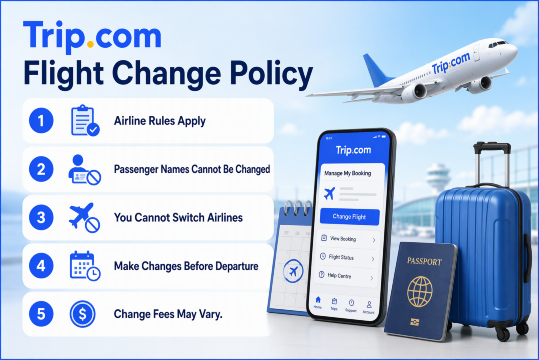
1. Airline Rules Apply
First, remember that Trip.com acts as an intermediary between you and the airline. This means flight changes are subject to the airline's fare rules and ticket conditions. Some promotional or discounted tickets may not allow changes at all, so it's always worth checking before booking.
2. Passenger Names Cannot Be Changed
Want to transfer your flight ticket to someone else? Unfortunately, you generally can't change the passenger's name or transfer your ticket to another person. You'll usually need to cancel your existing booking (subject to the cancellation policy) and make a new reservation.
3. You Cannot Switch Airlines
If you've booked a flight with one airline, you generally can't change it to another airline through a flight modification. You'll need to check your cancellation options and book a new ticket with your preferred airline.
4. Make Changes Before Departure
Don't leave it until the last minute! Flight changes must generally be requested before your scheduled departure time. Once your flight has departed, you won't be able to modify the original booking.
5. Change Fees May Vary
The cost of changing your flight depends on the airline, ticket type and how close you are to your departure date. Some airlines may charge higher fees for last-minute changes, while others may have different restrictions.
🎟️ What Is Trip.com Air Flexibility?
Here's another useful option worth knowing about! If you purchased Trip.com Air Flexibility when booking your flight, you may be eligible for extra flexibility if your travel plans change. Depending on the package terms, you may enjoy:
- 1 Free Flight Change: Change your flight once without paying the applicable change fee. However, if your new flight costs more, you'll still need to pay the fare difference.
- 1 Free Full Refund: You may also be eligible for one full refund before your first flight departs, subject to the package's terms and conditions.
Note: Air Flexibility is an optional add-on. Make sure to check its specific terms and conditions before purchasing or requesting a change.
💰 Trip.com Change Fee
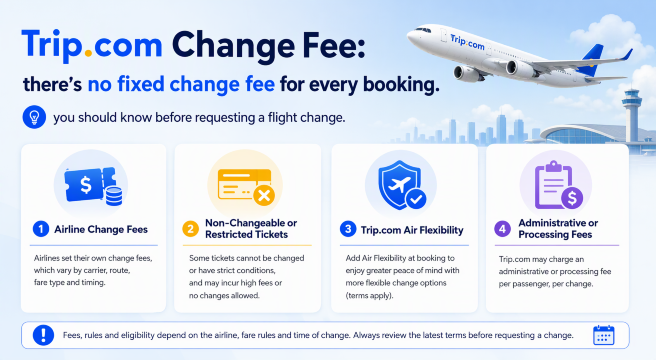
Since Trip.com acts as an intermediary, the airline's change policy usually determines the charges. Here's what you should know before requesting a flight change.
1. Airline Change Fees
The airline may charge a fee when you want to change your flight date or time. Depending on the airline and route, change fees can range from S$50 to over S$200, or the equivalent in other currencies.
For example, some airlines may charge a lower fee for domestic flight changes, while international routes or certain ticket types may come with higher charges. You'll also need to pay any fare difference if your new flight is more expensive.
2. Non-Changeable or Restricted Tickets
Not all flight tickets allow changes! If you've purchased a promotional, discounted or restricted fare, you may find that flight changes are not permitted.
In this case, you might need to cancel your original booking (if cancellation is allowed) and purchase a brand-new ticket instead. So, I'd recommend checking the fare conditions carefully before booking, especially when you're travelling during peak seasons.
3. Trip.com Air Flexibility
If you purchased Trip.com Air Flexibility as an add-on during your booking, you may be eligible for one free flight change before your first flight departs.
This means you generally won't need to pay the standard flight change fee covered by the benefit. However, if your new flight is more expensive, you'll still need to pay the fare difference. It's a handy option if you're not 100% sure about your travel dates!
4. Administrative or Processing Fees
Besides the airline's change fee, there may also be additional administrative or processing fees charged by Trip.com or the relevant supplier, depending on your booking conditions. These charges can vary, so don't forget to review the final amount before confirming your flight change.
⚠️ Note: The S$50–S$200+ range is an indicative example, not a fixed Trip.com fee. Actual charges depend on the airline, route, ticket conditions and applicable service fees. Always check the amount displayed in your Trip.com booking before confirming.
🌐 Top 10 Global Hotels
Lihat Semua Hotel
 NO.1







💳 How Much Does It Cost to Change a Flight on Trip.com?
Well, the total cost isn't always just the change fee! It usually depends on your airline's rules, the price of your new flight and any additional service charges. To make it easier, here's how the cost is generally calculated:
1. Understand the Total Flight Change Cost
When changing your flight on Trip.com, you may need to pay for these charges:
- Airline Change Fee: The fee charged by the airline for modifying your original flight booking, depending on your ticket conditions.
- Fare Difference: If your new flight is more expensive than your original ticket, you'll need to pay the price difference.
- Additional Service Fees: Trip.com or the relevant supplier may charge an extra processing or administrative fee, depending on your booking.
💰 Example: Calculating Your Flight Change Cost
🔍 Description | 💰 Amount |
|---|---|
Original flight ticket | RM300 |
New flight ticket | RM400 |
Fare difference | RM100 |
Airline change fee | RM80 |
Additional service fee | RM20 |
Total Additional Payment | RM200 |
For example, if your original flight costs RM300 but your new flight costs RM400, you'll have a RM100 fare difference. After adding an RM80 airline change fee and RM20 service fee, your total additional payment would be RM200.
2. What If Your New Flight Has the Same Price?
If your new flight has the same fare as your original booking, you may not need to pay any fare difference. However, you might still need to pay the airline's change fee or applicable service charges. So, even if the ticket price stays the same, changing your flight isn't necessarily free.
3. What If Your New Flight Is More Expensive?
If your new flight costs more than your original ticket, you'll need to pay the fare difference on top of any applicable change fees. For example, if your original ticket costs RM250 and your new flight costs RM380, the fare difference is RM130. This amount will be added to any other applicable charges.
4. What If Your New Flight Is Cheaper?
What if you find a cheaper flight instead? Well, don't assume you'll automatically get the remaining balance back! If your new flight costs less than your original ticket, the fare difference may not be refundable. Whether you can receive a refund, travel credit or retain any remaining value depends on the airline's fare rules and ticket conditions.
✈️Flights to China!
Kuala Lumpur to ChongQing
Kuala Lumpur to ShangHai
Kuala Lumpur to GuangZhou
Kuala Lumpur to ShenZhen
Kuala Lumpur to ZhengZhou
Kuala Lumpur to Xi'an
Lihat Semua Penerbangan


📱 How to Change Your Flight on Trip.com?
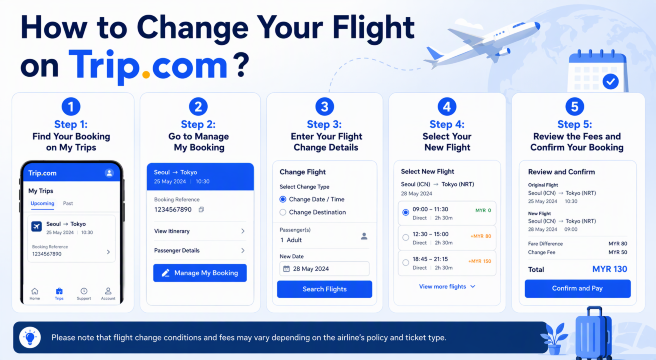
Step 1: Find Your Booking on My Trips
First, open the Trip.com app on your phone and log in to your account.
- Tap My Trips at the bottom of the app.
- Browse your booking history to find the flight you want to change.
- Select your flight booking to view the reservation details.aaaa
Your bookings are organised by date and time, making it easier to find the right flight.
Step 2: Go to Manage My Booking
Once you've found your flight, it's time to check the change options.
- Open your selected flight reservation.
- Tap Manage My Booking.
- Select Cancellation & Change Policies to review the applicable flight change fees and cancellation rules.
- Go back and tap Change Booking to proceed to the change request page.
I'd recommend checking the fees and conditions first so you know what to expect before making any changes.
Step 3: Enter Your Flight Change Details
Next, you'll need to provide the details of your requested flight change.
- Select the passenger or passengers whose flights you want to change.
- Check that you've selected the correct original flight.
- Tap the calendar button to choose your preferred new travel date.
- Once you've entered all the required details, tap View Flights to see the available options.
Make sure your new travel date is correct before moving to the next step!
Step 4: Select Your New Flight
Now comes the fun part! You'll be able to browse the available flights for your new travel date.
- Compare the available flight options and prices.
- Use filters such as Non-stop or Lowest Price to narrow down your choices.
- Check that your selected flight meets the airline and partner-airline requirements shown by Trip.com.
- Choose your preferred flight and cabin class, such as Economy or Business Class.
Take your time to compare the options, especially the flight times and additional costs.
Step 5: Review the Fees and Confirm Your Booking
Before confirming your new flight, make sure you review the final amount carefully. This is where you'll see how much you need to pay or whether a refund applies.
- Check the Refund for Original Ticket and the cost of your new flight.
- Review the final amount, including any applicable change fees and fare differences.
- If you're happy with the new flight and total cost, tap Confirm and proceed with payment if required.
- Once the change is confirmed, check your updated booking details to make sure everything is correct.
You'll receive a new booking confirmation email and, where applicable, a refund confirmation email. Keep in mind that the actual refund processing time depends on your bank or card issuer.
🔥 [Discount] Best Hotel Recommendations

-
-
-
-
Cari Hotel
🔥 Hotel Coupons: Exclusive Hotels Deal for New Users
Discover the world with trip.com! Book the perfect hotel anywhere in the world and get an unbeatable 10% discount if you're a first-time user! If this is your second time using it, you will receive a 5% discount! Download our app now and start planning your next trip with ease.
Just click this link and download the Trip.com App, after successfully registering as a member, use it when you place an order!
🔥Save More with Up to 5% Off
Use our promo code to enjoy up to 5% OFF on your attraction tickets, tours and eSIMs!
💡 Tips to Avoid Extra Flight Change Fees
💡 Tips | ✅ What You Should Do |
|---|---|
Check Ticket Conditions Before Booking | Always review the airline's fare rules before paying. Some promotional tickets don't allow changes, while flexible fares may offer free or cheaper changes. |
Change Your Flight Early | Avoid waiting until the last minute. Changing your flight earlier may give you more flight options and help you avoid certain last-minute restrictions or higher charges. |
Consider Trip.com Air Flexibility | If your travel plans aren't confirmed, consider adding Air Flexibility during booking, if available. It may offer one flight change without the applicable change fee, subject to its terms. |
Compare Different Flight Options | Check different departure dates and flight times before confirming. You might find a cheaper alternative with a smaller fare difference. |
Review All Additional Charges | Check the final payment breakdown, including airline change fees, fare differences and any applicable processing fees, before confirming your new flight. |
📱 Don't Forget to Get Your Travel eSIM!
Before changing your travel plans or heading to the airport, remember to prepare your mobile data! Stay connected with a Trip.com eSIM so you can check your flight updates, manage bookings and access travel information anytime, anywhere. I recommend getting your eSIM before departure for a hassle-free trip! ✈️
Lihat Semua Tarikan





Explore More
ChatGPT Travel Planning: How to Use the Trip.com App
Learn how to use the Trip.com app in ChatGPT to search flights, compare options with natural language, and prepare for future Trip.com travel planning features.
17 November 2026
Trip.com Map View: Find Cheap Flights with Interactive Map
Discover cheap flights using Trip.com Map View. Compare fares visually, explore flexible destinations, and book the best flight deals easily.
17 November 2026
Trip.com Booking Fee Explained: Service Fees, Charges & How to Avoid Them
What is the Trip.com booking fee? Learn how much Trip.com service fees cost, why they’re charged, hidden charges to watch for, and tips to save on bookings.
17 November 2026
Trip.com Cancellation Policy: Your Detailed Guide to Canceling Flights, Hotels, and Trains
If you're curious about Trip.com Cancellation Policy, check the detailed guide on how to cancel your flight, hotel, and train reservations!
17 November 2026
Trip.com Payment Methods | Accepted Cards & Secure Options
Explore all Trip.com payment methods, including cards, e-wallets, and online banking. Fast, secure, and convenient for every booking.
17 November 2026
Flight Delayed? Here's How to Claim Compensation on Trip.com
This guide explains how to request compensation through Trip.com, check your eligibility and prepare your claim.
17 November 2026
❓FAQs: Trip.com Flight Change Fees
-
1. Does Trip.com charge a flight change fee?
-
2. What is the difference between a change fee and a fare difference on Trip.com?
-
3. Can I change my flight on Trip.com for free?
-
4. What happens if my new flight is cheaper than my original ticket?
-
5. Can I change my passenger name or airline on Trip.com?
Disclaimer: This article has been provided by an individual contributor or third party platform. If there is any discrepancy regarding the copyright, please contact us directly and we will delete the content immediately.