
How to Delete Your Trip.com Account: A Step-by-Step Guide

Oleh Tom
19 November 2026
Thinking of saying goodbye to Trip.com? ✈️ Maybe you no longer use the app, want to switch accounts, or simply prefer to remove your personal information. Whatever your reason, deleting your account is something worth checking carefully before you proceed!
If you're wondering how to delete your Trip.com account, don't worry! I'll walk you through the steps, explain what happens to your existing bookings, refunds and Trip Coins, and share a few things you should check before confirming your account deletion. Let's get started!
📱 How to Delete Your Trip.com Account?
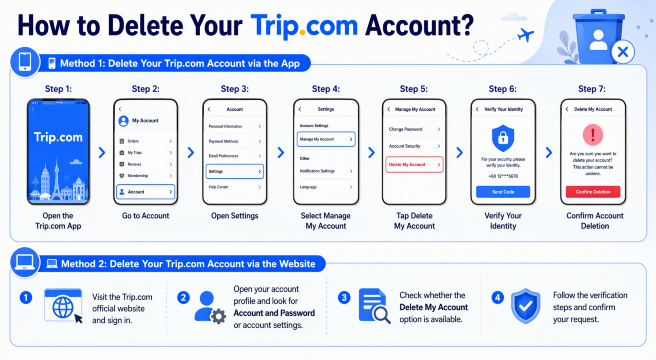
🔍 Method 1: Delete Your Trip.com Account via the App
Step 1: Open the Trip.com App
Open the Trip.com app on your phone and sign in to the account you want to delete.
Step 2: Go to Account
Tap Account at the bottom-right corner of the screen.
Step 3: Open Settings
Tap the Settings (⚙️) icon at the top of the page.
Step 4: Select Manage My Account
Look for Manage My Account or Account and Password, depending on your app version.
Step 5: Tap Delete My Account
Scroll down to the bottom of the page and select Delete My Account.
Step 6: Verify Your Identity
Enter the verification code sent to your registered email address or mobile number.
Step 7: Confirm Account Deletion
Follow the on-screen instructions and confirm your deletion request. Make sure you've checked all the important information before proceeding!
🔍 Method 2: Delete Your Trip.com Account via the Website
- Visit the Trip.com official website and sign in.
- Open your account profile and look for Account and Password or account settings.
- Check whether the Delete My Account option is available.
- Follow the verification steps and confirm your request.
⚠️ Note: Trip.com's menu names and account deletion procedures may vary depending on your app version, region and account status. Follow the latest instructions displayed in your account.
⚠️ What Happens After You Delete Your Trip.com Account?
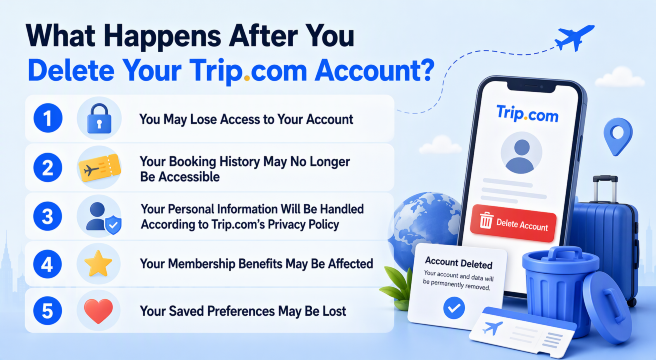
1. You May Lose Access to Your Account
Once your account deletion is completed, you may no longer be able to log in using your old email address or phone number. This also means you won't be able to access your account settings, saved preferences or other account-related features.
2. 🎫 Your Booking History May No Longer Be Accessible
All those previous flight tickets, hotel reservations and attraction bookings may no longer be available through your account. If you need your booking details for future reference, I recommend saving your confirmation emails and receipts before deleting your account.
3. 👤 Your Personal Information Will Be Handled According to Trip.com's Privacy Policy
Your account deletion request may affect how your personal information is stored and processed. However, some information may still be retained by Trip.com where required for legal, regulatory or legitimate business purposes.
4. ⭐ Your Membership Benefits May Be Affected
If you're a Trip.com member, deleting your account may result in losing access to your membership status, associated privileges and exclusive benefits. So, make sure you check whether you have any unused membership perks before proceeding.
5. ❤️ Your Saved Preferences May Be Lost
You may also lose access to personal settings and saved information, such as:
- Saved traveller details
- Favourite hotels and destinations
- Personalised travel preferences
- Saved payment methods
- Other account-related information
🌐 Top 10 Global Hotels
Lihat Semua Hotel
 NO.1







🎫 What Happens to Your Existing Bookings, Refunds & Trip Coins?
If you've already booked flights, hotels or attraction tickets, you might be wondering whether they'll be cancelled automatically or what happens to your unused Trip Coins. Don't worry, let's go through each one so you won't run into any unexpected problems!
1. ✈️ What Happens to Your Existing Flight Bookings?
Deleting your Trip.com account should not be treated as cancelling your flight tickets. However, you may lose access to your booking details through your account after deletion. Before deleting your account, I recommend:
- Checking all your upcoming flight bookings.
- Downloading your e-tickets and booking confirmations.
- Saving your airline booking reference (PNR).
- Contacting Trip.com if you need help managing an existing reservation.
2. 🏨 What Happens to Your Hotel Reservations?
If you've already booked a hotel through Trip.com, make sure you keep a copy of your reservation confirmation before deleting your account. Here are a few things I'd suggest checking:
- Confirm your hotel booking status.
- Save your hotel confirmation and reservation number.
- Check the hotel's check-in date and cancellation policy.
- Contact Trip.com if you need to modify or cancel your reservation.
Remember, deleting your account is not the same as cancelling your hotel reservation!
3. 💰 What Happens to Your Pending Refunds?
Still waiting for a flight or hotel refund? I'd recommend settling or checking your refund status before requesting account deletion.
If your refund is still being processed, save the relevant booking details, cancellation confirmation and refund reference. You can also contact Trip.com Customer Support to confirm how your pending refund will be handled after account deletion.
4. 🪙 What Happens to Your Unused Trip Coins?
Don't forget to check them before saying goodbye! Depending on Trip.com's account deletion and rewards policies, you may lose access to unused Trip Coins and other account-related rewards once your account is deleted. I'd suggest checking your Trip Coins balance and using any eligible rewards before proceeding.
5. 🎟️ What Happens to Your Unused Vouchers & Coupons?
The same goes for your unused Trip.com vouchers and promotional coupons! If you have any discounts saved in your account, check their validity and redemption conditions first. You might want to use eligible vouchers for your next hotel stay, flight or attraction booking before deleting your account.
⚠️ Note: The treatment of existing bookings, refunds, Trip Coins and vouchers may depend on Trip.com's applicable terms and policies. Contact Trip.com Customer Support to confirm your specific situation before deleting your account.
✈️Flights to China!
Kuala Lumpur to ChongQing
Kuala Lumpur to ShangHai
Kuala Lumpur to GuangZhou
Kuala Lumpur to ShenZhen
Kuala Lumpur to ZhengZhou
Kuala Lumpur to Xi'an
Lihat Semua Penerbangan


🔥 [Discount] Best Hotel Recommendations

-
-
-
-
Cari Hotel
🔥 Hotel Coupons: Exclusive Hotels Deal for New Users
Discover the world with trip.com! Book the perfect hotel anywhere in the world and get an unbeatable 10% discount if you're a first-time user! If this is your second time using it, you will receive a 5% discount! Download our app now and start planning your next trip with ease.
Just click this link and download the Trip.com App, after successfully registering as a member, use it when you place an order!
🔥Save More with Up to 5% Off
Use our promo code to enjoy up to 5% OFF on your attraction tickets, tours and eSIMs!
💡 Things to Check Before Deleting Your Trip.com Account
🔍 Checklist | ✅ What You Should Do |
|---|---|
Upcoming Flights | Check your confirmed flights and save your e-tickets and booking references. |
Hotel Reservations | Make sure you have copies of your hotel confirmations and check-in details. |
Pending Refunds | Check whether all your cancellations and refunds have been completed. |
Trip Coins | Review your remaining Trip Coins and use eligible rewards before deletion. |
Vouchers & Coupons | Check your unused vouchers, coupons and their expiry dates. |
Booking Records | Download or save important booking confirmations, receipts and invoices. |
Personal Information | Review and save any traveller details or account information you may need later. |
Customer Support | Contact Trip.com if you have unresolved bookings, refund issues or account-related questions. |
📱 A Little Travel Reminder: Don't Forget Your eSIM!
Before your next trip, don't forget to prepare your mobile data! Having an eSIM makes it easier to check your Trip.com bookings, track refund updates, contact customer support, and stay connected wherever you go. I recommend getting your eSIM through Trip.com before departure so you can enjoy a hassle-free travel experience from the moment you arrive!
Lihat Semua Tarikan





Explore More
ChatGPT Travel Planning: How to Use the Trip.com App
Learn how to use the Trip.com app in ChatGPT to search flights, compare options with natural language, and prepare for future Trip.com travel planning features.
20 November 2026
Trip.com Map View: Find Cheap Flights with Interactive Map
Discover cheap flights using Trip.com Map View. Compare fares visually, explore flexible destinations, and book the best flight deals easily.
20 November 2026
Trip.com Booking Fee Explained: Service Fees, Charges & How to Avoid Them
What is the Trip.com booking fee? Learn how much Trip.com service fees cost, why they’re charged, hidden charges to watch for, and tips to save on bookings.
20 November 2026
Trip.com Cancellation Policy: Your Detailed Guide to Canceling Flights, Hotels, and Trains
If you're curious about Trip.com Cancellation Policy, check the detailed guide on how to cancel your flight, hotel, and train reservations!
20 November 2026
Trip.com Payment Methods | Accepted Cards & Secure Options
Explore all Trip.com payment methods, including cards, e-wallets, and online banking. Fast, secure, and convenient for every booking.
20 November 2026
Flight Delayed? Here's How to Claim Compensation on Trip.com
This guide explains how to request compensation through Trip.com, check your eligibility and prepare your claim.
20 November 2026
❓FAQs: Delete Trip.com Account
-
1. How do I permanently delete my Trip.com account?
-
2. Can I delete my Trip.com account if I have upcoming bookings?
-
3. Will deleting my Trip.com account cancel my existing bookings?
-
4. Can I recover my Trip.com account after deleting it?
-
5. Will I lose my Trip Coins after deleting my Trip.com account?
Disclaimer: This article has been provided by an individual contributor or third party platform. If there is any discrepancy regarding the copyright, please contact us directly and we will delete the content immediately.