

Trip.com Refund Processing Time: When Will You Get Your Money Back?

Oleh Tom
19 November 2026

Ever cancelled a flight or hotel booking on Trip.com and found yourself wondering, "When will I get my money back?" 💸 I've been there, and waiting for a refund can be a little stressful, especially when you're already planning your next trip!
The good news is that getting a refund doesn't have to be complicated. However, the processing time can vary depending on your booking type, payment method, and other factors. In this guide, I'll walk you through the Trip.com Refund Timeline, how to check your refund status, and some handy tips to help you avoid unnecessary delays. Let's get started! ✨
🕛 How Long Does a Trip.com Refund Take?
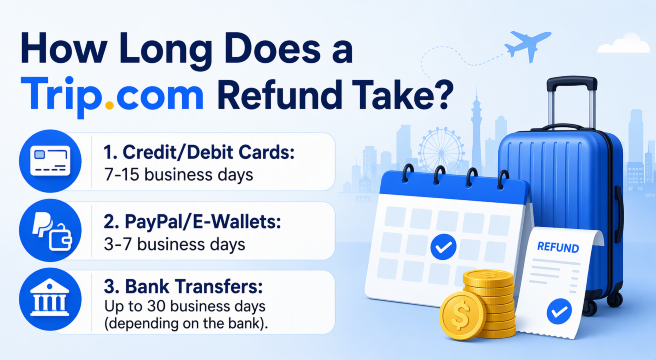
Generally, Trip.com refunds take around 3 to 15 business days to process, depending on your booking type and payment method. However, don't worry if your refund doesn't appear immediately after cancellation! The refund may need to go through Trip.com, the airline or hotel provider, and your bank or payment service before the money reaches your account. Here's a quick breakdown of the estimated refund processing time:
🔍 Payment Method | 🕛 Estimated Refund Time |
|---|---|
Credit / Debit Cards | 7–15 business days |
PayPal / E-Wallets | 3–7 business days |
Bank Transfers | Up to 30 business days (depending on the bank) |
⚠️ Note: These are general estimated timelines, not guaranteed processing times. Actual refund times may vary depending on the booking, payment provider, and bank.
✅ Trip.com Refund Timeline
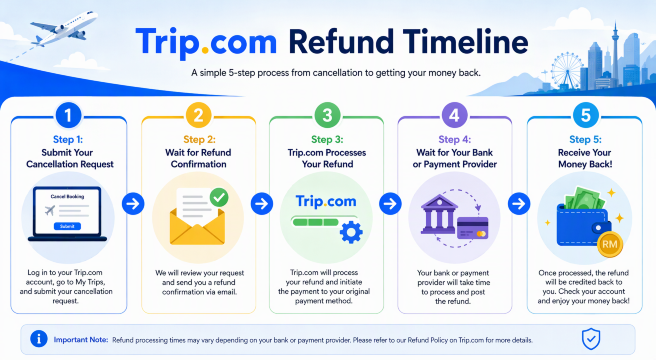
Step 1: Submit Your Cancellation Request
First, log in to your Trip.com account and submit a cancellation or refund request. Make sure to check your booking's cancellation policy to see whether you're eligible for a full or partial refund.
Step 2: Wait for Refund Confirmation
Once your request is submitted, Trip.com will review your booking details and confirm your refund eligibility. Depending on your booking, the airline, hotel, or service provider may also need to approve the request.
Step 3: Trip.com Processes Your Refund
After your refund is approved, Trip.com will process the refund and send it back through your original payment method, where applicable.
Step 4: Wait for Your Bank or Payment Provider
This is where you might need a little patience! Your bank or payment provider will process the transaction, and the time needed can vary depending on your payment method.
Step 5: Receive Your Money Back!
Once everything is completed, the refunded amount should appear in your original payment account. Remember to check your bank statement or e-wallet transaction history.
🌐 Top 10 Global Hotels
Lihat Semua Hotel
 NO.1







❓ How Long Does a Trip.com Refund Take by Booking Type?
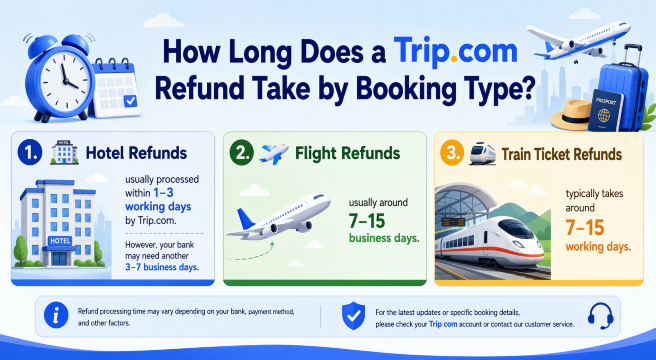
Here's what you can generally expect for each booking type:
1. 🏨 Hotel Refunds
Good news! Hotel refunds are usually processed within 1–3 working days by Trip.com after the cancellation is approved. However, your bank may need another 3–7 business days to credit the money back to your account.
2. ✈️ Flight Refunds
Flight refunds can take a little longer, usually around 7–15 business days for credit or debit card payments. This is because the airline may need to approve the cancellation and return the funds to Trip.com before the refund can be completed.
3. 🚄 Train Ticket Refunds
If you've cancelled a train ticket, the refund typically takes around 7–15 working days. The actual processing time may vary depending on the railway operator and your original payment method.
💡 My tip: Before cancelling any booking, I always recommend checking the cancellation and refund policy on Trip.com. Some bookings offer free cancellation, while others may have cancellation fees or are non-refundable. This helps you avoid unexpected surprises!
🔍 How to Check Your Trip.com Refund Status?
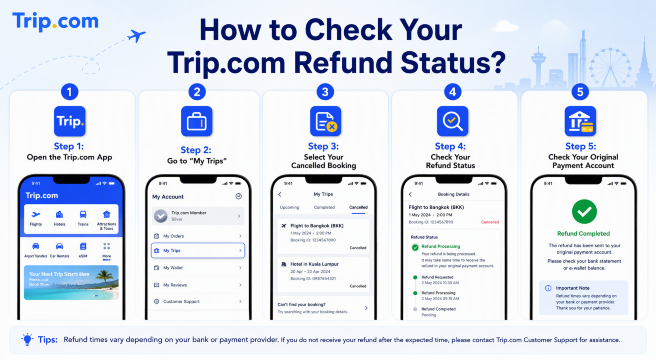
Step 1: Open the Trip.com App
Open the Trip.com app on your phone and log in to the account you used to make your booking.
Step 2: Go to "My Trips"
Tap My Trips at the bottom of the app to view your upcoming and past bookings.
Step 3: Select Your Cancelled Booking
Find the flight, hotel, or other booking you've cancelled and tap on it to view the booking details.
Step 4: Check Your Refund Status
Look for the refund details or refund status section. You should be able to see the latest available updates about your refund request and its processing progress.
Step 5: Check Your Original Payment Account
If Trip.com has confirmed that your refund has been processed, check your original credit or debit card, bank account, or e-wallet for the refunded amount.
✈️Flights to China!
Kuala Lumpur to ChongQing
Kuala Lumpur to ShangHai
Kuala Lumpur to GuangZhou
Kuala Lumpur to ShenZhen
Kuala Lumpur to ZhengZhou
Kuala Lumpur to Xi'an
Lihat Semua Penerbangan


💡 My tip: If your refund status shows as processed but the money hasn't appeared yet, don't panic! Your bank or payment provider may need additional time to complete the transaction. If it's taking longer than the estimated timeline, contact Trip.com Customer Support for help.
⚠️ Why Is My Trip.com Refund Taking So Long?
Still haven't received your money even after cancelling your booking? I know waiting for a refund can be frustrating, especially when you need the money for your next trip! 😩 But don't worry, there are a few common reasons why your Trip.com refund might be taking longer than expected.
1. ✈️ Airline or Hotel Provider Hasn't Approved the Refund
For some bookings, Trip.com needs to wait for the airline, hotel, or service provider to approve and return the funds before processing your refund. This can add extra waiting time.
2. 💳 Bank or Payment Provider Processing Delays
Even after Trip.com has processed your refund, your bank or payment provider may need additional time to credit the money back to your account. This is especially common with credit and debit card refunds.
3. 📅 Weekends and Public Holidays
Keep in mind that most refund timelines are calculated using business days, not calendar days. Weekends and public holidays can therefore extend your waiting time.
4. 📄 Your Booking Has Special Cancellation Conditions
Not every booking is eligible for an immediate refund. Some flights, hotels, and attraction tickets have specific cancellation rules, refund penalties, or additional approval requirements.
5. 🔍 Additional Refund Verification Is Required
Sometimes, Trip.com or the service provider may need to verify your booking or payment details before completing the refund. This can happen if additional information or confirmation is required.
🔥 [Discount] Best Hotel Recommendations

-
-
-
-
Cari Hotel
🔥 Hotel Coupons: Exclusive Hotels Deal for New Users
Discover the world with trip.com! Book the perfect hotel anywhere in the world and get an unbeatable 10% discount if you're a first-time user! If this is your second time using it, you will receive a 5% discount! Download our app now and start planning your next trip with ease.
Just click this link and download the Trip.com App, after successfully registering as a member, use it when you place an order!
🔥Save More with Up to 5% Off
Use our promo code to enjoy up to 5% OFF on your attraction tickets, tours and eSIMs!
💡 Tips to Get Your Trip.com Refund Faster
| 💡 Tips | ✨ What You Should Do |
|---|---|
Check the Cancellation Policy | Always read the refund and cancellation conditions before booking or cancelling. This helps you understand whether you're eligible for a full or partial refund. |
Submit Your Request Early | If you need to cancel, try to submit your refund request as soon as possible, especially before the free cancellation deadline. |
Provide Accurate Information | Double-check your booking details and payment information to avoid unnecessary verification delays. |
Keep Your Confirmation | Save your cancellation confirmation, refund notification, and booking reference in case you need to follow up. |
Monitor Your Refund Status | Regularly check the refund progress under My Trips in the Trip.com app. |
Check Your Original Payment Account | Keep an eye on the original credit card, bank account, or e-wallet you used to pay for your booking. |
Contact Customer Support | If your refund exceeds the estimated processing time, contact Trip.com Support for an update. |
📱 A Little Travel Reminder: Don't Forget Your eSIM!
Before your next trip, don't forget to prepare your mobile data! Having an eSIM makes it easier to check your Trip.com bookings, track refund updates, contact customer support, and stay connected wherever you go. I recommend getting your eSIM through Trip.com before departure so you can enjoy a hassle-free travel experience from the moment you arrive!
Lihat Semua Tarikan





Explore More
ChatGPT Travel Planning: How to Use the Trip.com App
Learn how to use the Trip.com app in ChatGPT to search flights, compare options with natural language, and prepare for future Trip.com travel planning features.
20 November 2026
Trip.com Map View: Find Cheap Flights with Interactive Map
Discover cheap flights using Trip.com Map View. Compare fares visually, explore flexible destinations, and book the best flight deals easily.
20 November 2026
Trip.com Booking Fee Explained: Service Fees, Charges & How to Avoid Them
What is the Trip.com booking fee? Learn how much Trip.com service fees cost, why they’re charged, hidden charges to watch for, and tips to save on bookings.
20 November 2026
Trip.com Cancellation Policy: Your Detailed Guide to Canceling Flights, Hotels, and Trains
If you're curious about Trip.com Cancellation Policy, check the detailed guide on how to cancel your flight, hotel, and train reservations!
20 November 2026
Trip.com Payment Methods | Accepted Cards & Secure Options
Explore all Trip.com payment methods, including cards, e-wallets, and online banking. Fast, secure, and convenient for every booking.
20 November 2026
Flight Delayed? Here's How to Claim Compensation on Trip.com
This guide explains how to request compensation through Trip.com, check your eligibility and prepare your claim.
20 November 2026
❓FAQs: Trip.com Refunds
-
1. How long does a Trip.com refund take?
-
2. Does Trip.com refund money automatically after cancellation?
-
3. How can I check my Trip.com refund status?
-
4. Why is my Trip.com refund still processing?
-
5. What should I do if I haven't received my Trip.com refund?
Disclaimer: This article has been provided by an individual contributor or third party platform. If there is any discrepancy regarding the copyright, please contact us directly and we will delete the content immediately.