

Trip.com Voucher Stacking: Can You Use Multiple Promo Codes?

Oleh Tom
25 November 2026

Planning your next getaway and looking for ways to save more on Trip.com? ✈️ You've probably come across different promo codes, discount vouchers and special deals, but here's the tricky part: can you actually combine them to get an even bigger discount?
I've also wondered whether I could apply a new promo code after making a booking, especially when a better deal pops up later! 😅 So, before you rush to checkout, let's take a closer look at how Trip.com voucher stacking works, whether you can use multiple promo codes, and some handy tips to get the most out of your travel budget.
🎟️ What Is Trip.com Voucher Stacking?
In simple terms, voucher stacking means using more than one discount or promotion in a single purchase to save even more money. For example, you might want to apply a promo code on top of an existing hotel discount or combine a voucher with a special member offer.
On Trip.com, you'll come across different types of deals, such as promo codes, coupons, app-exclusive discounts and member offers. However, not all of them can be combined, as each promotion comes with its own terms and conditions.
💳 Can You Stack Multiple Trip.com Promo Codes?
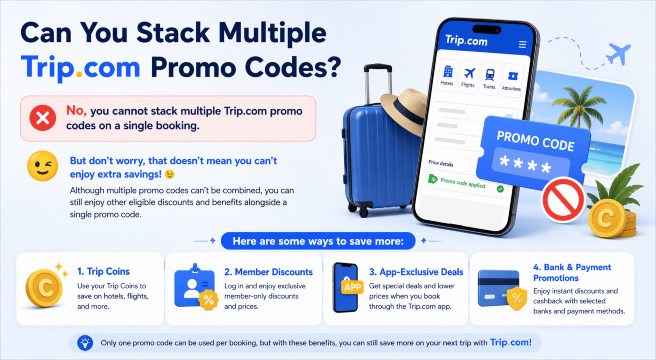
⚠️ Here's the thing: No, you cannot stack multiple Trip.com promo codes on a single booking. You can only apply one promo code per order, so if you have two different codes, you'll need to choose the one that gives you the better discount. Also, once your payment is completed, you can't add another promo code to that booking.
But don't worry, that doesn't mean you can't enjoy extra savings! Although multiple promo codes can't be combined, you can still enjoy other eligible discounts and benefits alongside a single promo code. Here are some ways to save more:
🔍 Discount Type | ❓ Can You Combine It? | ✅ Details |
|---|---|---|
Trip Coins | Yes, if eligible | You can redeem your available Trip Coins at checkout alongside an eligible promo code. |
Member Discounts | Generally yes | Enjoy eligible member-exclusive prices or loyalty benefits together with your promo code. |
App-Exclusive Deals | Depends | Some app-only prices and promotions may still be available when using a promo code. |
Bank & Payment Promotions | Depends | Selected credit card or e-wallet promotions may offer additional savings, depending on the campaign terms. |
🌐 Top 10 Global Hotels
Lihat Semua Hotel
 NO.1







🔄 Can You Apply a Trip.com Promo Code to an Existing Booking?
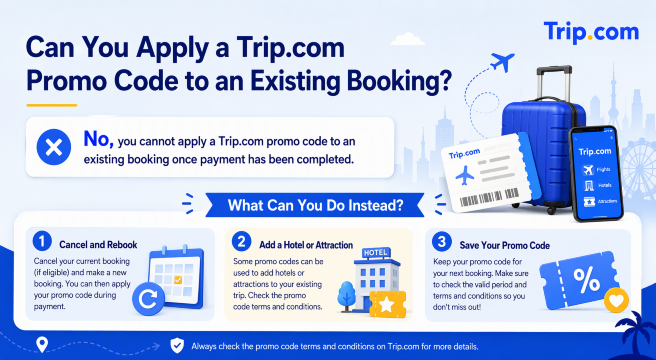
Unfortunately, you cannot apply a Trip.com promo code to an existing booking once payment has been completed. Promo codes must be claimed and entered during checkout before you make payment.
🔍 What Can You Do Instead?
🔍 Option | ✅ What You Can Do |
|---|---|
Cancel and Rebook | If your existing booking offers free cancellation, you can cancel it and make a new booking using your promo code. Just check for cancellation fees, availability and price changes first. |
Add a Hotel or Attraction | For eligible flight bookings, you may be able to add a hotel or attraction later through My Bookings to enjoy available bundle discounts. |
Save Your Promo Code | Keep your unused promo code in your Trip.com account under Promo Codes and use it for your next eligible booking. |
✈️Flights to China!
Kuala Lumpur to ChongQing
Kuala Lumpur to ShangHai
Kuala Lumpur to GuangZhou
Kuala Lumpur to ShenZhen
Kuala Lumpur to ZhengZhou
Kuala Lumpur to Xi'an
Lihat Semua Penerbangan


❌ Why Is My Trip.com Promo Code Not Working?
Here are some common reasons why your Trip.com promo code might not work:
1. ⏰ Expired Promo Code
Every promo code comes with a validity period. If the code has expired, you won't be able to redeem it, even if you meet all the other requirements.
2. 💰 Minimum Spend Not Met
Some promo codes require you to spend a minimum amount before you can enjoy the discount. For example, a RM30 discount might only be available for bookings above RM300.
3. ✈️ Product Restrictions
Not every promo code works for all travel products. Some are only valid for selected flights, hotels, train tickets or attractions, so make sure your booking is eligible.
4. 👤 User Eligibility
Certain promotions are exclusive to new users, selected Trip.com members or specific customer groups. If your account doesn't meet the requirements, the code may not work.
5. 🎟️ Trying to Combine Multiple Promo Codes
Remember, Trip.com generally allows only one promo code per order. If you're trying to apply two promo codes to the same booking, the system won't accept both.
6. 💳 Payment Method Restrictions
Some promotions are linked to specific payment methods, credit cards or e-wallets. Check whether your selected payment option meets the promotion requirements.
7. 🌍 Regional Restrictions
Some promo codes are only available in selected countries or regions. A code designed for another market may not work with your Malaysia-based booking.
💡 My tip: Before checking out, always read the promo code's terms and conditions, including its expiry date, minimum spend and eligible products. If everything looks correct but your code still doesn't work, try contacting Trip.com Customer Support for help.
📱 Where to Find Trip.com Vouchers and Promo Codes?


🔥 [Discount] Best Hotel Recommendations

-
-
-
-
Cari Hotel
🔥 Hotel Coupons: Exclusive Hotels Deal for New Users
Discover the world with trip.com! Book the perfect hotel anywhere in the world and get an unbeatable 10% discount if you're a first-time user! If this is your second time using it, you will receive a 5% discount! Download our app now and start planning your next trip with ease.
Just click this link and download the Trip.com App, after successfully registering as a member, use it when you place an order!
🔥Save More with Up to 5% Off
Use our promo code to enjoy up to 5% OFF on your attraction tickets, tours and eSIMs!
💡 How to Save More on Trip.com?
💡 Tips | ✨ What You Can Do |
|---|---|
Check the Coupon Centre | Browse available vouchers and promo codes for flights, hotels, attractions and more. Remember to check the minimum spend and expiry dates! |
Enjoy Member Discounts | Sign in to your Trip.com account to check exclusive member prices, special perks and loyalty rewards. |
Look for App-Exclusive Deals | Check the Trip.com app for special promotions and prices that may not be available on the website. |
Redeem Trip Coins | Use your accumulated Trip Coins for eligible discounts at checkout and enjoy extra savings on your next booking. |
Check Bank & Payment Promotions | Look out for credit card, bank and e-wallet promotions that offer additional discounts or cashback. |
Book During Major Sale Campaigns | Keep an eye on 11.11, 12.12, Chinese New Year and other seasonal campaigns for limited-time travel deals. |
Compare Before Checkout | Compare the final prices after applying eligible discounts. Sometimes, a special package or lower room rate can save you more than a bigger-looking voucher! |
📱 Quick Reminder: Remember to Get Your eSIM Before Travelling!
Don't forget to prepare your mobile internet before your trip! Having an eSIM makes it easier to check flight updates, receive delay notifications, contact customer support and keep your travel plans on track. I recommend getting your eSIM through Trip.com before departure so you can stay connected throughout your journey. ✈️
Lihat Semua Tarikan





🔍 Explore More
Trip.com Booking Fee Explained: Service Fees, Charges & How to Avoid Them
What is the Trip.com booking fee? Learn how much Trip.com service fees cost, why they’re charged, hidden charges to watch for, and tips to save on bookings.
25 November 2026
Trip.com Flight Change Policy: Fees, Fare Differences & How to Change
Need to change your flight on Trip.com? Learn about flight change fees, fare differences, possible extra charges and how to modify your booking easily.
25 November 2026
Flight Delayed? Here's How to Claim Compensation on Trip.com
This guide explains how to request compensation through Trip.com, check your eligibility and prepare your claim.
25 November 2026
How to Delete Your Trip.com Account: A Step-by-Step Guide
Follow this easy step-by-step guide to close your account, understand what happens to your bookings and check important things before deleting it.
25 November 2026
Trip.com Refund Processing Time: When Will You Get Your Money Back?
Get clear answers about Trip.com refund timelines! Discover how long refunds take for flights, hotels, and other bookings.
25 November 2026
❓FAQs: Trip.com Voucher Stacking
-
1. Can I use two promo codes on one Trip.com booking?
-
2. Can I apply a Trip.com promo code after booking?
-
3. Can I combine Trip.com promo codes with Trip Coins?
-
4. Can I cancel my Trip.com booking and rebook with a promo code?
-
5. Why can't I use my Trip.com promo code?
Disclaimer: This article has been provided by an individual contributor or third party platform. If there is any discrepancy regarding the copyright, please contact us directly and we will delete the content immediately.