How to Redeem Your Trip.com eSIM (No QR Code Needed!)
The easiest way I’ve found to get an eSIM is through Trip.com:
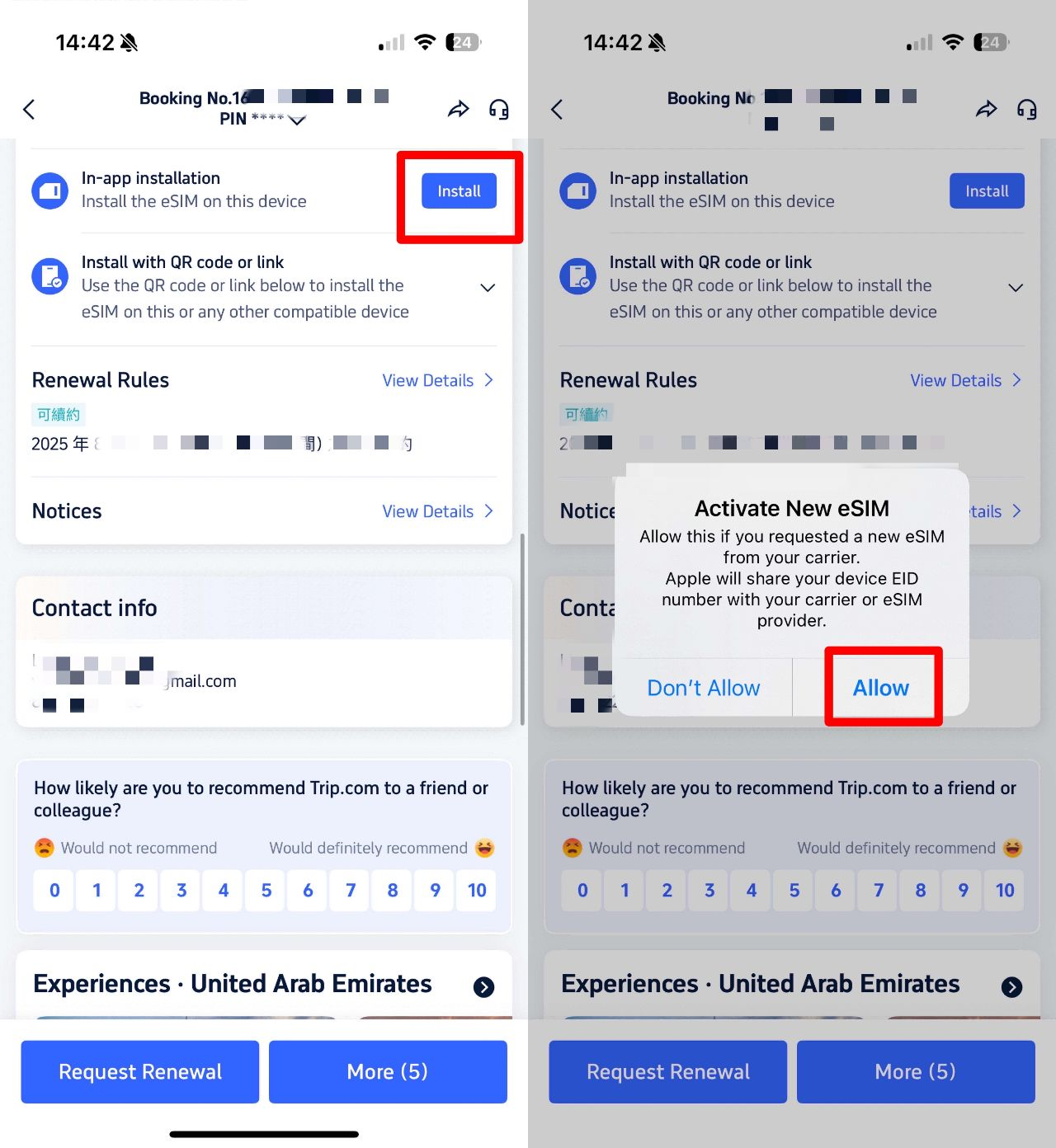
- Buy a plan in the Trip.com app.
- Head over to "My Orders" → Find your eSIM.
- Tap "In-App Installation".
- All set! It’ll automatically load right into your Settings.
How can I activate my Trip.com eSIM before I travel?
We’re diving into eSIM options for 32 European countries to help you get started. Check out the table below for a handy guide on installing your eSIM on both iOS and Android devices, covering both QR code and manual setup methods.
Device | Installing your QR code | Manual Installation |
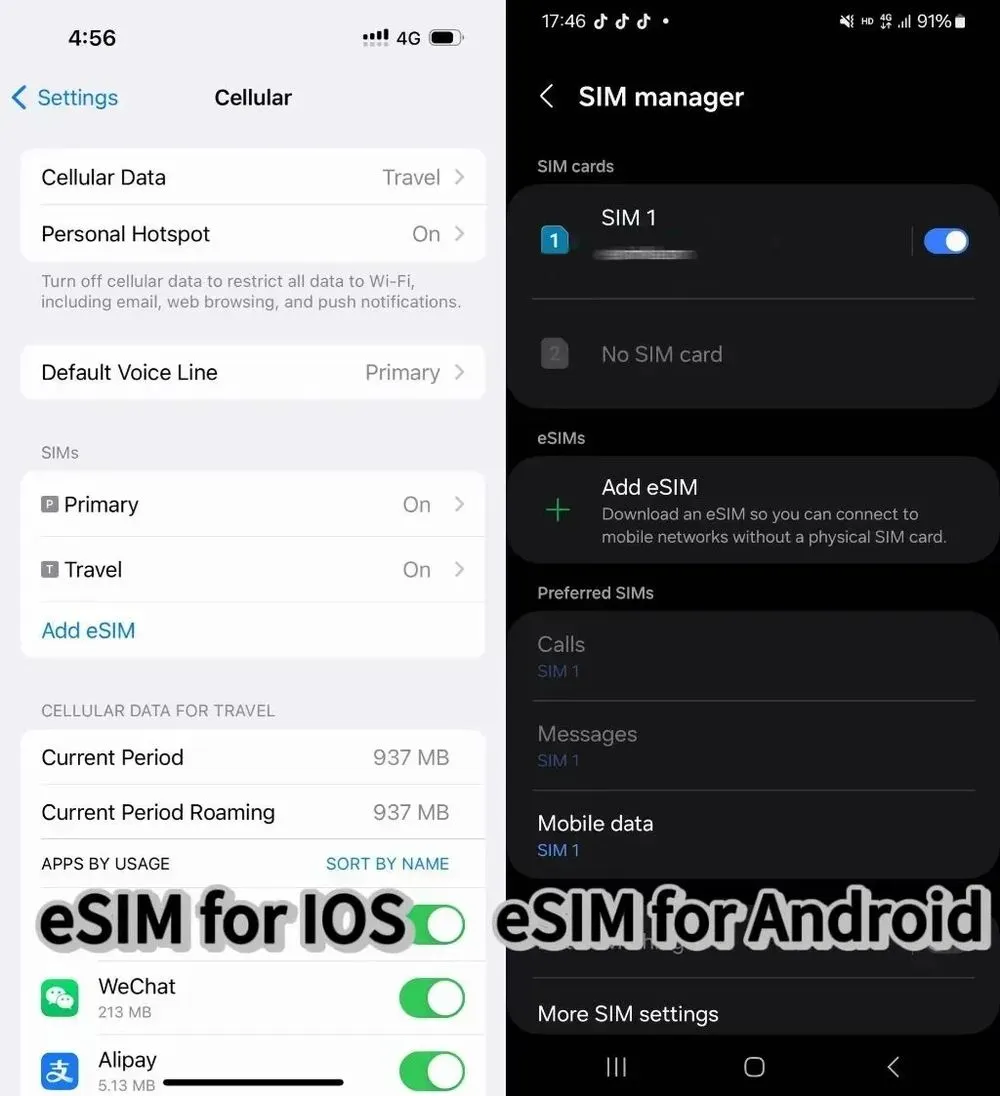
iOS | 1. Head to Settings > Cellular > Add eSIM > Use QR code > Scan > Activate eSIM > Continue. 2. Select your default network for Cellular Data, toggle off "Allow Cellular Data Switching," enable "Turn On This Line," and make sure to switch on Data Roaming. 3. If your device shows the wrong network, select the correct one under Network Selection. | 1. Head over to Settings > Cellular > Add eSIM > Use QR code > Enter Details Manually, then simply input your SM-DP+ Address and Activation Code, and tap Next. 2. Follow steps 5 and 6 of the QR code installation. |
Android | 1. Head over to Settings > Network & Internet > SIMs > + > Download a SIM > Next > Scan QR code > Download. 2. Once you see "Download Complete," head over to Settings. | 1. Start by heading to Settings > Network & Internet > SIMs > + > Download a SIM > Next > Need help? > Enter it manually. 2. Enter the code for Android, tap Continue, and then hit Download. Once you see "Download Complete," head over to your Settings. |
✨A Special Note✨
- Before you place an order, please check whether your phone supports eSIM — you can find this information on the product page.
- For a smooth, worry-free trip, please don't delete your eSIM once it's successfully installed — removing it may invalidate the package and require you to purchase a new eSIM.
🎁 Book the cheapest flights worldwide and find the best hotels! Plus, get 5% off your Trip.com eSIM or SIM card.Why Trip.com eSIMs Are a Game-Changer for International Travel
1. Start using your eSIM the moment you land
One of the biggest perks of using an eSIM when traveling abroad is having smooth, reliable Internet access the second you touch down at the airport. With traditional SIM cards, you’re often stuck hunting for an airport shop or carving out time to pick up a pre-ordered card. But with an eSIM, you can simply download it in advance and connect to the network the moment you step off the plane. It’s a total game-changer for a stress-free start to your trip, making it easy to book a taxi or pull up directions to your hotel right away!
2. With an eSIM, there's no risk of loss or damage.
Physical SIM cards are tiny and need careful handling—especially when you’re swapping one out while traveling, when the chance of losing or damaging it goes up. An eSIM, however, has no physical form, so you don’t have to worry about losing or breaking it. No more fiddling with a SIM tray and a tiny pin or accidentally dropping that little card while you’re juggling luggage and passports.
3. Dual SIM supported
With an eSIM, you can easily take advantage of dual SIM capabilities. Essentially, dual SIM lets you run two different networks on a single smartphone. This means you can have your regular SIM and a travel-ready eSIM for Japan or abroad all in one device. Whether you're jetting off from Japan to an international destination or heading back home, switching between network environments is seamless. Plus, with dual SIM, you can say goodbye to the hassle of constantly signing up for a new Internet connection every time you hop between countries!
Curious about eSIMs? What are the disadvantages of using one?
While eSIMs are super convenient, they aren't without their quirks. Here are a few things to keep in mind:
- Device Compatibility: Keep in mind that not all devices are eSIM-compatible. For instance, most Android models sold in the U.S. or South Korea don't support eSIMs, and older iPhones (anything before the XS) aren't compatible either. Also, keep in mind that some carrier-locked devices might restrict your ability to use an eSIM.
- Limited flexibility for swapping devices — Unlike physical SIM cards, eSIMs are tied to a specific device. If your phone breaks while traveling, you'll need to get a new eSIM for your replacement device. Some providers do offer limited transfers (for example, Trip.com supports up to 10 installations), but that's not universal, so it's a good idea to check your provider's policy before you go.
- Wi-Fi Dependency: Getting set up often requires an Internet connection, which can be a bit tricky if you land somewhere with spotty airport Wi-Fi.
- Regional Coverage Gaps: While global eSIMs like Trip.com’s keep you connected in 70+ countries, keep in mind that more remote or off-the-beaten-path destinations might have limited coverage compared to a local physical SIM.
More Popular Trip.com eSIMs Around the World
Best eSIM for International Travel

[10% Off] Top Hotel Picks for Your Global Getaway
🎁 Book the cheapest flights worldwide and find the best hotels! Plus, get 5% off your Trip.com eSIM or SIM card.