

How to Ride China High-Speed Train (HSR): Guide for Malaysians


How to Take Trains/High-Speed Rail in China? Save 3% on Trip.com train tickets with a promo code! This guide explains how to book with a foreign passport, pick seats, and cancel tickets—so your travels in China are smooth and fuss-free. 😀
How foreigners book Trip.com China high-speed rail
If you need to book train tickets in China but don't know how to do it, don't worry – Trip.com platform is very simple! Here's how:
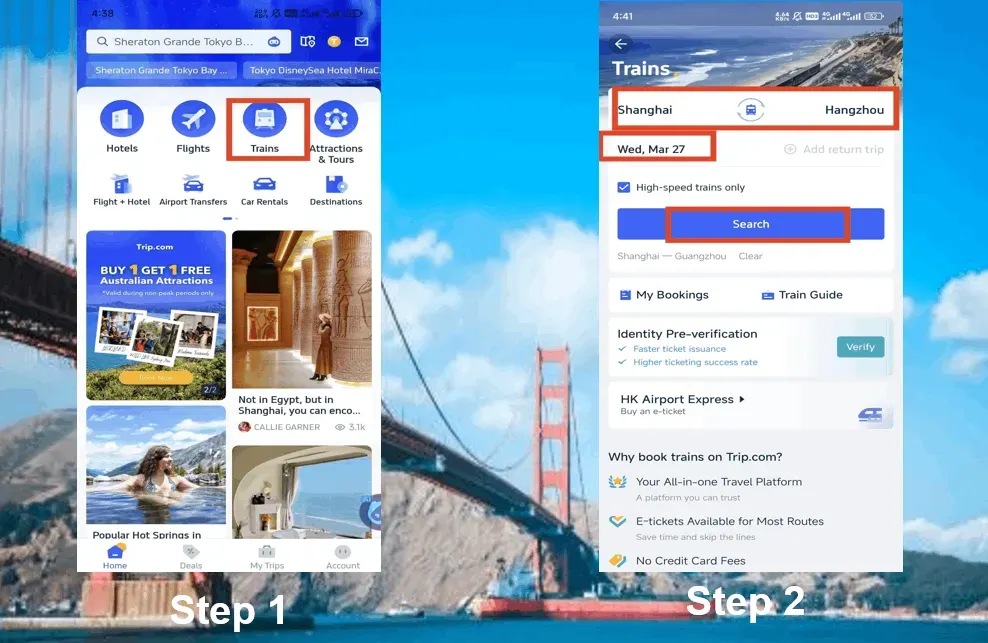
Step 1: Enter your trip
- Go to Trip.com (site or app).
- Enter your departure city (e.g., “Beijing”) and destination (e.g., “Shanghai”).
- Choose your travel date. Pro tip: Sales usually open 15 days in advance—for peak periods (Chinese New Year, Golden Week), book as early as possible.
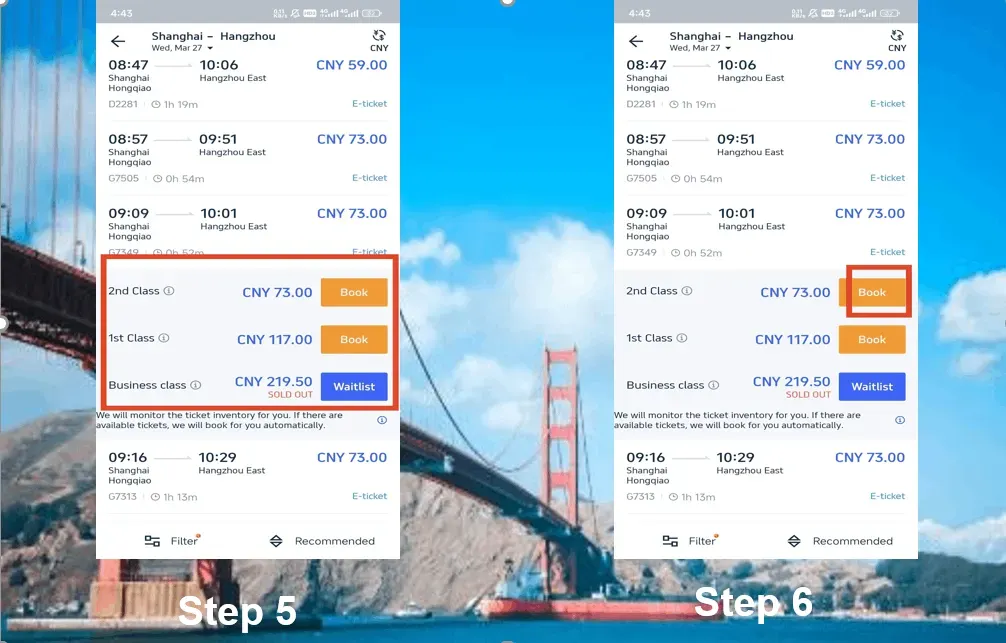
Step 2: Pick your train & seat class
- G trains = fastest (300+ km/h).
- D trains = slightly slower (200–250 km/h).
- Z/T/K trains = slower but cheaper (hard/soft sleeper options).
Seat classes:
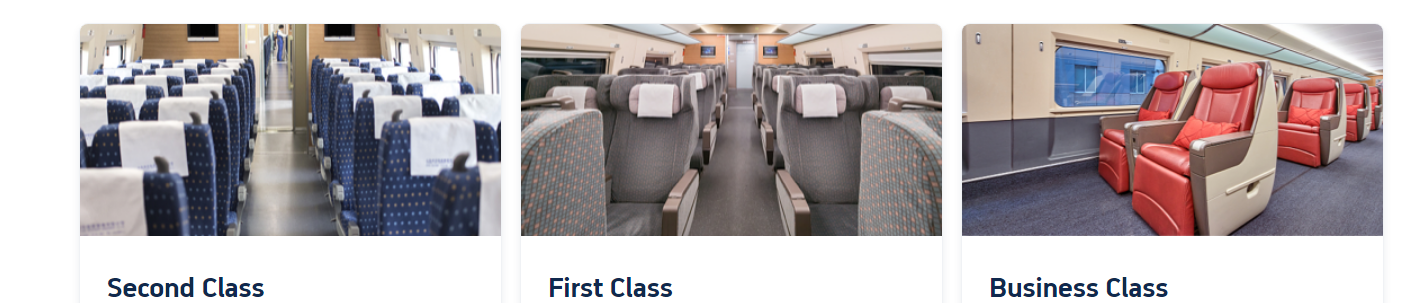
- Second Class – cheapest; good for budget or short trips.
- First Class – wider seats, quieter cabin, more comfort; priced above Second Class.
- Business Class – top tier, most expensive; extra privacy, some routes have lie-flat seats; ideal for long or business trips.
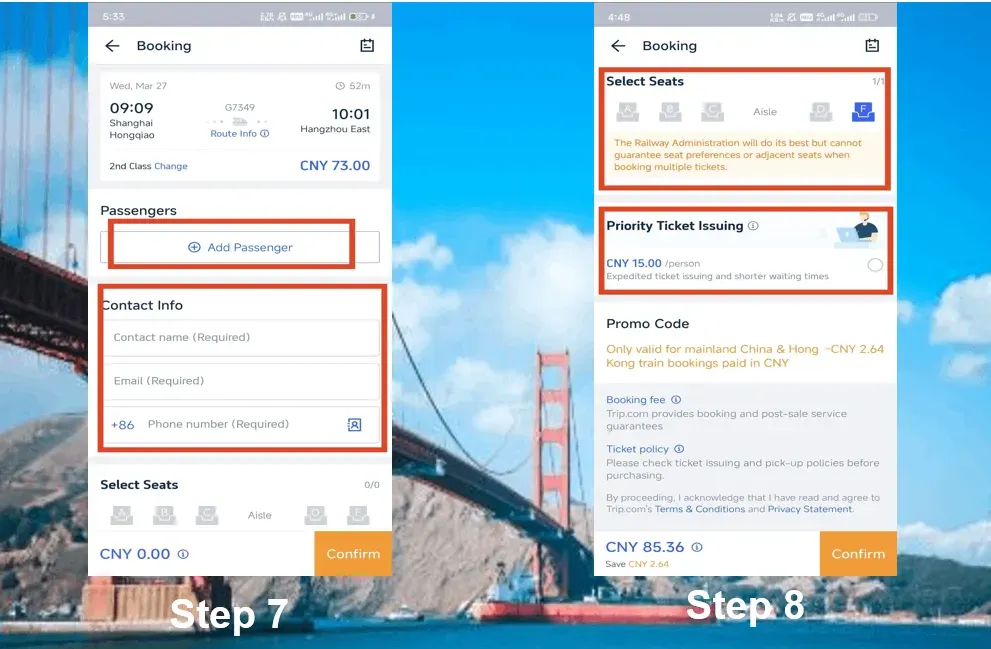
Step 3: Enter passenger details
- Full name (exactly as per passport).
- Passport number (double-check!).
- Email and phone (for e-ticket confirmation).
Step 4: Choose your seat (where available)
- Window (A/F) = best views.
- Aisle (C/D) = easy access to toilet.
- Middle (B) = avoid if you can; it’s cramped with passengers on both sides.
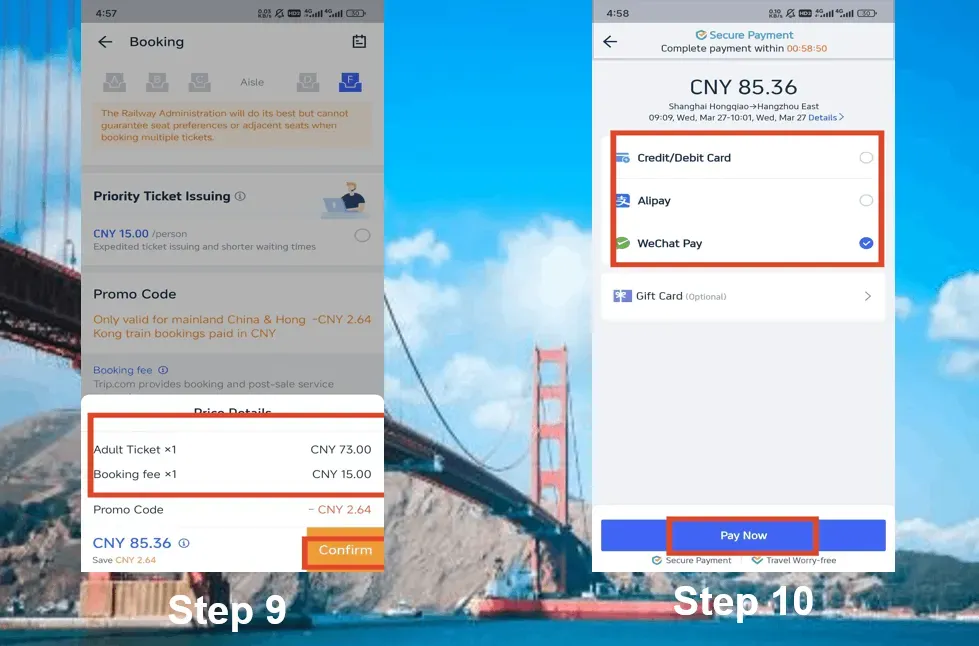
Step 5: Pay & get your ticket
- Payments: Visa, Mastercard, PayPal, Alipay, WeChat Pay.
- E-ticket: No need to collect at station—just scan your passport at the gates.
Quick tips for buying train tickets:
- ✅ Book early – popular routes sell out fast.
- ✅ Arrive 1 hour earlier for security checks.
- ✅ Download your e-ticket (screenshot in case Wi-Fi is spotty).
- ✅ Bring your passport—you’ll need it to board.
Things to Do in Shanghai
Things to Do in Beijing
Things to Do in Guangzhou
Lihat Semua Tarikan
 2055497 ditempah













![Pelayaran Malam Sungai Pearl Guangzhou [Menikmati Pemandangan Malam Menara Guangzhou + Kapal Bertema Kebangsaan Jinxi dengan Persembahan Langsung]](https://ak-d.tripcdn.com/images/0350b12000t035oqcECB2_C_568_320.png)

![Lawatan Sehari Tarikan Pelancongan Qingyuan Gulongxia [Berlepas Setiap Hari dari Guangzhou/Shenzhen/Dongguan dalam Lawatan Berkumpulan]](https://ak-d.tripcdn.com/images/0353s12000rxyln7f32A5_C_568_320.jpg)


Trip.com Chinese trains - choose the right type of seat
How to choose your seat:
- Once you've selected your train, click on "Seat Selection" (most of them are available, if available).
- High-speed trains: Select aisle/window preferences. The exact seats are random.
- Sleeper: Book in advance (15-day window) to secure a lower bunk.
Trip.com China high-speed train train seat (G/D).
2nd class (cheap but crowded)
- Seating arrangement: 5 seats per row (3+2), decent legroom, power outlets.
- Best for: Excursions (<4 hours), solo travelers, budget-conscious people.
- Avoid if: You're over 5'9" tall or hate the spontaneous snooker.
First class (worth it.)
- What you will get: 4 seats per row (2+2), wider seats, quieter cabin.
- Best for: 4+ hours of travel, workaholics who need laptop space.
- Pro tip: Grab F (window) or D (aisle) seats for maximum comfort.
Business Class (Superlative)
- You can enjoy: 3 seats per row (1+2), flat seats on some routes, complimentary snacks.
- Best for: Beijing-Shanghai (4.5 hours), treat yourself or jet lag recovery.
Trip.com China Ordinary Train Train Seat (Z/T/K)
Hard seat (short distance, cheaper)
- Facilities: Benches, zero privacy, crowding.
- Best for: Passengers on a budget or short trips
- Cons: There is no air conditioning on some old trains. Summer = a feast of sweat.
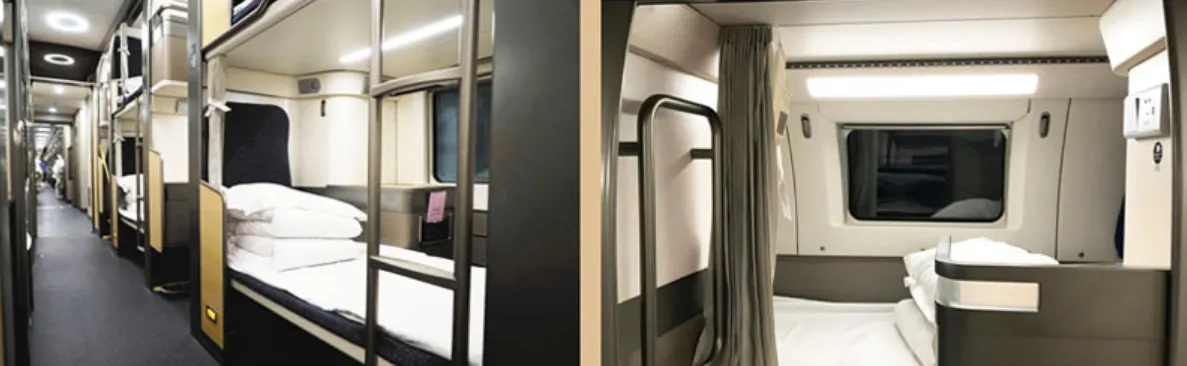
Hard sleeper (overnight, with budget)
- Facilities: Open bunk beds (6 per car), no doors, shared sockets.
- Best for: Overnight trips with the ability to sleep anywhere.
- Prefer the lower berth: because the upper berth = inconvenient to go up and down, the height is very low, and it is impossible to sit upright. Middle = depressed atmosphere, less space.
Soft sleeper (overnight, comfortable)
- Amenities: 4-story cabin with doors, bedding and privacy.
- Best for: 12-hour+ journeys, light sleepers, or passengers who need privacy.
上海机票
深圳机票
厦门机票
重庆机票
广州机票
Lihat Semua Penerbangan


How to cancel a Chinese train ticket on Trip.com
Let's take a look at the cancellation rules for Trip.com – because sometimes plans change, and if you have to cancel or change your booking, you can see how much you can lose.
Step 1: Find your booking
- Open the Trip.com app→ tap on "Trains" → go to "My Bookings".
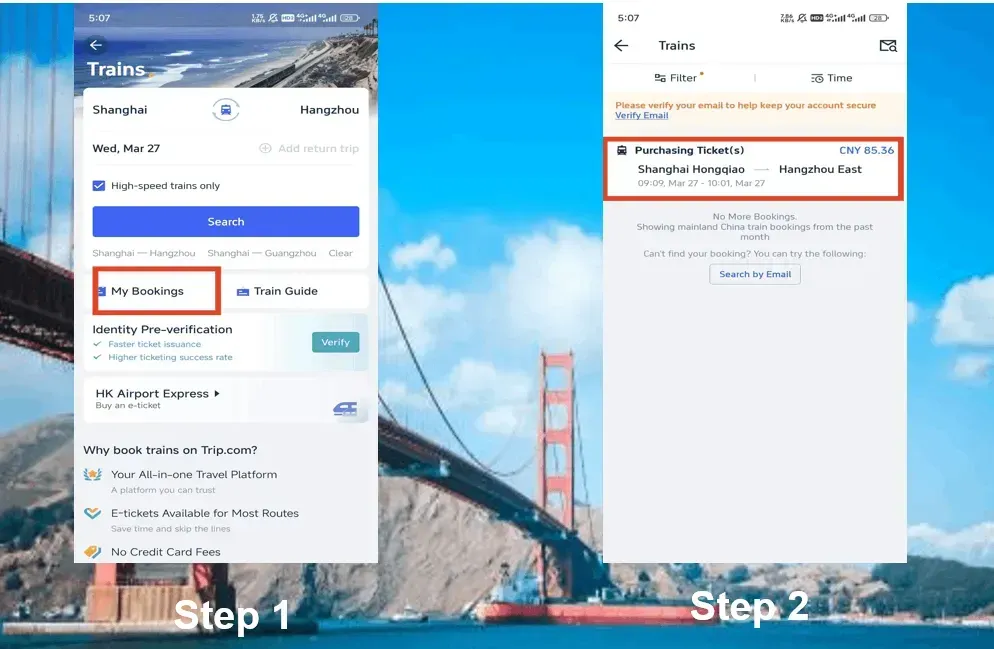
Step 2: Select the train you want to cancel
- Tap the reservation you want to cancel. Check the departure time carefully – choosing the wrong one may result in a fee deduction.
- Warning: If your train has already departed, then your train ticket cannot be canceled.
Step 3: Click "Refund" and prepare to pay the fee
- Click the "Refund" button.
- Trip.com will show the refundable amount minus the service fee (usually 3-5%).
- Example: Cancellation of a $500 ticket 2 days in advance will get you a refund of ~$475.
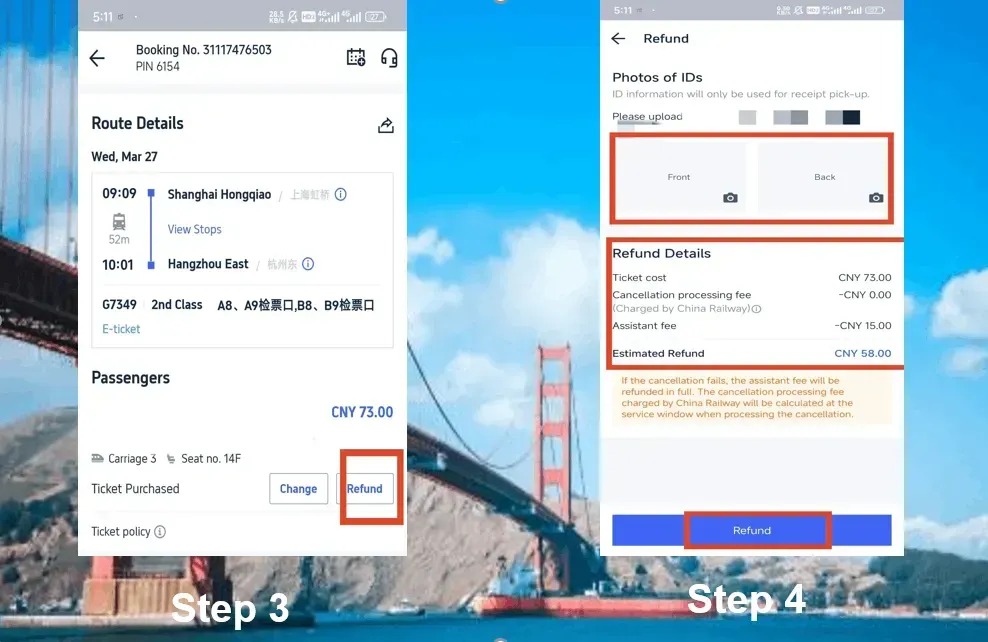
Step 4: Upload your ID
- You will need to upload a front/back photo of your passport (yes, even if it is an e-ticket).
- Chinese railways need to be verified. Blurry photos can cause delays in ticket purchases.
Step 5: Confirm and wait for the refund
- Review the refund details → click "Confirm".
- Refunds will arrive at your bank/PayPal within 7-15 days (international cards take longer).
Refund Fees:
- > 8 days before departure: Full refund.
- 48 hours to 15 days: 5% of the fee (~$25 will be charged for a $500 ticket Trip.com).
- 24-48 hours: 10% of the fee ($50 deducted).
- < 24 hours: 20% of the fee (100 yuan fine!) )。
Frequently asked questions?
- "Refund Pending": If your train departs within <24 hours, cancellations may fail.
- Wrong ID uploaded: They will notify you via email to resubmit. Need to resubmit as soon as possible.
- Partial refund: Cancel 1 ticket in a group booking? Each ticket is subject to a fee.
Lihat Semua Tarikan





Why choose to book high-speed trains on Trip.com?

- Multilingual support (eliminating language barriers).
- Accepts foreign cards (unlike other sites).
- No need to queue at the station (a huge time saver).
Trip.com China Train vs 12306 - Which is better for foreigners?

Booking trains in China with Trip.com is suitable for everyone (recommended), if you are fluent in your Chinese and have a local bank account, you can try 12306.
Iterms | Trip.com | 12306 (Official Website) |
language | Full English support | Chinese only (translation tool required) |
Foreign card | Accept Visa、Mastercard、PayPal and so on | Chinese bank account/Alipay required |
E-tickets | Automatic issuance (boarding with passport) | Paper tickets must be collected at the station |
expenses | ~3% service charge + card handling fee/ But discounts are often available, so it's actually cheaper | There are no fees |
customer support | 24/7 English chat/email | Mandarin hotline |
Best for: | Foreigners, first-time visitors to China, and people who are afraid of trouble | Locals or Mandarin speakers on a budget |
🔥China Hotel Recommendations
Top Shanghai Hotels
Top Beijing Hotels
Top Guangzhou Hotels
Lihat Semua Hotel






















5% OFF】China’s Must-Visit Attractions
Check out some of China’s must-see spots! 👀





*Prices are estimated and may vary depending on season, ticket availability and ticket type. All prices are in RMB.
FAQ about How to Ride China High-Speed Train
-
Do Malaysians need a passport to board China HSR?
-
When do tickets open?
-
Which seat is best?
-
Can I cancel my ticket?
Disclaimer: This article has been provided by an individual contributor or third party platform. If there is any discrepancy regarding the copyright, please contact us directly and we will delete the content immediately.