

Trip.com Hotel Overbooked? Here's What to Do Next!

Oleh Tom
20 November 2026

Imagine arriving at your hotel after a long flight, only to hear the receptionist say, "Sorry, we're fully booked!" 😭 Even though you've already booked and paid through Trip.com, the hotel suddenly has no room available. Talk about a holiday mood killer!
This situation is known as hotel overbooking, and it can happen even when your reservation is confirmed. But don't panic! I've put together this guide to help you understand why hotels overbook, what to do if your Trip.com hotel has no room for you, and whether you can get a refund or compensation. Let's make sure one hotel problem doesn't ruin your entire trip! ✨
🤔 Why Do Hotels Overbook Rooms?
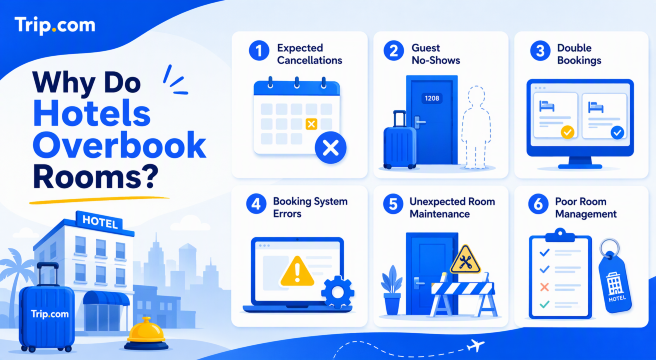
1. Expected Cancellations
Hotels often expect some guests to cancel their reservations before check-in. To avoid having empty rooms, they may accept more bookings than the number of rooms available. However, if fewer guests cancel than expected, there might not be enough rooms for everyone.
2. Guest No-Shows
Sometimes, guests simply don't turn up on their check-in date without cancelling their bookings. Hotels may take this possibility into account when accepting extra reservations, but unexpected arrivals can leave them short of rooms.
3. Double Bookings
This can happen when a hotel lists its rooms on multiple booking platforms. If the room availability isn't updated properly across all platforms, two guests might end up booking the same room.
4. Booking System Errors
Technical glitches or delays in updating room availability can also cause problems. For example, Trip.com may still show a room as available even though the hotel has already received another reservation for it.
5. Unexpected Room Maintenance
Sometimes, a room becomes unavailable due to plumbing problems, air-conditioning issues or other maintenance emergencies. If the hotel doesn't have enough spare rooms, it may struggle to accommodate all confirmed guests.
6. Poor Room Management
Some hotels may not manage their room inventory properly, especially during busy travel periods. This can lead to more confirmed reservations than the hotel can actually accommodate.
💡 My tip: Even if your Trip.com booking is confirmed, I recommend contacting the hotel a day or two before arrival to reconfirm your reservation. This is especially helpful during school holidays, public holidays and peak travel seasons. A quick check can save you from an unpleasant surprise at the reception!
🚨 What to Do If Your Trip.com Hotel Is Overbooked?
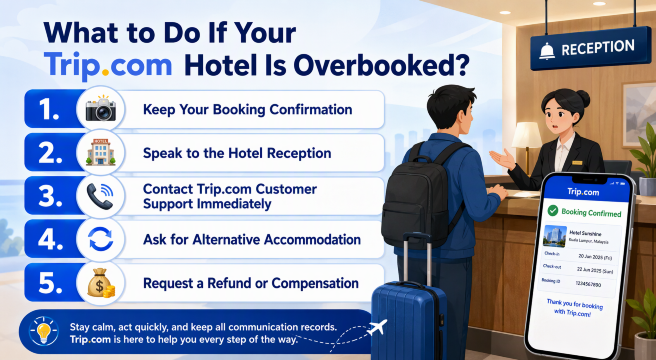
1. 📸 Keep Your Booking Confirmation
First, open your Trip.com app and take screenshots of your hotel booking confirmation, payment receipt, and reservation details. These documents will help prove that your booking was confirmed and paid for.
2. 🏨 Speak to the Hotel Reception
Ask the hotel staff why your room isn't available and whether they can offer another room of the same standard or a suitable alternative. If possible, request written confirmation that the hotel is unable to accommodate your booking.
3. 📞 Contact Trip.com Customer Support Immediately
Don't rush to book another hotel just yet! Contact Trip.com Customer Support through the app or website and explain what happened. Provide your booking reference and any evidence from the hotel so the support team can investigate.
4. 🔄 Ask for Alternative Accommodation
If the hotel cannot provide your reserved room, ask Trip.com whether they can help arrange another hotel nearby with similar facilities, location, and room standards. Make sure you understand any additional charges before agreeing.
5. 💰 Request a Refund or Compensation
If alternative accommodation isn't suitable, ask Trip.com about your refund options. Depending on the booking terms and circumstances, you may also ask whether compensation or reimbursement for additional expenses is available. Keep all receipts if you've had to pay for another hotel.
🌐 Top 10 Global Hotels
Lihat Semua Hotel
 NO.1







📞 How to Contact Trip.com Customer Service for Hotel Overbooking?
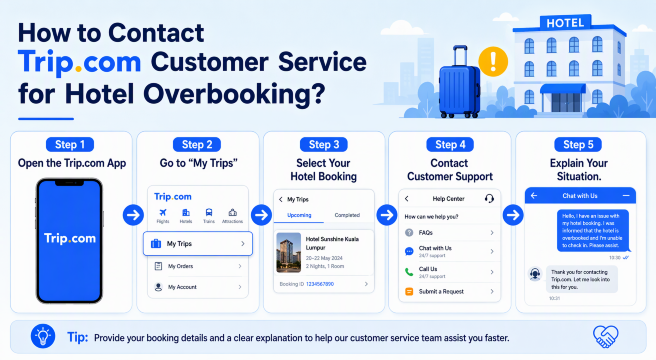
Here's how you can contact Trip.com:
Step 1: Open the Trip.com App
Open the Trip.com app on your phone and log in to the account you used to make your hotel reservation.
Step 2: Go to "My Trips"
Tap My Trips at the bottom of the app and find the hotel booking that's affected by the overbooking issue.
Step 3: Select Your Hotel Booking
Tap on your hotel reservation to view the booking details. Make sure you have your booking reference and hotel information ready.
Step 4: Contact Customer Support
Look for the Customer Support or Contact Us option in your booking details. Select the relevant issue and follow the instructions to connect with Trip.com's support team.
Step 5: Explain Your Situation
Let the support team know that the hotel cannot accommodate your confirmed reservation. Provide any supporting evidence, such as screenshots, booking confirmations, or written messages from the hotel.
Step 6: Follow Up on the Solution
Ask Trip.com to help arrange alternative accommodation or explain your refund options. Remember to confirm any proposed arrangements before making additional payments.
💰 Can You Get a Refund or Compensation for Hotel Overbooking?
If your Trip.com hotel booking is confirmed but the hotel cannot provide your reserved room due to overbooking, you may be eligible for a refund or other assistance. 💸 However, the options available will depend on your booking conditions, the circumstances, and Trip.com's investigation. Here's what you should know:
1. Full Refund for Your Hotel Booking
If the hotel cannot accommodate you and your booking cannot be fulfilled, contact Trip.com to request a refund. Depending on the circumstances, you may be eligible for a full refund rather than being charged a cancellation fee.
2. 🏨 Alternative Hotel Accommodation
You can ask Trip.com to help arrange alternative accommodation nearby. Ideally, request a hotel with a similar location, room type, and facilities to your original booking.
3. 💰 Compensation for Additional Expenses
If you need to pay extra for another hotel or transportation because of the overbooking, you can ask Trip.com whether reimbursement or compensation is available. Keep all receipts and supporting documents, as approval will depend on the applicable terms and circumstances.
4. 🔄 Price Difference for a Replacement Hotel
If the alternative hotel costs more than your original booking, ask Trip.com whether they can cover the price difference. Don't assume the additional cost will automatically be reimbursed, so get confirmation from customer support before agreeing to pay.
✈️Flights to China!
Kuala Lumpur to ChongQing
Kuala Lumpur to ShangHai
Kuala Lumpur to GuangZhou
Kuala Lumpur to ShenZhen
Kuala Lumpur to ZhengZhou
Kuala Lumpur to Xi'an
Lihat Semua Penerbangan


🔥 [Discount] Best Hotel Recommendations

-
-
-
-
Cari Hotel
🔥 Hotel Coupons: Exclusive Hotels Deal for New Users
Discover the world with trip.com! Book the perfect hotel anywhere in the world and get an unbeatable 10% discount if you're a first-time user! If this is your second time using it, you will receive a 5% discount! Download our app now and start planning your next trip with ease.
Just click this link and download the Trip.com App, after successfully registering as a member, use it when you place an order!
🔥Save More with Up to 5% Off
Use our promo code to enjoy up to 5% OFF on your attraction tickets, tours and eSIMs!
💡 Tips to Avoid Hotel Overbooking Problems
💡 Tips | ✨ What You Should Do |
|---|---|
Book Your Hotel Early | Try to reserve your hotel in advance, especially during peak travel seasons, public holidays, and major events. |
Choose Highly Rated Hotels | Check guest reviews and ratings on Trip.com before booking to get a better idea of the hotel's service and reliability. |
Check Your Booking Confirmation | Make sure you receive your booking confirmation and check that your dates, room type, and guest details are correct. |
Contact the Hotel Before Arrival | Consider contacting the hotel a few days before your stay to confirm that your reservation is in their system. |
Keep Your Booking Details Handy | Save your Trip.com booking reference, confirmation email, and payment receipt so you can access them easily during check-in. |
Arrive Within the Check-in Time | Try to arrive during the hotel's stated check-in hours. If you're arriving late, inform the hotel in advance to avoid any confusion. |
Read the Cancellation Policy | Check the booking terms carefully so you understand your options if something goes wrong. |
📱 A Little Travel Reminder: Don't Forget Your eSIM!
Before your next trip, don't forget to prepare your mobile data! Having an eSIM makes it easier to check your Trip.com bookings, track refund updates, contact customer support, and stay connected wherever you go. I recommend getting your eSIM through Trip.com before departure so you can enjoy a hassle-free travel experience from the moment you arrive!
Lihat Semua Tarikan





Explore More
ChatGPT Travel Planning: How to Use the Trip.com App
Learn how to use the Trip.com app in ChatGPT to search flights, compare options with natural language, and prepare for future Trip.com travel planning features.
20 November 2026
Trip.com Map View: Find Cheap Flights with Interactive Map
Discover cheap flights using Trip.com Map View. Compare fares visually, explore flexible destinations, and book the best flight deals easily.
20 November 2026
Trip.com Booking Fee Explained: Service Fees, Charges & How to Avoid Them
What is the Trip.com booking fee? Learn how much Trip.com service fees cost, why they’re charged, hidden charges to watch for, and tips to save on bookings.
20 November 2026
Trip.com Cancellation Policy: Your Detailed Guide to Canceling Flights, Hotels, and Trains
If you're curious about Trip.com Cancellation Policy, check the detailed guide on how to cancel your flight, hotel, and train reservations!
20 November 2026
Trip.com Payment Methods | Accepted Cards & Secure Options
Explore all Trip.com payment methods, including cards, e-wallets, and online banking. Fast, secure, and convenient for every booking.
20 November 2026
Flight Delayed? Here's How to Claim Compensation on Trip.com
This guide explains how to request compensation through Trip.com, check your eligibility and prepare your claim.
20 November 2026
❓FAQs: Trip.com Hotel Overbooking
-
1. What happens if my Trip.com hotel is overbooked?
-
2. Can I get a full refund if my Trip.com hotel is overbooked?
-
3. Will Trip.com help me find another hotel if my booking is overbooked?
-
4. Can I claim compensation for hotel overbooking on Trip.com?
-
5. How can I avoid hotel overbooking when booking through Trip.com?
Disclaimer: This article has been provided by an individual contributor or third party platform. If there is any discrepancy regarding the copyright, please contact us directly and we will delete the content immediately.