

Struggling to Find Delivery Options or Local Deals While Traveling in China? Ever found yourself hungry in China but unsure where to order food? Or wanted to visit a popular local hotpot restaurant but didn't know where to get the best deals? This is where Meituan comes in.
Meituan is like having a local friend in your pocket, helping you order food, book restaurants, discover authentic experiences, and avoid paying "tourist prices." It's a time and money-saver that can help you explore the best eats, activities, and deals in your destination! 😍
In this guide, I'll show you how to download Meituan, order food, and easily find amazing local offers. Get ready for a seamless trip!
What is the Meituan App?

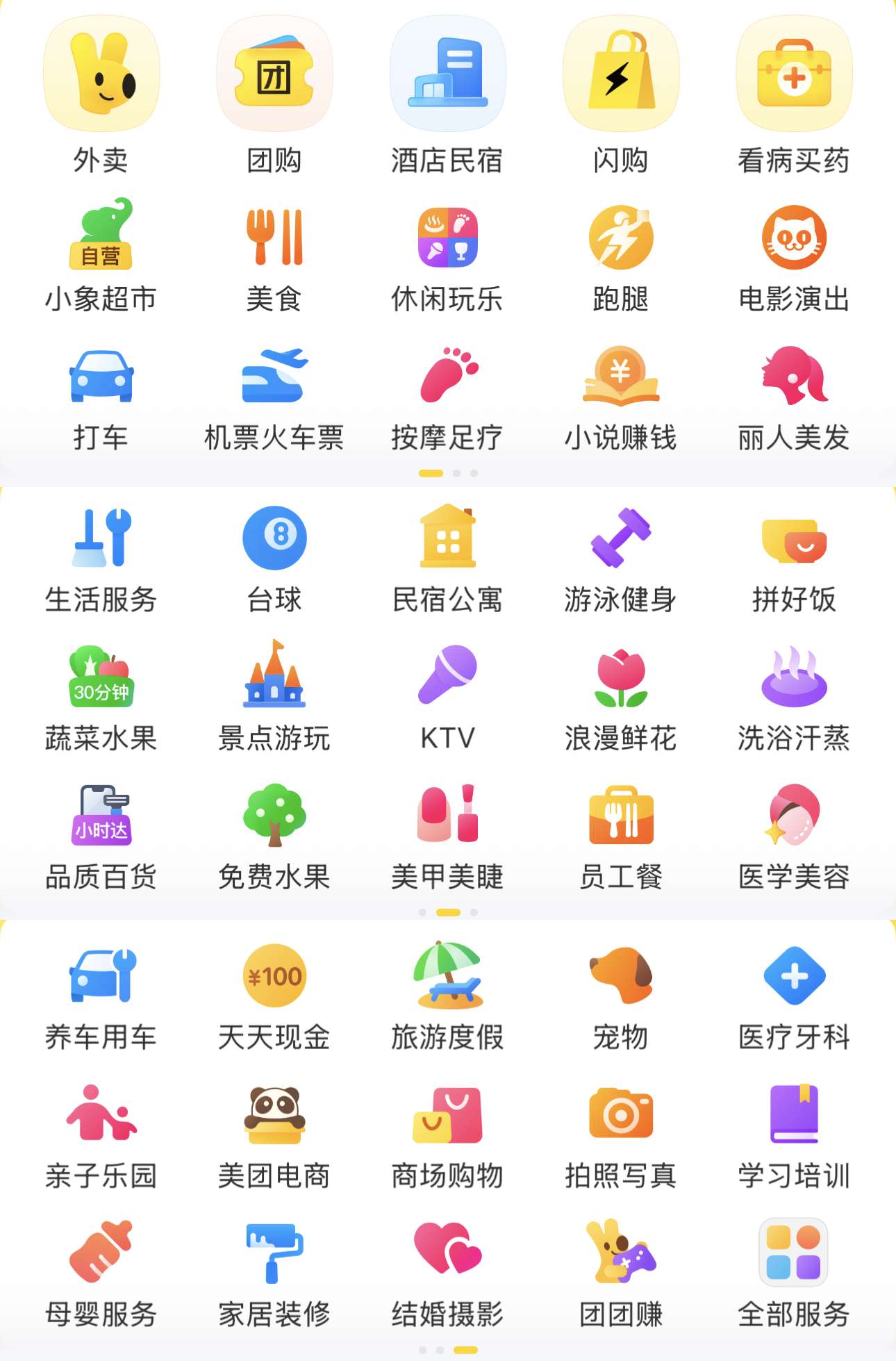
Meituan is a popular app in China that locals use for food delivery, purchasing dining discounts, and booking services like massages and haircuts. It even allows hotel reservations! It covers almost everything you need in daily life.
You may have heard of Dianping, which is great for checking reviews and finding good places nearby. Meituan works well with Dianping but focuses more on ordering and flash sales. It's like combining a local discount card and a food delivery app into one.
Main Services of the Meituan App

- Food Delivery: Craving noodles, bubble tea, or a late-night snack? Meituan usually delivers to your hotel within 30-45 minutes.
- Dining Discounts: Get vouchers for hotpot, dim sum, or BBQ at discounted prices. Pay in the app and show the code at the restaurant for a better deal.
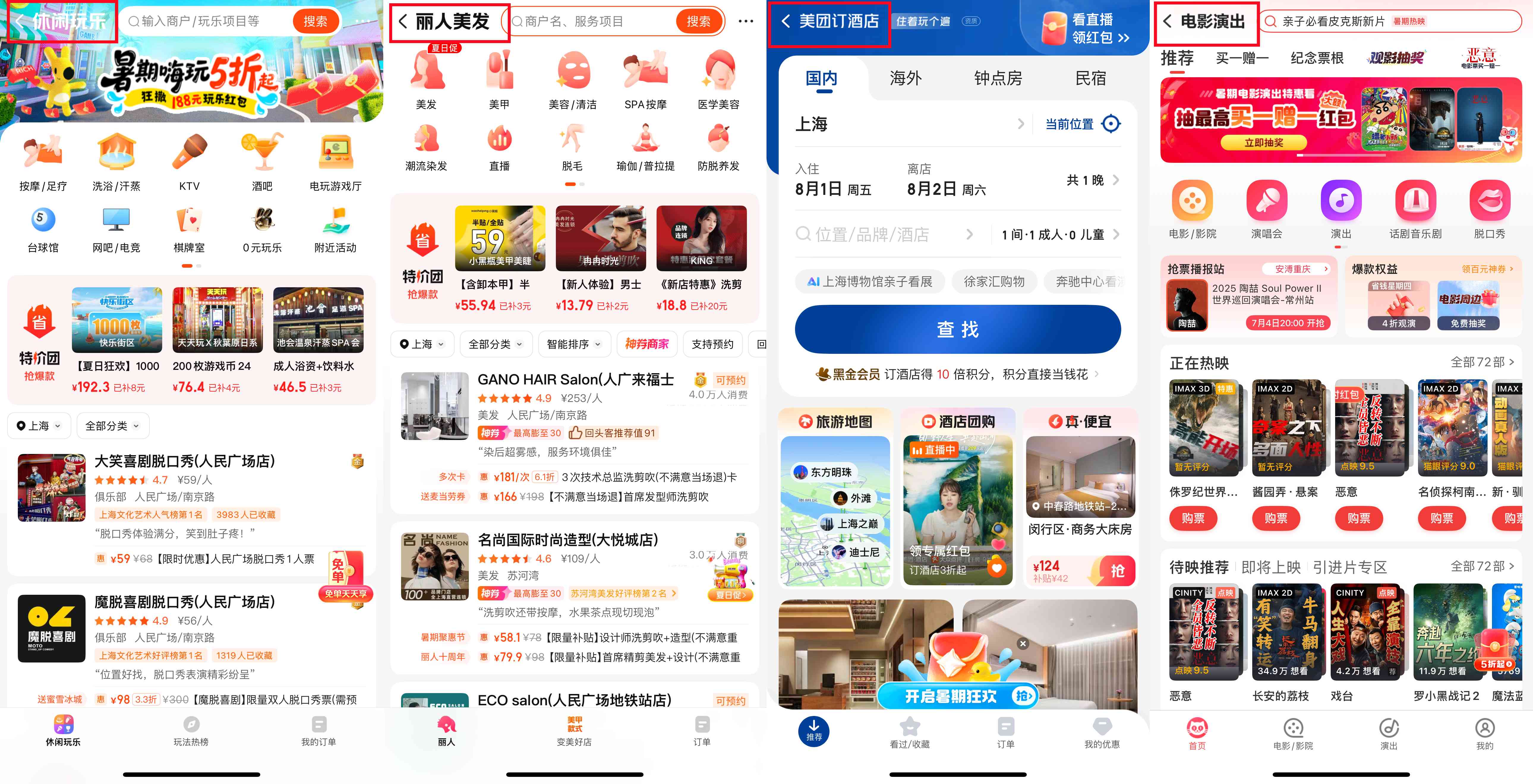
- Local Services: Need a massage, haircut, or a KTV session while traveling? Meituan makes it easy to book these services at local prices.
- Attraction Ticket Flash Sales: You can buy tickets for museums, parks, or shows directly in the app, often at a lower price than at the ticket office.
- Grocery Delivery: If you're staying longer, you can order fresh fruit, snacks, and drinks.
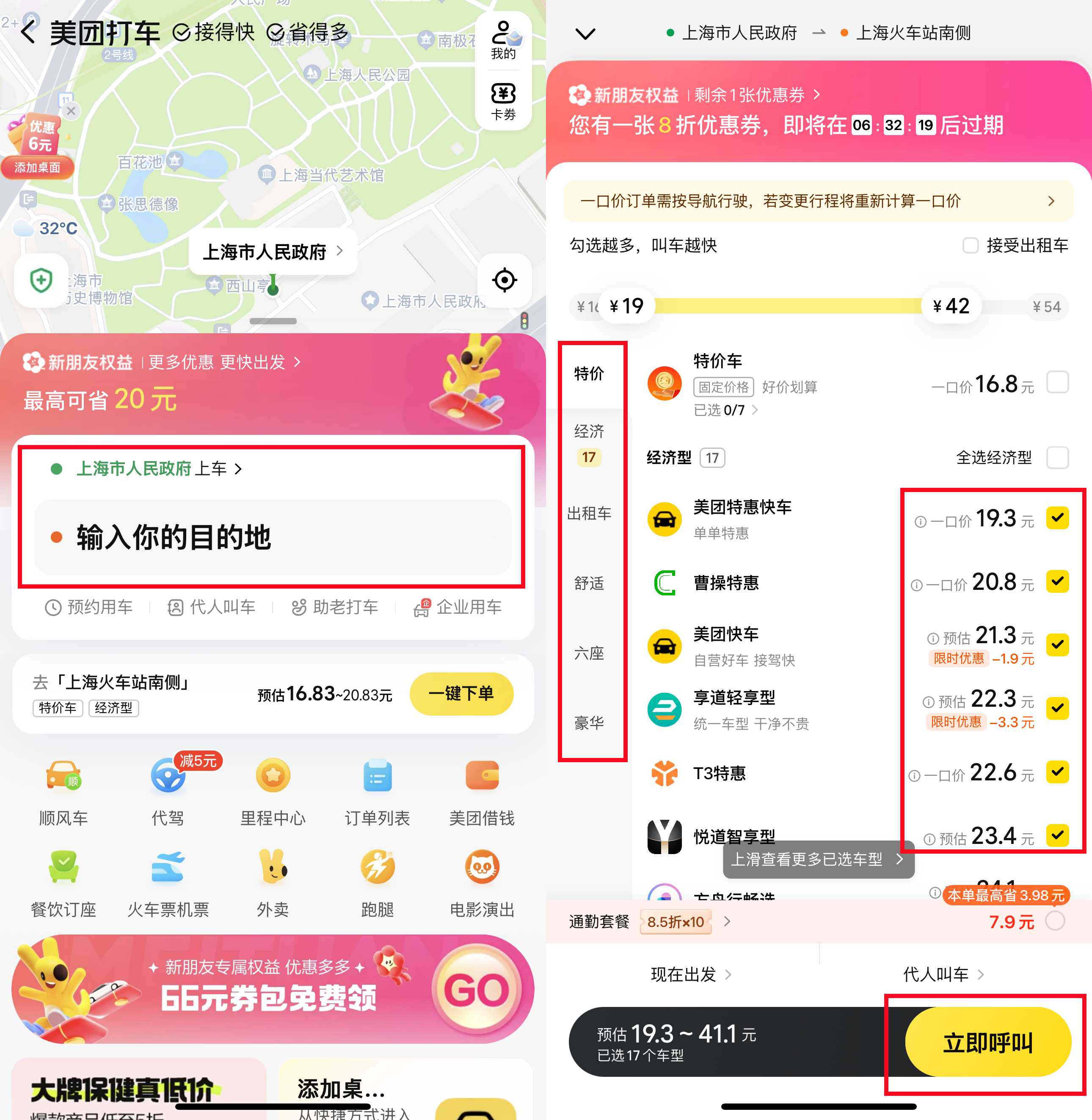
- Ride-hailing: In some cities, Meituan also offers ride-hailing services as an alternative to Didi or taxis.
- Hotel and short-term accommodation bookings: Ideal for last-minute stays or day rooms during layovers
How to Download and Set Up the Meituan App?
1. Find the App

On iPhone: Change your App Store region to China (if needed) and search for "Meituan" or "Mei Tuan."
On Android: Use a multi-region Play Store or download from the App Store. You can also use an APK site, just make sure it’s a reputable source.
Note: Meituan usually defaults to Chinese. It doesn’t have a full English version, but you can use the translation feature or the help prompts when you first use it.
2. Create an Account

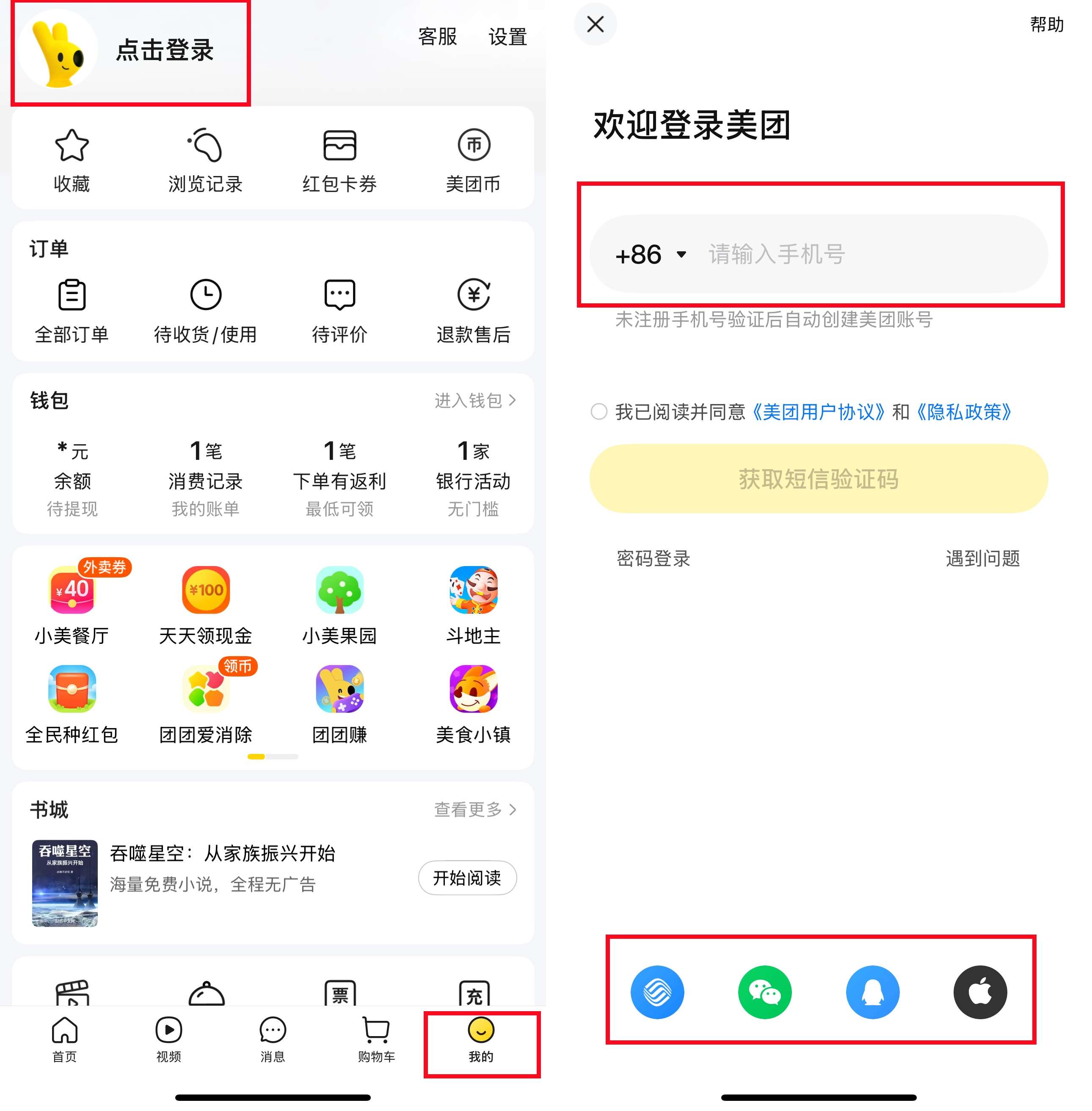
You'll need a phone number to register. Go to "My" and click "Click to Login." Many users register using their overseas numbers and receive a verification SMS. If you have a device for data or a SIM card, you can use that.
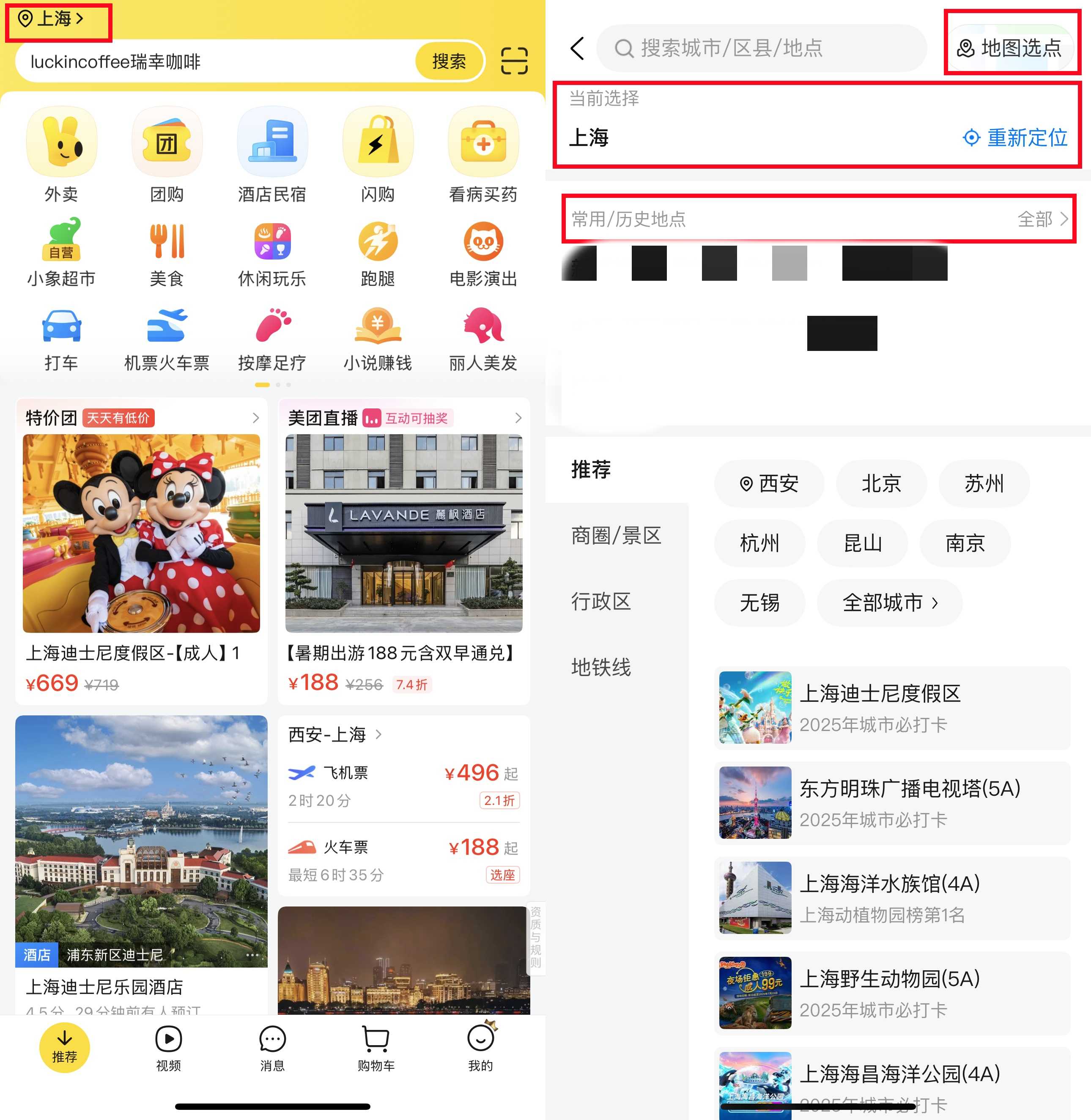
3. Set Your City and Delivery Address

Copy-paste or manually input your address from the map.
4. Link Your Payment Method
Meituan supports WeChat Pay or Alipay, both of which accept foreign credit cards or Chinese-issued cards. You’ll need to top up your wallet in these apps or link your card first. Once linked, payment on Meituan will be seamless.
That's it! You’re all set to browse for food, discounts, services, and more.
How to Use Meituan for Food Delivery?
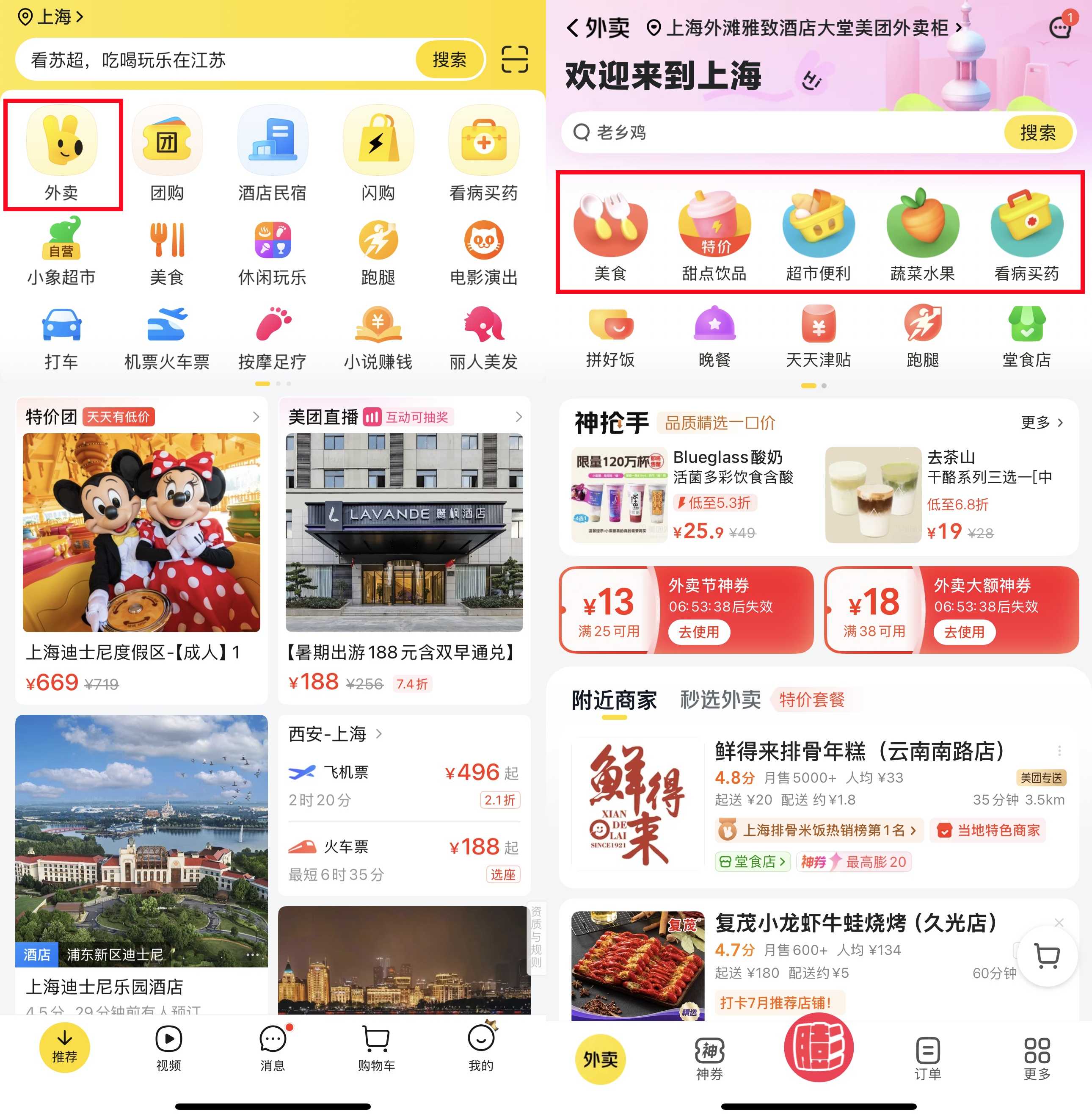
After downloading and setting up Meituan, make sure your address is correct. If you’ve moved to another city, remember to update it. It's similar to using GrabFood in Malaysia.
Find Delivery Services
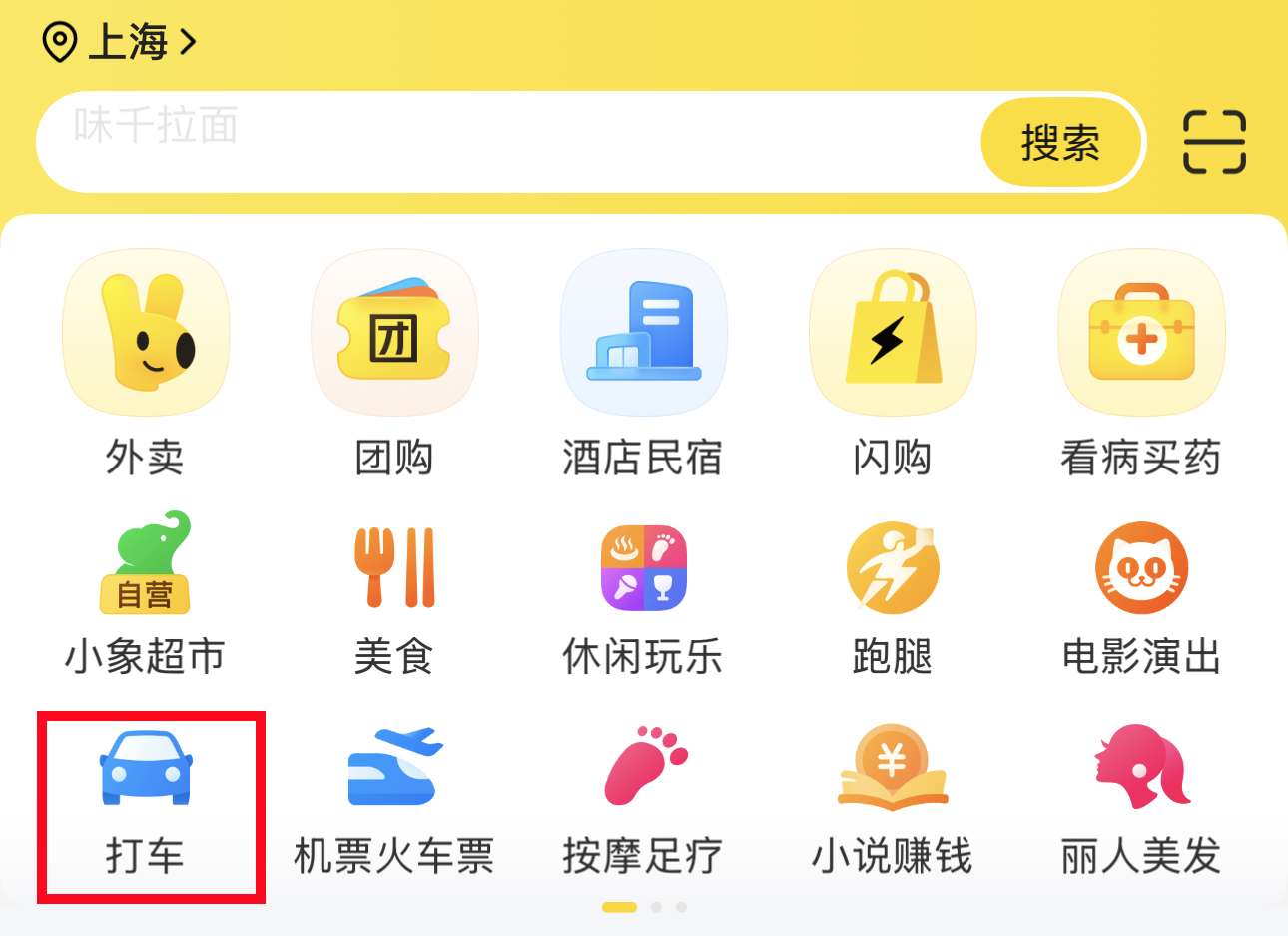
Tap the "Delivery" icon (usually the first one you see).
Browse or Search
You can scroll to check nearby restaurants or search for what you want to eat.
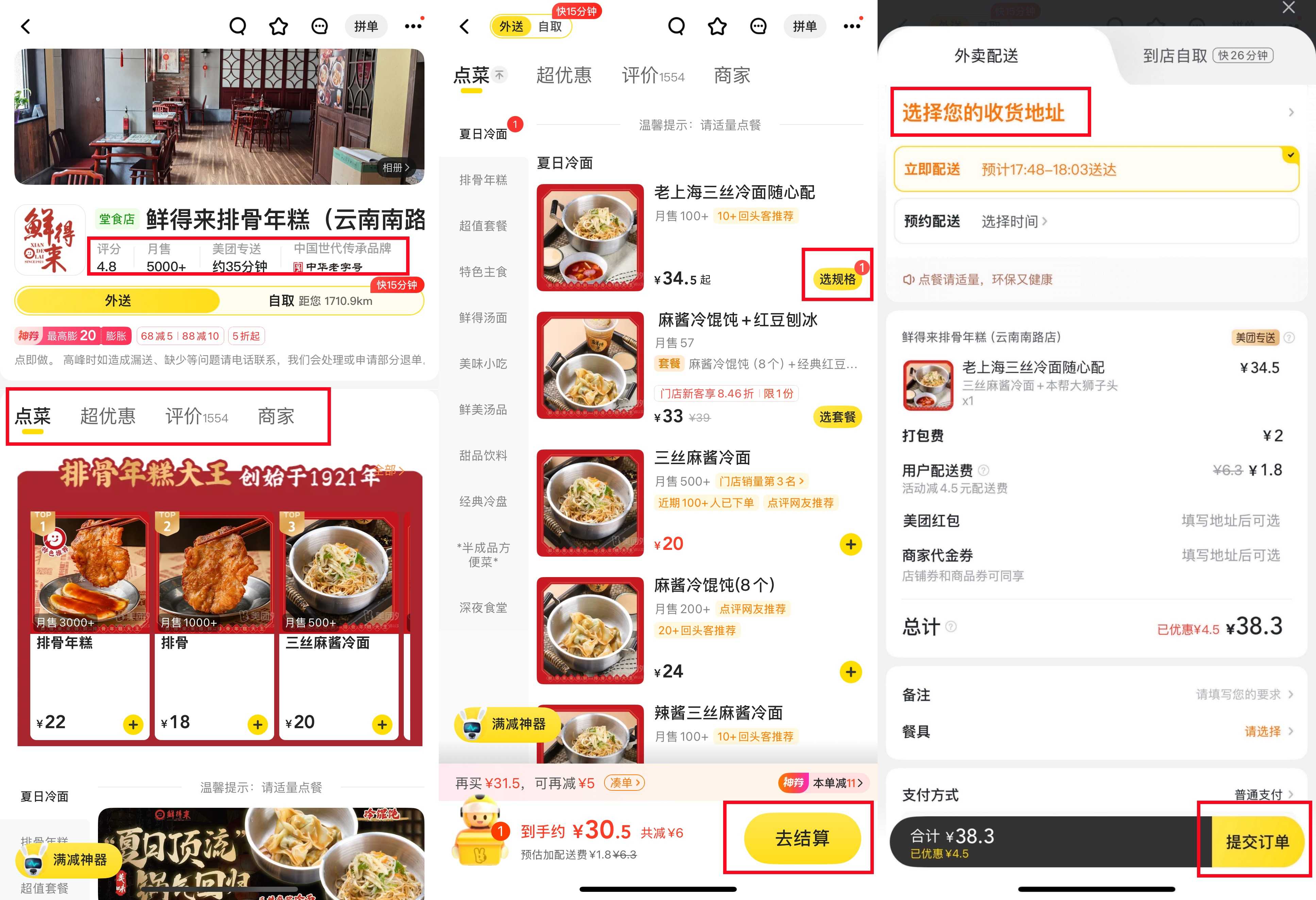
Tip: Look for places with higher ratings (yellow stars) and delivery times under 45 minutes.

Check Delivery Fees and Minimum Orders
Some places charge a small delivery fee (3 to 6 yuan). Many restaurants have a minimum order requirement, but it's usually easy to pair drinks and mains.
Place Your Order
Click "Select Specifications" for the dish you want. Check your cart before confirming. Then tap "Checkout" and pay. If you have coupons or vouchers, they’ll be automatically applied or you can select them before payment. You can also leave a note for the restaurant or the Meituan rider. Tap "Submit Order" to place it.

Pay
Pay quickly with WeChat Pay or Alipay. Once successful, you’ll receive a confirmation.
Track Your Order
You can track the driver’s progress on a map, just like GrabFood. Many drivers will call when they arrive. If you don’t speak Chinese, ask the hotel staff for help, or message the driver “I’m at the lobby.”
Leave a Review
After receiving your food, you can leave a quick star rating and comment. This helps other users and keeps your Meituan account active for future discounts.

How to use Meituan App to purchase discount packages?
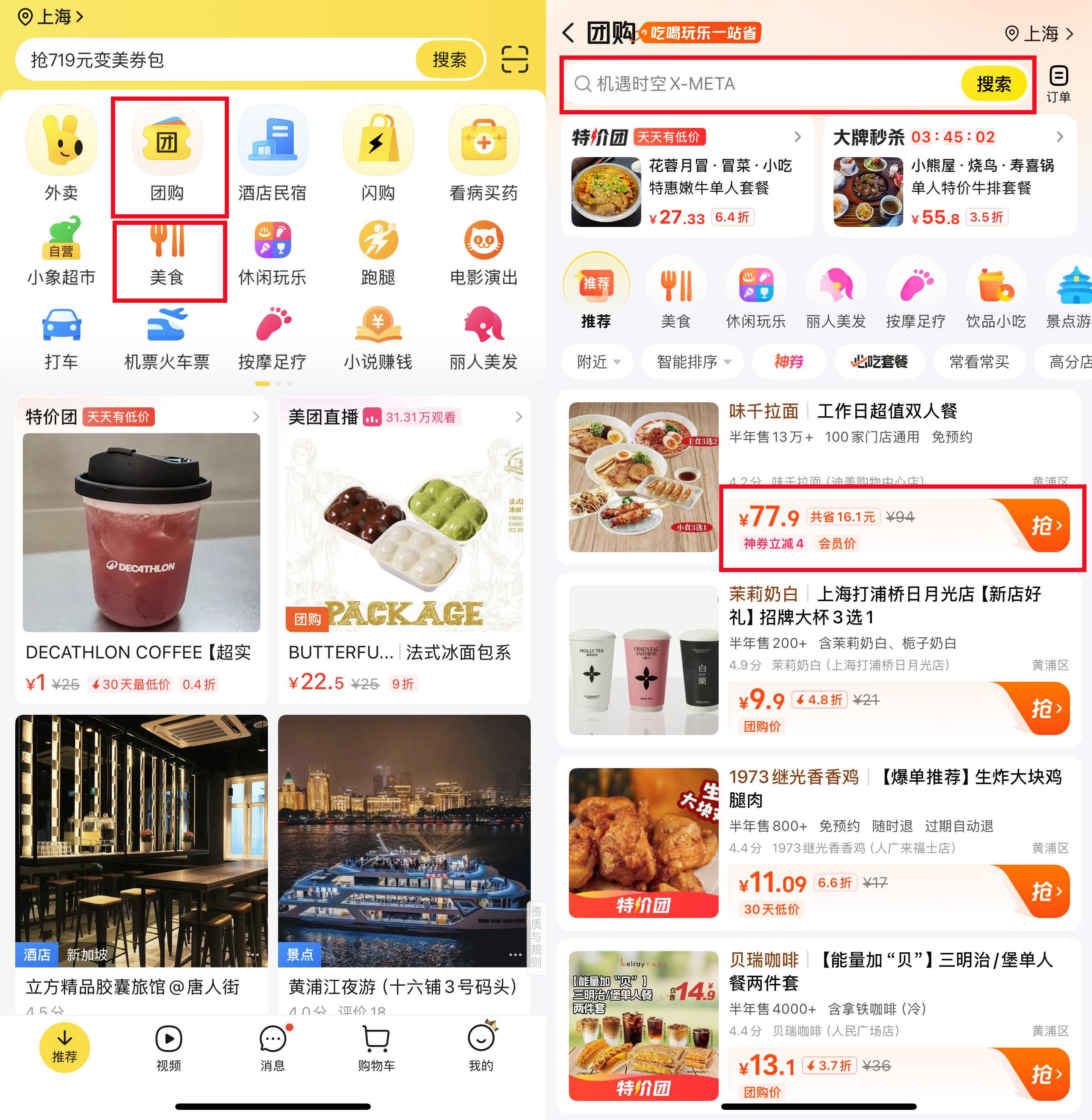
1. Find the dining offers section
Click on the dining offers section (look for icons with forked chopsticks or voucher symbols).
2. Search or browse
You can search for a certain food or see what's popular nearby. Offers usually show discounts clearly.

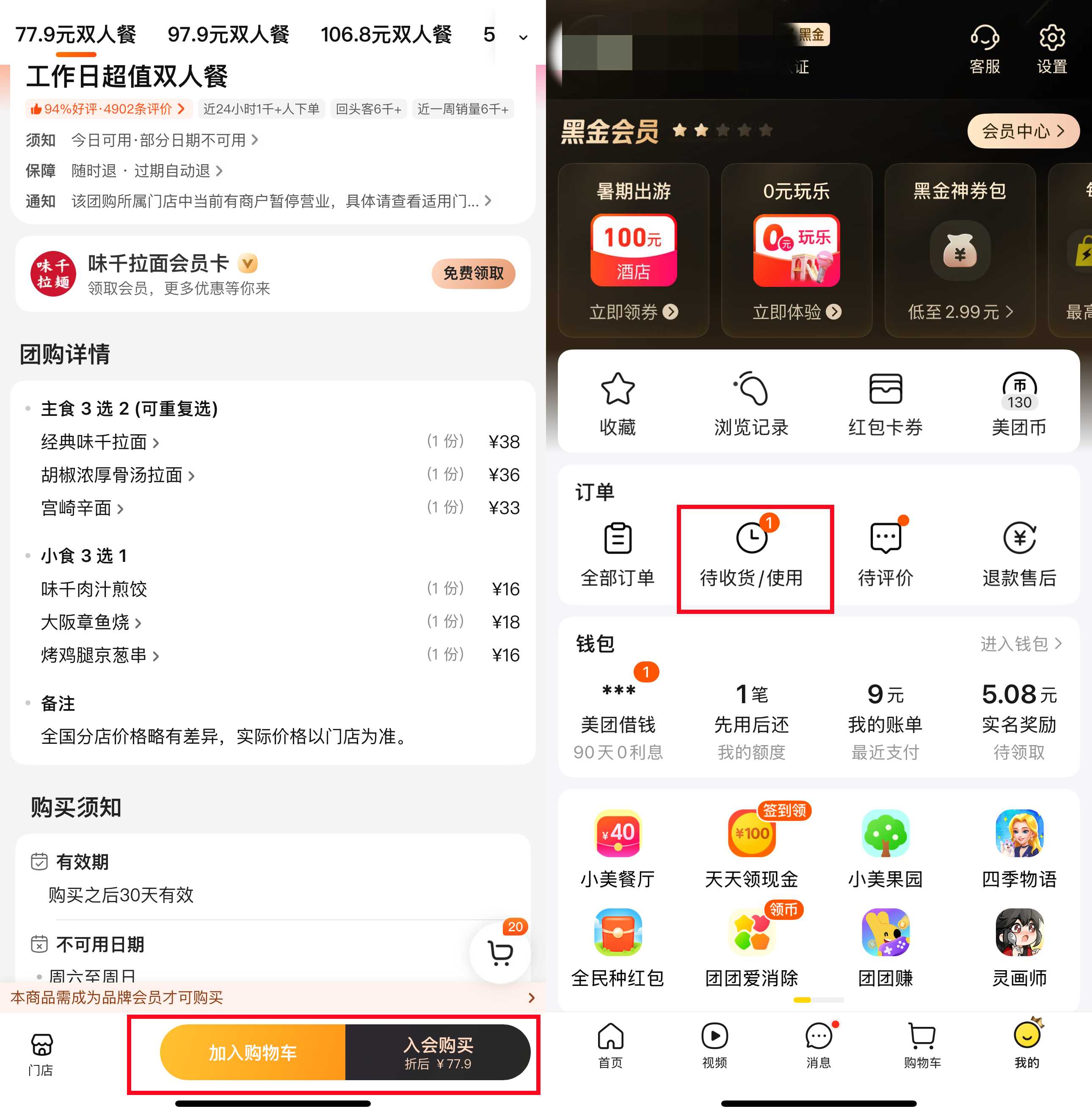
3. Check the details
Before purchasing, check:
- What's included in the transaction.
- Any time restrictions (some are lunch-only or weekdays only).
- Do you need to make a reservation in advance?
4. Purchase transactions
Click to pay with WeChat Pay or Alipay. The voucher will appear in your "To Receive/Use" section.

5. Go to the restaurant
Show your coupon code to the staff before ordering. They will scan it or enter the code into their system to write it off.
6. Enjoy your meal and save
Use the voucher value for your bill. If your bill exceeds the voucher, you usually only pay the extra amount.
How to use Meituan App to book an online ride-hailing app?
1. Find the ride-hailing area
Find the ride-hailing section (car icon).
Note: Meituan ride-hailing is not available in all cities, but it works well in many major cities.

2. Set your pickup location
The app will automatically locate you, or you can pin your location on the map.
3. Set the destination
Enter your destination in Chinese or copy-paste the address from Google Maps.
4. Select your car model
If you have luggage, options include a standard, comfort, or larger car.
5. Check the estimated fare and waiting time
You will see the estimated cost and how long it will take for the driver to arrive. Click Confirm.

6. Check your driver
View the driver's location on the map. If they call and you don't speak Chinese, you can send a message like "I'm here" (I'm here) or ask the hotel staff for help.
7. Confirm and pay
Payments are usually automatically deducted after the ride.
Other services on Meituan

Meituan is not just for food and rides. You can also book a variety of local services such as massages, haircuts, entertainment, mahjong parlors, movie tickets, and even workshops.
To use these services, simply navigate through the relevant sections within the app, select what you want, and check details like time and location. Upon arrival, simply show the QR code or voucher to the staff. Just like the catering offer, it's very convenient!
Is Meituan worth using in China?
Absolutely! If you want to eat well, save money, and experience local life without the usual tourist hassle, Meituan is a must-have app. It might take some time to get used to the language and setup, but once you’re familiar with it, it will make your trip much smoother. So yes, whether you’re a foodie, a busy traveler, or just looking for convenience, Meituan is definitely worth trying on your next trip to China. You may find yourself using it more than you expected!
Essential Chinese Apps
【🔥 8% OFF】Best China Hotels
From now until supplies last, if you register as a member on the Trip.com website or app, you can enjoy up to 8% off on hotels at Trip.com!
🔥 Exclusive China Train Coupon: Get 3% off now!
【5% OFF】China’s Must-Visit Attractions
Check out some of China’s must-see spots! 👀


389055 ditempah