

WeChat QR Code Guide for Foreigners

Oleh Tom
6 November 2026

Planning a trip to China? One thing you'll quickly notice is that QR codes are everywhere! From logging in to WeChat and adding new friends to paying for meals, shopping and even accessing certain services, scanning QR codes makes everyday life in China so much easier.
When I first explored how things work in China, I realised that knowing how to use WeChat's QR code scanner was pretty much a must! Don't worry if you're new to WeChat. In this guide, I'll show you how to find the scanner, scan QR codes to log in and pay, and let others scan your own QR code. Let's get started 📱
🔍 How to Find the QR Code Scanner on WeChat?
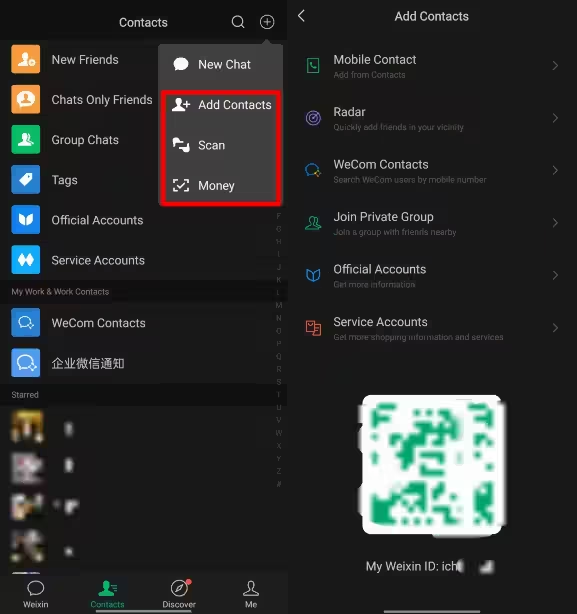
Step 1: Open WeChat
Launch the WeChat app on your phone and go to the Chats homepage.
Step 2: Tap the "+" Icon
Look for the + icon in the top-right corner of the screen and tap it to open the menu.
Step 3: Select "Scan"
Tap Scan from the dropdown menu. Your phone's camera will open, ready to scan QR codes.
Step 4: Scan the QR Code
Point your camera at the QR code and keep your phone steady. WeChat will automatically recognise the code and show you the relevant page or action.
💡 Quick Tip: If WeChat can't access your camera, check your phone settings and make sure camera permission is enabled for the app. Also, some QR codes may require an internet connection to open properly.
✈️Flights to China!
Kuala Lumpur to Chong Qing
Kuala Lumpur to Shang Hai
Kuala Lumpur to Hang Zhou
Lihat Semua Penerbangan


🔑 How to Scan a QR Code to Log In to WeChat?
Sometimes, when you log in to WeChat on a new device or computer, you'll be asked to scan a QR code using your existing WeChat account. Don't panic if you see this! It's simply an extra security step to verify that it's really you. 🔐
Step 1: Open WeChat on Your Computer or New Device
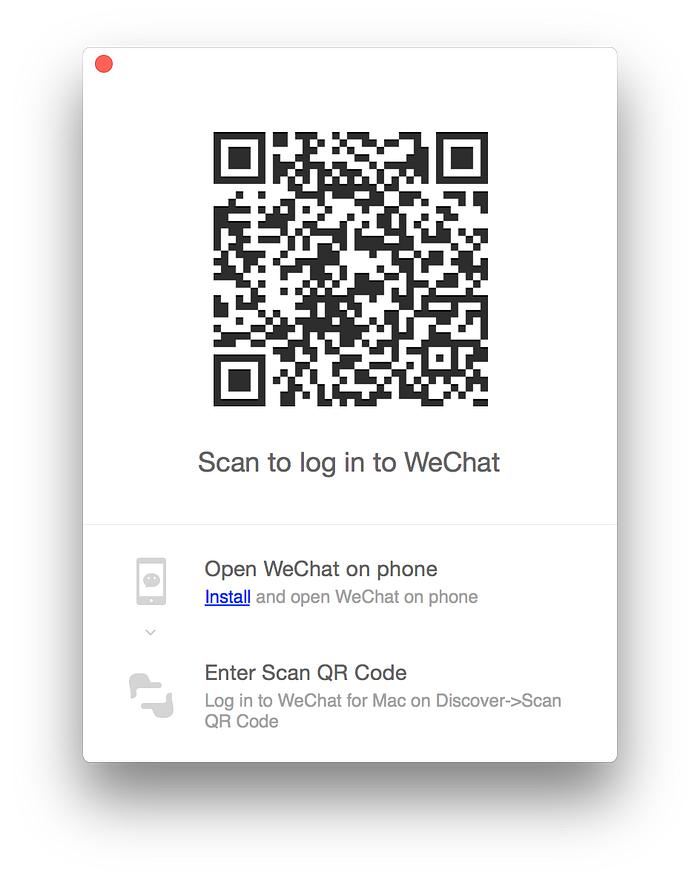
Go to the WeChat login page on your computer or open the app on your new device. Select the QR code login option if available.
Step 2: Display the Login QR Code
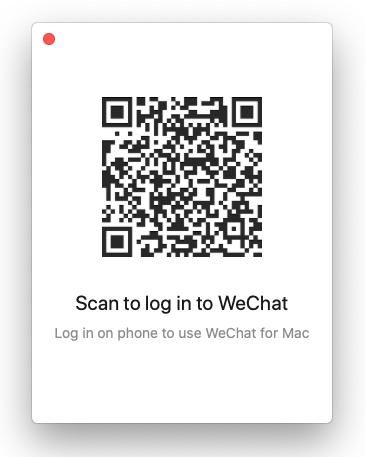
A unique QR code will appear on your screen. Keep the page open while you prepare your phone.
Step 3: Scan the QR Code with Your Phone
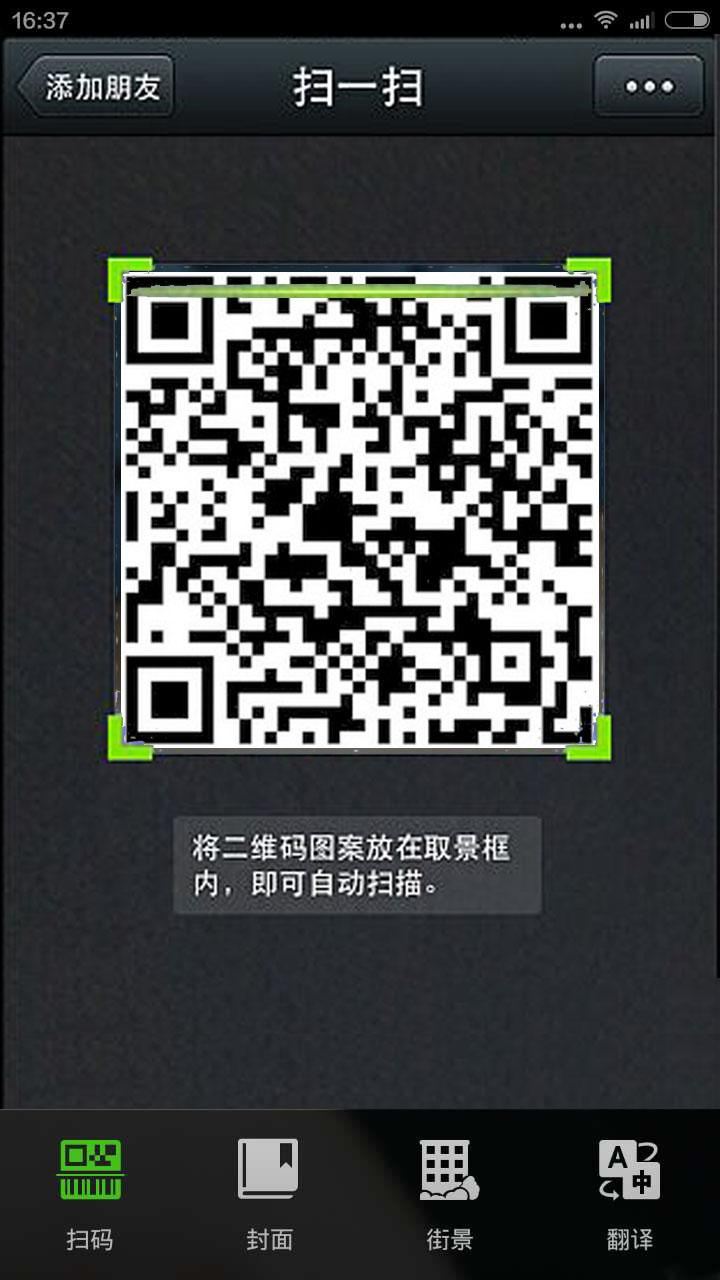
Open WeChat on your existing phone, tap the + icon in the top-right corner, select Scan, and point your camera at the login QR code.
Step 4: Confirm Your Login
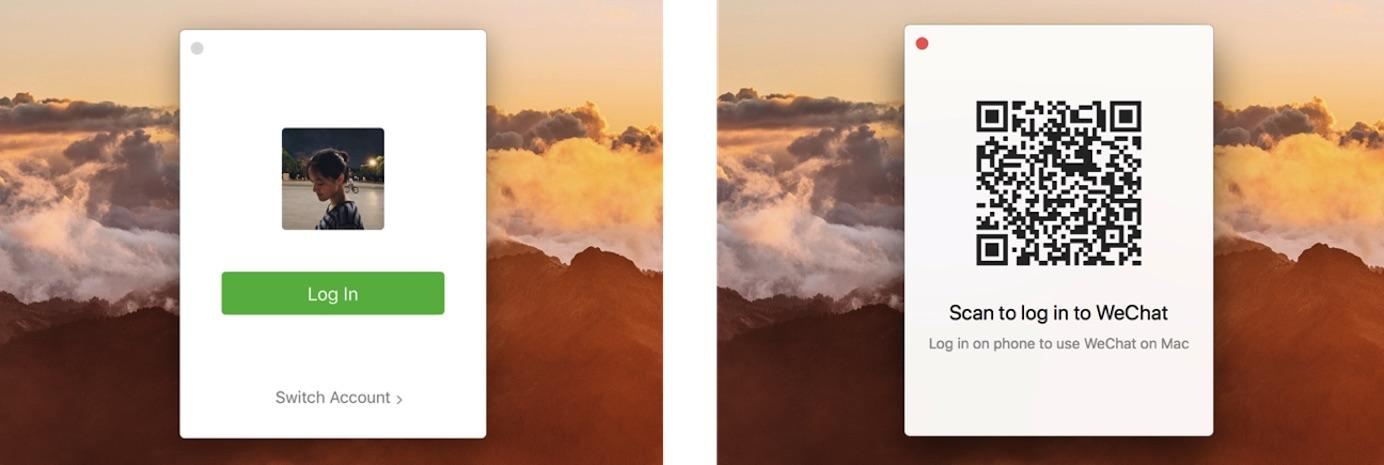
Follow the on-screen instructions on your phone and tap the confirmation option if prompted. Once approved, your computer or new device should be logged in.
💡 Quick Tip: Login QR codes are usually time-sensitive, so scan them promptly. If the code expires, simply refresh the login page to generate a new one. Also, only approve login requests from devices you recognise to keep your WeChat account safe!

eSIM 5G China Daratan/Hong Kong/Macau | Pelan Harian / Data Jumlah | Caj 24 Jam | Kod QR
4.6/5
22334 ulasanSemasa pengembaraan saya mengelilingi dunia, saya melawat China untuk menziarahi tempat-tempat yang berkaitan dengan Romance of the Three Kingdoms kesayangan saya. Oleh itu, tempat-tempat yang saya kunjungi bukanlah bandar-bandar utama seperti Beijing atau Shanghai, tetapi kawasan tempatan yang jarang dikunjungi oleh pelancong atau penduduk tempatan. Walau bagaimanapun, saya dapat menggunakannya tanpa sebarang masalah, yang sangat membantu! Terima kasih kepadanya, saya mempunyai perjalanan terbaik dan mencipta kenangan yang akan saya hargai selama-lamanya.☀️

eSIM 5G/4G di 10 negara Asia | Sokongan berbilang rangkaian, menyokong ChatGPT & Peta Google | 500MB/hari - jumlah 50GB | 1-30 hari | Pengebilan 24 jam | Kod QR
4.6/5
6977 ulasanPengalaman eSIM yang Hebat! ⭐⭐⭐⭐⭐
Sangat mudah dan senang digunakan! Proses pengaktifan adalah pantas dan mudah, dan sambungan internet juga pantas dan stabil sepanjang perjalanan kami. Ia bagus untuk kekal berhubung tanpa perlu menukar kad SIM fizikal. Berbaloi dengan wang dan pastinya menjadikan perjalanan lebih mudah. Amat disyorkan, dan pasti akan membeli lagi untuk perjalanan kami yang seterusnya!

eSIM 5G Cina continentale | Supporta Google Maps / ChatGPT | Piani dati giornalieri/totali | Fatturazione 24 ore | 1–365 giorni | Codice QR
4.6/5
31705 ulasanSaya cadangkan anda mendapatkan yang 100GB dengan segera. Saya sudah biasa dengan eSIM; ia sangat mudah dan kelajuannya sangat baik. Dan yang paling penting, anda tidak perlu sentiasa menukar kad SIM. Ia berfungsi tanpanya.

Tanah Besar China 5G eSIM | Pas Harian/Pakej Data Keseluruhan | Pengebilan 24 Jam | 1–365 Hari | Kod QR
4.6/5
69525 ulasanIa sangat mudah digunakan di Wilayah Beijing dan Yunnan.
eSIM China | 1-30 Hari | Sehingga 60GB Data Kelajuan Tinggi | Liputan di Rangkaian Utama
4.3/5
119 ulasanIsyaratnya sangat bagus, ia sangat mudah dibuka dan digunakan. Harganya agak lebih baik daripada membeli kedai biasa. Dan kualiti isyarat jauh lebih baik
💳 How to Scan QR Codes to Pay with WeChat Pay?
One thing I found really convenient when travelling in China is how easy it is to pay using WeChat Pay! 💰 From restaurants and convenience stores to street food stalls, many merchants accept QR code payments. You don't have to worry about carrying too much cash around.
Method 1: Scan the Merchant's QR Code
Step 1: Find the Merchant's Payment QR Code
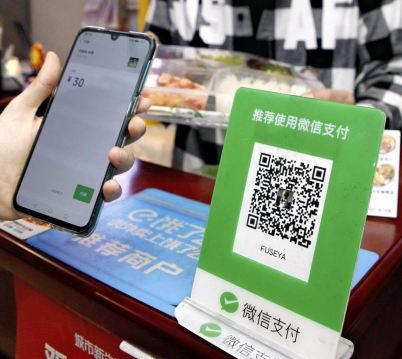
Look for a WeChat Pay QR code displayed at the cashier, restaurant counter or payment stand.
Step 2: Open WeChat Scan
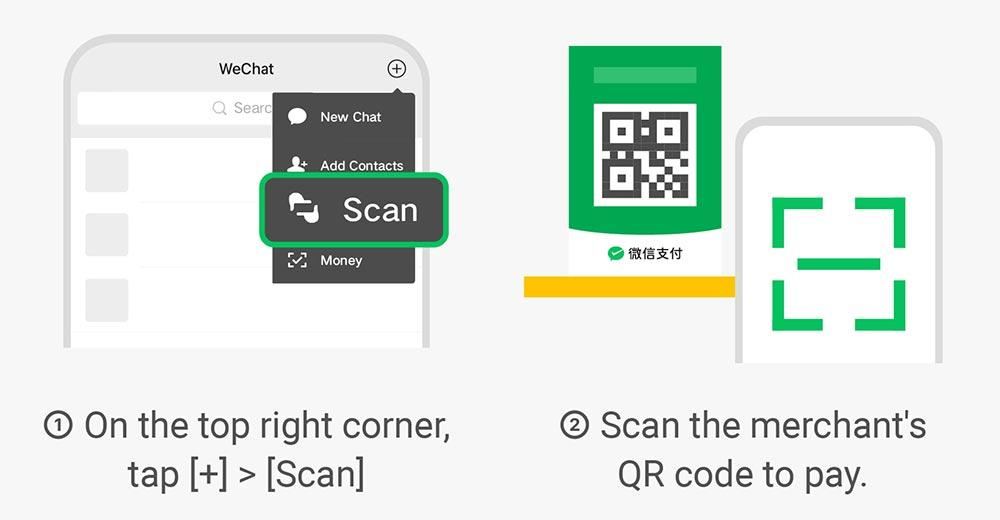
Open WeChat, tap the + icon at the top right and select Scan. Point your camera at the merchant's QR code.
Step 3: Enter the Payment Amount
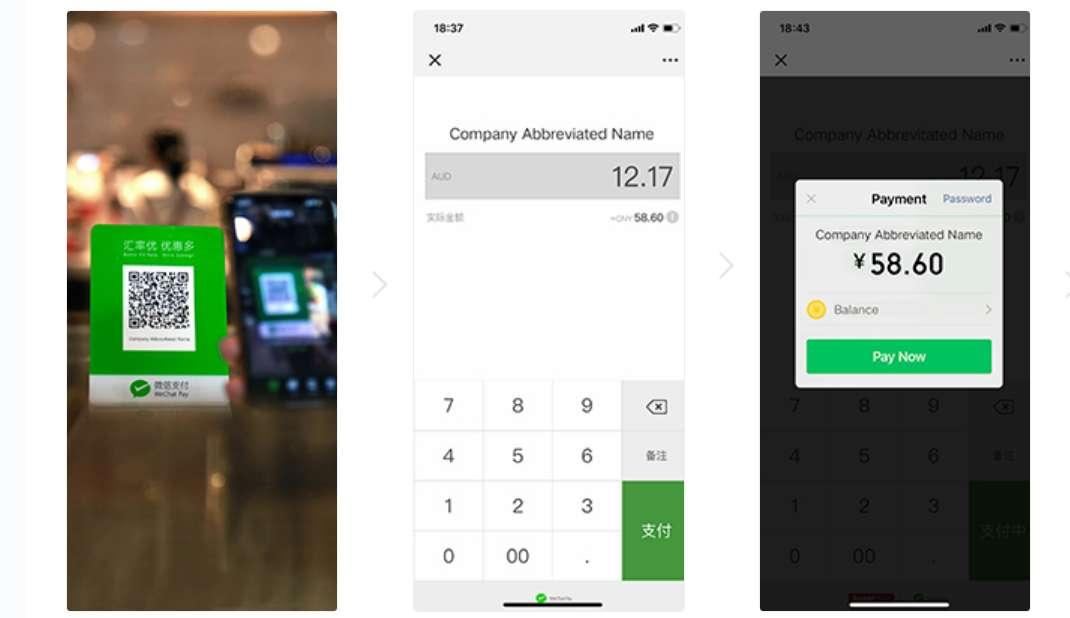
If it's a merchant QR code that requires you to enter the amount, key in the correct amount and double-check it before proceeding.
Step 4: Confirm Your Payment
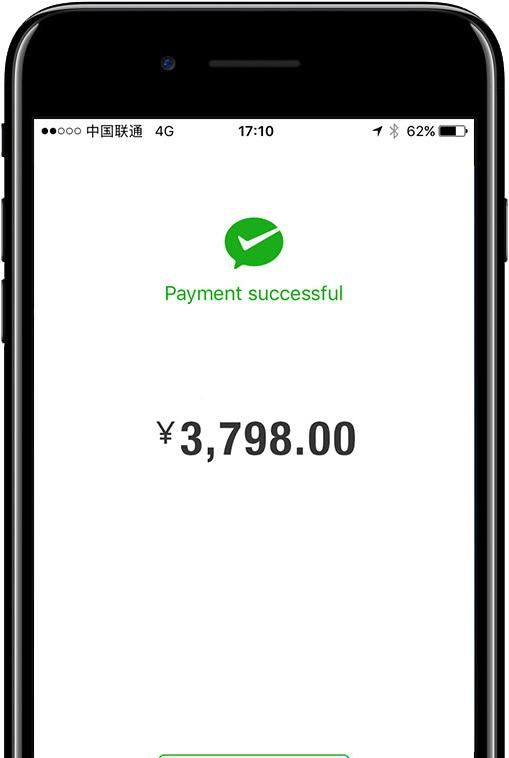
Select your linked payment method, follow any verification instructions and confirm the transaction. Wait for the payment success message before leaving.
Method 2: Let the Merchant Scan Your Payment QR Code
Step 1: Open WeChat Pay
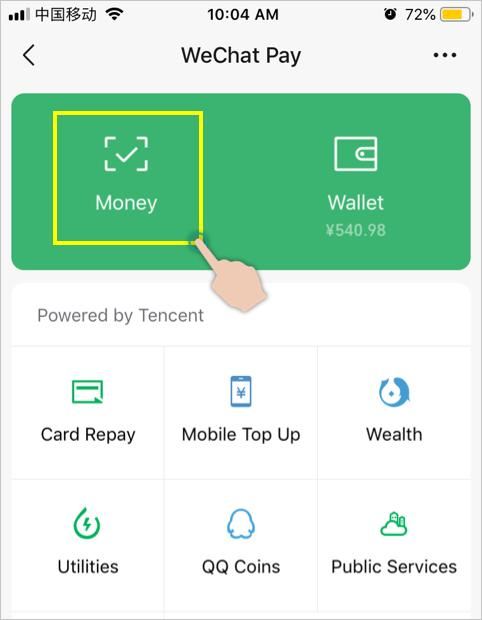
Open WeChat and go to Me → Services → Money (the menu name may vary depending on your app version).
Step 2: Show Your Payment Code
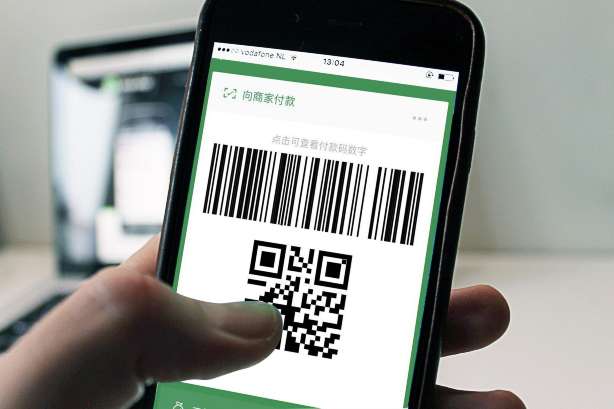
Your payment barcode and QR code will appear on the screen. Show this page to the cashier.
Step 3: Let the Cashier Scan It
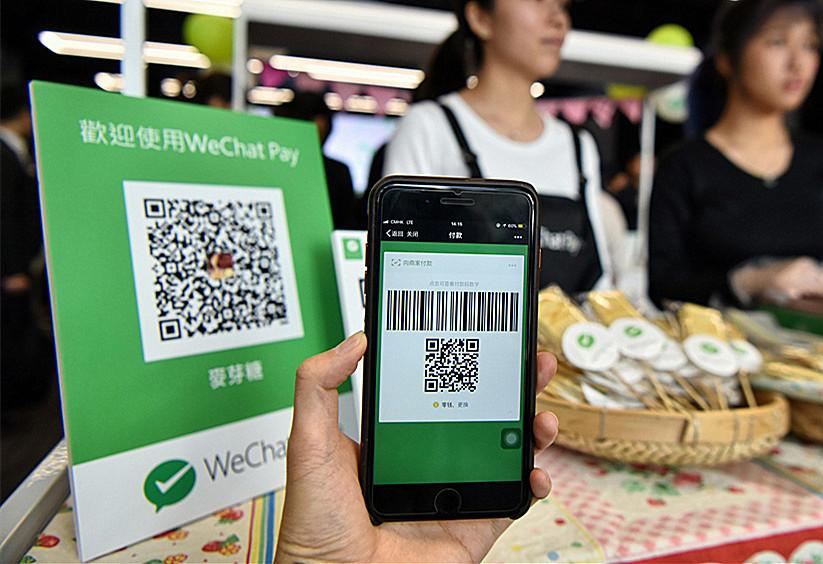
The cashier will scan your payment code using their payment device. You usually don't need to enter the payment amount yourself.
Step 4: Check Your Payment Status
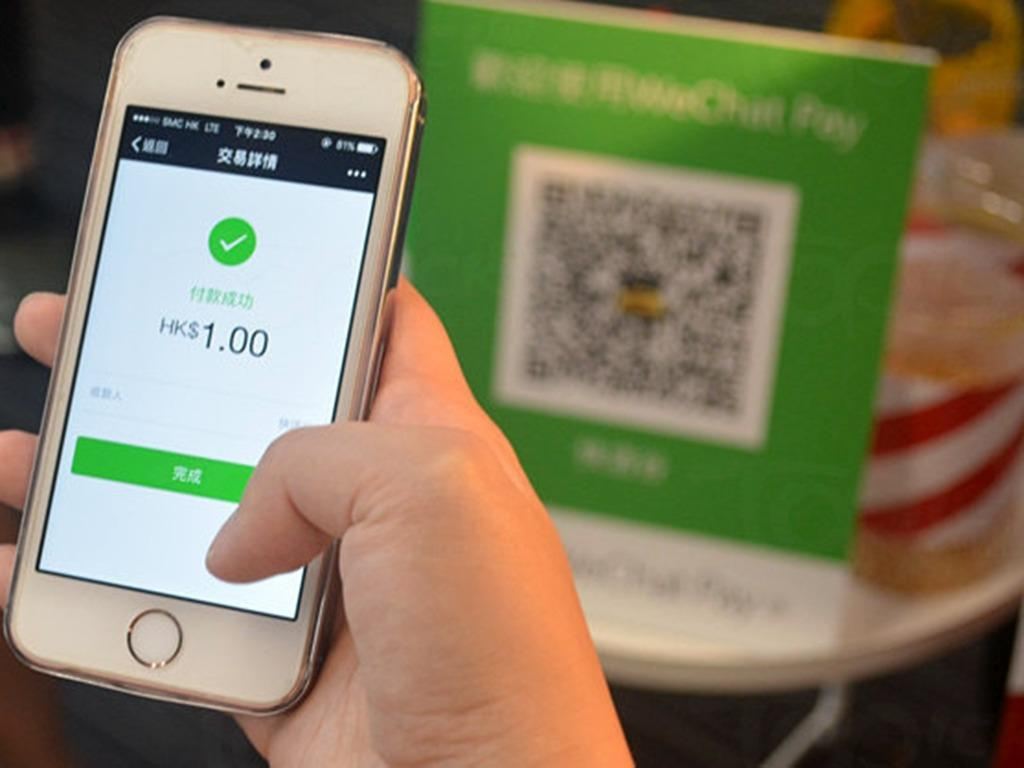
Wait for the payment confirmation on your phone and check that the correct amount has been deducted.
💡 Can Foreigners Use WeChat Pay in China?
Yes! Foreign visitors can generally link eligible international bank cards, such as Visa and Mastercard, to WeChat Pay. However, payment availability depends on your card, account verification and transaction type.
A few things to prepare before your trip:
- Link your eligible international bank card to WeChat Pay.
- Complete the required identity verification.
- Check your card's overseas transaction settings.
- Keep an alternative payment method handy in case a transaction doesn't go through.
📲 How to Let Others Scan Your WeChat QR Code?
Besides scanning other people's QR codes, you can also show your own WeChat QR code and let others scan it! 📱 This is especially useful when you want to add new friends in China, share your contact details or receive payments.
Method 1: Let Others Scan Your Personal QR Code to Add You as a Friend
Step 1: Open Your WeChat Profile
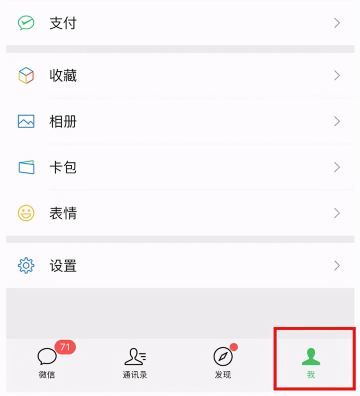
Launch WeChat and tap Me at the bottom-right corner of the screen.
Step 2: Tap Your Profile and QR Code
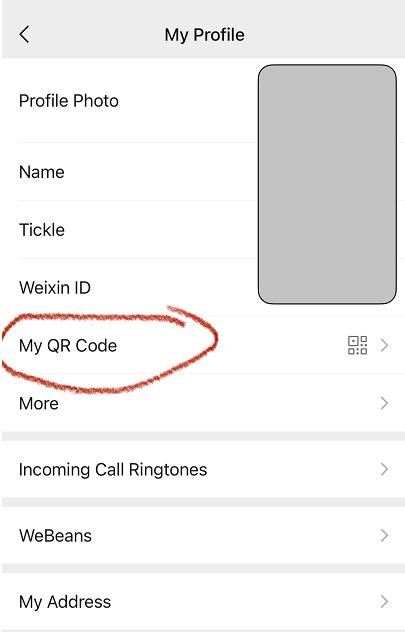
Tap your profile name or profile picture, then look for My QR Code to open your personal QR code.
Step 3: Show Your QR Code
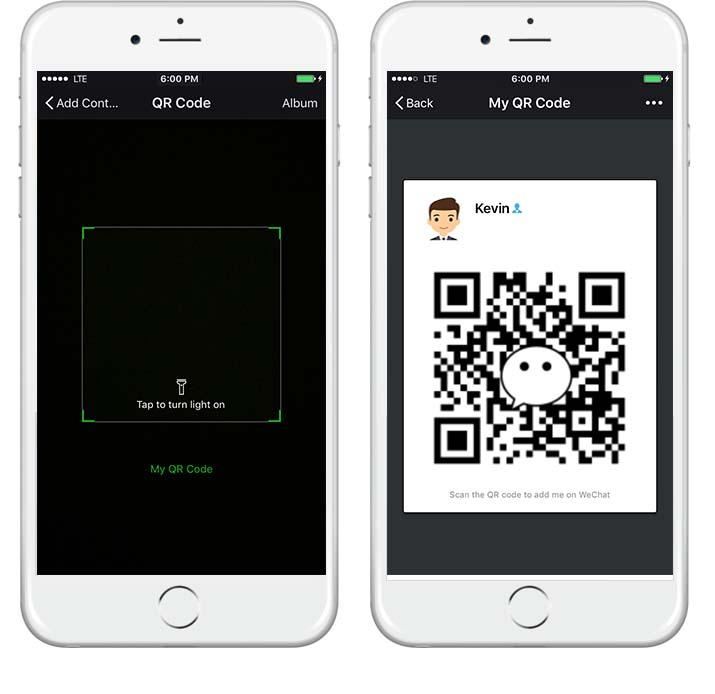
Let the other person scan your QR code using their WeChat app. They should be directed to your profile.
Step 4: Confirm the Friend Request
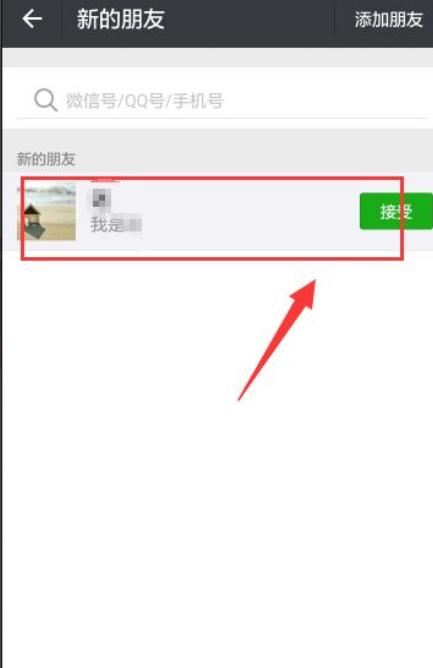
The other person can send you a friend request. Accept it to start chatting on WeChat!
Method 2: Let Others Scan Your WeChat Pay Payment Code
Step 1: Open WeChat Pay
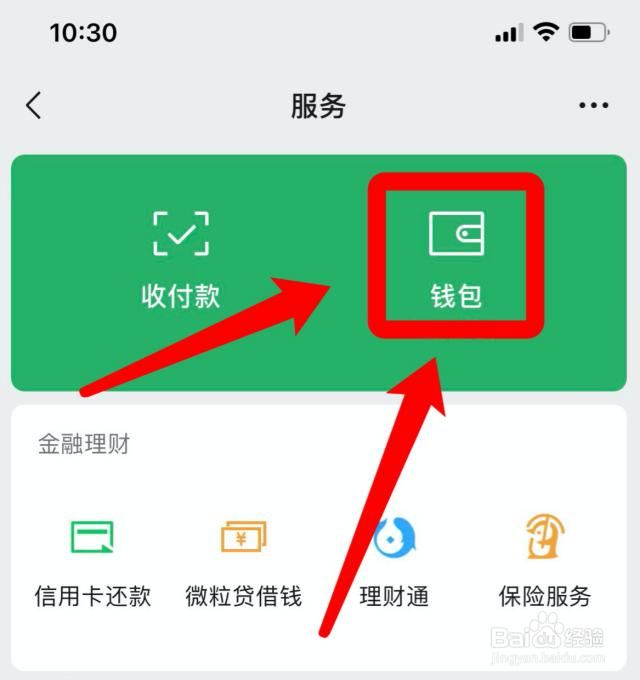
Go to WeChat → Me → Services → Money to access your payment code.
Step 2: Display Your Payment Code
Your payment barcode and QR code will appear on your screen. Show it to the cashier.
Step 3: Let the Cashier Scan It
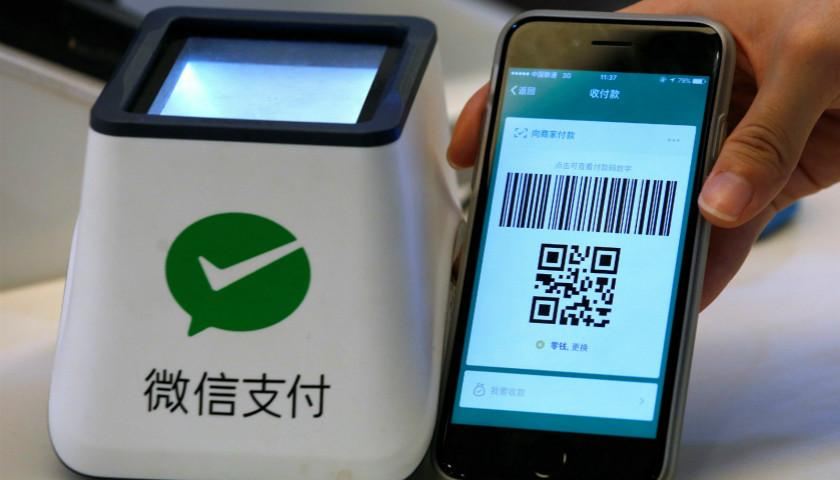
The cashier will scan your payment code to process the transaction. Follow any additional verification instructions if required.
Step 4: Check Your Payment Confirmation
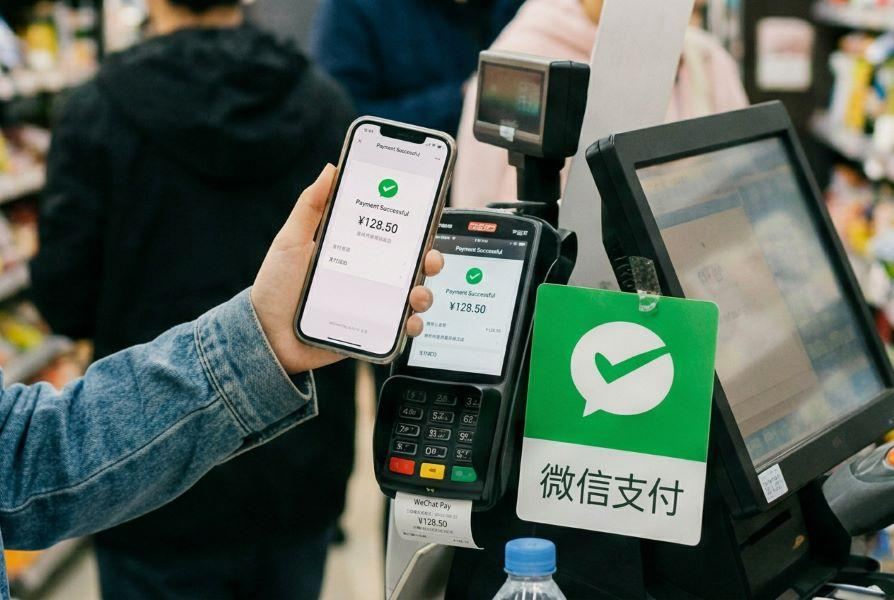
Once the payment is completed, check your WeChat notification to make sure the correct amount has been deducted.
🛍️ What Can You Scan with WeChat in China?
🔍 QR Code Type | ✅ What Can You Do? |
|---|---|
Restaurant QR Codes | Scan to view digital menus, order dishes and sometimes pay for your meals without waiting for a waiter. |
Shop & Payment QR Codes | Scan merchants' payment codes to pay for snacks, drinks, souvenirs and everyday shopping. |
WeChat Mini Program QR Codes | Open Mini Programs to access services such as food ordering, shopping, hotel bookings and ticket reservations without downloading separate apps. |
Public Transport QR Codes | Access supported metro and bus services through transport Mini Programs. Some require you to generate a ride QR code instead of scanning one. |
Attraction & Ticket QR Codes | Access attraction information, digital guides, booking services or eligible electronic tickets. |
Wi-Fi QR Codes | Access Wi-Fi network details or connect to supported networks at hotels, cafes and restaurants. |
Lihat Semua Tarikan
 9774 ditempah








🏨 [Get Deals] Best Hotels in China

-
-
-
-
Cari Hotel
🔥 Hotel Coupons: Exclusive Hotels Deal for New Users
Discover the world with trip.com! Book the perfect hotel anywhere in the world and get an unbeatable 10% discount if you're a first-time user! If this is your second time using it, you will receive a 5% discount! Download our app now and start planning your next trip with ease.
Just click this link and download the Trip.com App, after successfully registering as a member, use it when you place an order!
🔥Save More with Up to 5% Off
Use our promo code to enjoy up to 5% OFF on your attraction tickets, tours and eSIMs!
💡 Tips for Foreigners Using WeChat QR Code
💡 Tips | ❓ What You Should Know |
|---|---|
Set Up WeChat Before Your Trip | Download WeChat, register your account and complete any required verification before flying to China. |
Link Your Bank Card in Advance | Add an eligible international Visa or Mastercard to WeChat Pay and check that your payment method is ready to use. |
Prepare Your Internet Connection | Get a China eSIM or another suitable internet option so you can scan QR codes and access WeChat Mini Programs while travelling. |
Allow Camera Permissions | Make sure WeChat has permission to access your phone's camera, otherwise you may not be able to scan QR codes. |
Check Before Scanning | Only scan QR codes from trusted shops, restaurants and official service providers. Avoid suspicious or unfamiliar codes. |
Prepare an Alternative Payment Method | Not every merchant accepts WeChat Pay or international bank cards, so keep some cash or another payment option handy. |
Keep Your Phone Charged | You'll rely on your phone for payments, maps, bookings and communication, so bring a power bank when exploring China. |
📱 Quick Reminder: Don't Forget Your China eSIM!
Imagine arriving in China, finding a delicious restaurant and then realising you can't access the internet to scan its menu QR code! 😂 To avoid this, I'd recommend getting your China eSIM ready before departure. With a suitable China eSIM, you can stay connected to check maps, scan QR codes, access WeChat services and share your travel moments without worrying about finding public Wi-Fi. Just remember to check whether your chosen plan supports the apps and services you need.
Lihat Semua Tarikan






What to Prepare for a Trip to China?
- Visa & Entry Tips Malaysians transiting through China to a third country can usually apply for a 24-hour or 240-hour visa-free transit; in addition, a 30-day visa-free period has been implemented between China and Malaysia. Learn more about China Arrival Card to land in China easily.
- Getting Connected VPNs are vital for accessing Google, WhatsApp, Instagram, etc in China. Set one up before arriving. China eSIMs are the easiest option for data and bypassing restrictions.
- Money Exchange & Tax Refunds Exchange money in China banks (better rates than airports). ATMs accept foreign cards, but notify your bank first. For tax refunds, spend over ¥500 at stores with a "Tax-Free" sign. Keep receipts and get forms stamped at customs before departure.
Must-Have Apps in China
- China Payment Apps Forget cash. Chinese use Alipay (I like it better) or WeChat Pay to pay for everything in China. Scan a QR code at noodle stalls, metros, even temples. Link your foreign Visa/Mastercard before landing.
- China Map Apps Amap (Gaode Map) & Baidu Map (limited English) is what locals use, with real-time navigation, metro/bus routes, and traffic updates. Apple Maps does a good job too if you're already an IOS user.
- China Transport Apps Street taxis are cheap, but drivers rarely speak English. Use China Taxi App like DiDi (China’s Uber)—set your destination in English, pay by Alipay.
- China Travel Apps 15+ China trips taught me: Use Trip.com. It's the best English app for booking China trains/flights/hotels + finds Trip.com deals.
- China Dating Apps Locals use Tantan (China’s Tinder) and Momo. WeChat’s “People Nearby” works too, but expect language barriers unless your Mandarin’s decent.
- China Food App Use Meituan (also helps find nearby restaurants) or Ele.me for food delivery—both have English mode. No English menu in restaurants? Scan the QR with Alipay's translator.
Best Places to Visit in China: Top Cities & Travel Guide
Discover the best places to visit in China, from Beijing and Shanghai to Xi’an, Chengdu, Guilin, Hangzhou, and Guangzhou. Plan your first China trip with top attractions, travel tips, halal-friendly areas, and itinerary ideas.
20 November 2026
China Taxi Guide: Fares, Apps, Payment Methods & Travel Tips
Planning a trip to China? This complete guide covers everything first-time visitors need to know about taxis in China.
20 November 2026
How to Exchange Money in China 2026: Payment Tips for China Travel | Trip.com
Traveling to China? Learn where & how to exchange money in China, use Alipay & WeChat Pay, and exchange CNY easily.
20 November 2026
Visa-Free Countries for Chinese Passport Holders 2026 | Complete Guide
Discover where Chinese passport holders can travel visa-free in 2026. Get the full list of countries, entry requirements, and practical travel tips for your next trip.
20 November 2026
❓FAQs: WeChat Scan QR Code
-
1. How do I scan a QR code on WeChat?
-
2. Can foreigners scan QR codes using WeChat in China?
-
3. Can I use WeChat to scan QR codes without logging in?
-
4. Can foreigners use WeChat to scan and pay in China?
-
5. Why can't WeChat scan my QR code?
Disclaimer: This article has been provided by an individual contributor or third party platform. If there is any discrepancy regarding the copyright, please contact us directly and we will delete the content immediately.