




Apple Maps in China: Can You Use It? (2026 Guide)

Gambar Profil Penulis
Apple Map in China

Stick with Apple Maps if you have an iPhone! Apple Maps in China is a ​Gaode Maps wrapper in English — same accurate data, zero Mandarin hassle. iOS users should 100% use it over struggling with local apps. Just don’t panic if it looks glitchy before you arrive.

Does Apple Maps Work in China?

Does Apple Maps Work in China?


Yes, — but only once you’re physically in China. Here’s why:

Why directions show “unavailable” when you’re NOT in China

Apple Maps outside China uses Apple’s own data (which China blocks). But once you land in mainland China, it auto-switches to Amap data in English - AKA Gaode Maps (China’s #1 map app) – so directions magically work. ​No VPN needed.

“Wait, do I need a VPN? Is it in English?”​

  • No VPN needed — Apple Maps works in China without one.
  • Full English interface — menus, buttons, and most place names (like “The Bund” or “Beijing Capital Airport”) stay in English. Some local spots might show Mandarin names, but you can search using ​Pinyin (e.g., “Tiananmen Square” instead of 天安门广场).
🎁 Search Cheapest flights to China & book the best China hotels! Get fast data with China eSIM.

How to Use Apple Maps in China

How to Use Apple Maps in China

Here’s how to make Apple Map work in China:

Just arrive in China (seriously, that’s it)

Directions, transit routes, and live traffic ​unlock automatically once you’re in mainland China. If you’re checking from Hong Kong/Taiwan/abroad, it’ll look broken — ignore that.

How to Use for English speakers

  • ​Search with landmarks (“Shanghai Disneyland”, “Sanlitun Bar Street”).
  • ​Use Pinyin for streets/areas (search “Nanjing Lu” instead of 南京路).
  • ​Drop a pin if you’re lost — Apple Maps shows your live location even without Mandarin addresses.
  • ​Copy-paste Chinese addresses from your hotel/WeChat messages into Apple Maps.

Can I use Apple Maps offline?

Apple added ​offline maps in iOS 17 (late 2023) — and it’s finally working smoothly in China! Next chapter will talk about how to download.


🚆Search High Speed Train in China🚆

How to Download Offline Apple Maps for China

How to Download Offline Apple Maps for China

No data? No problem. Here’s how to save maps for offline use:

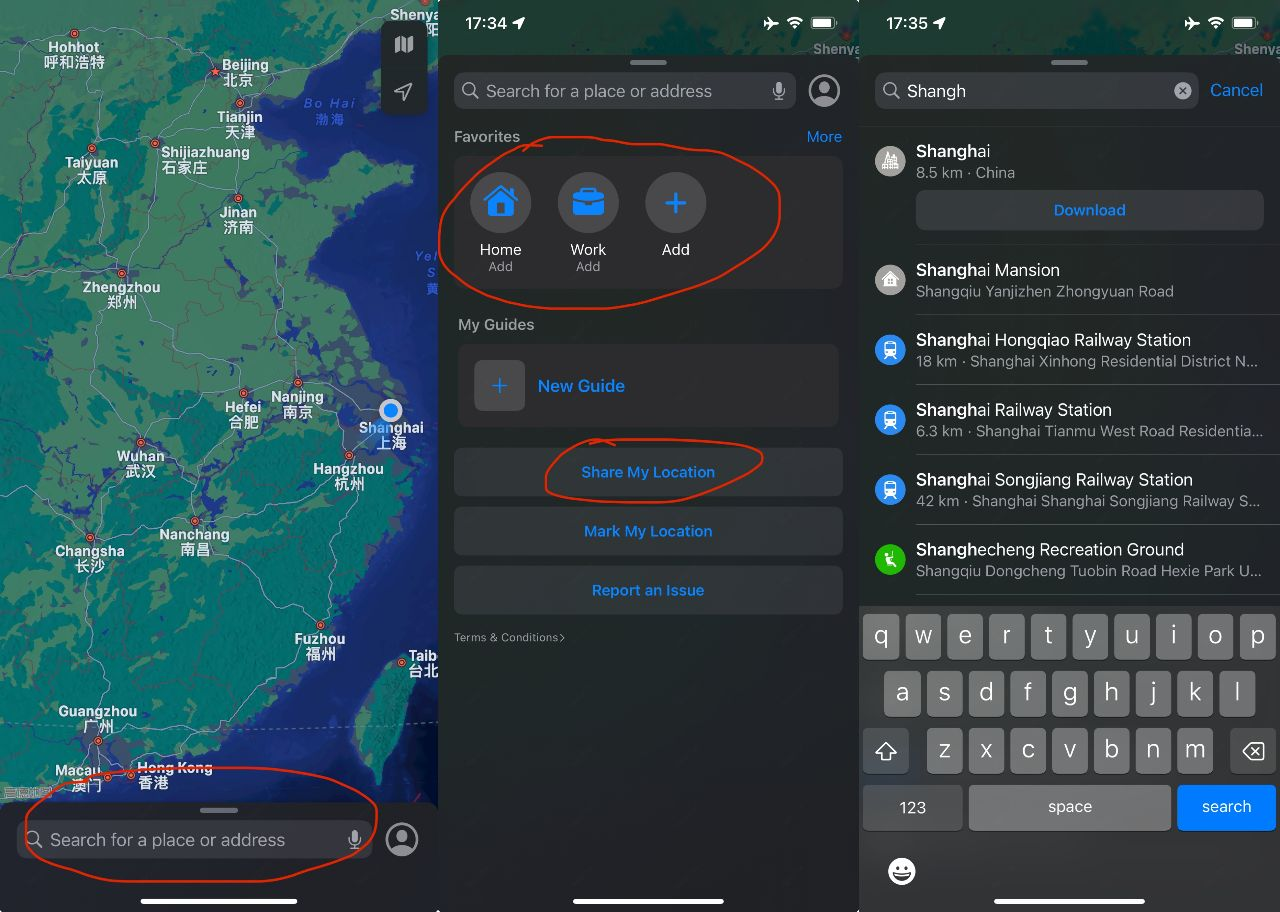
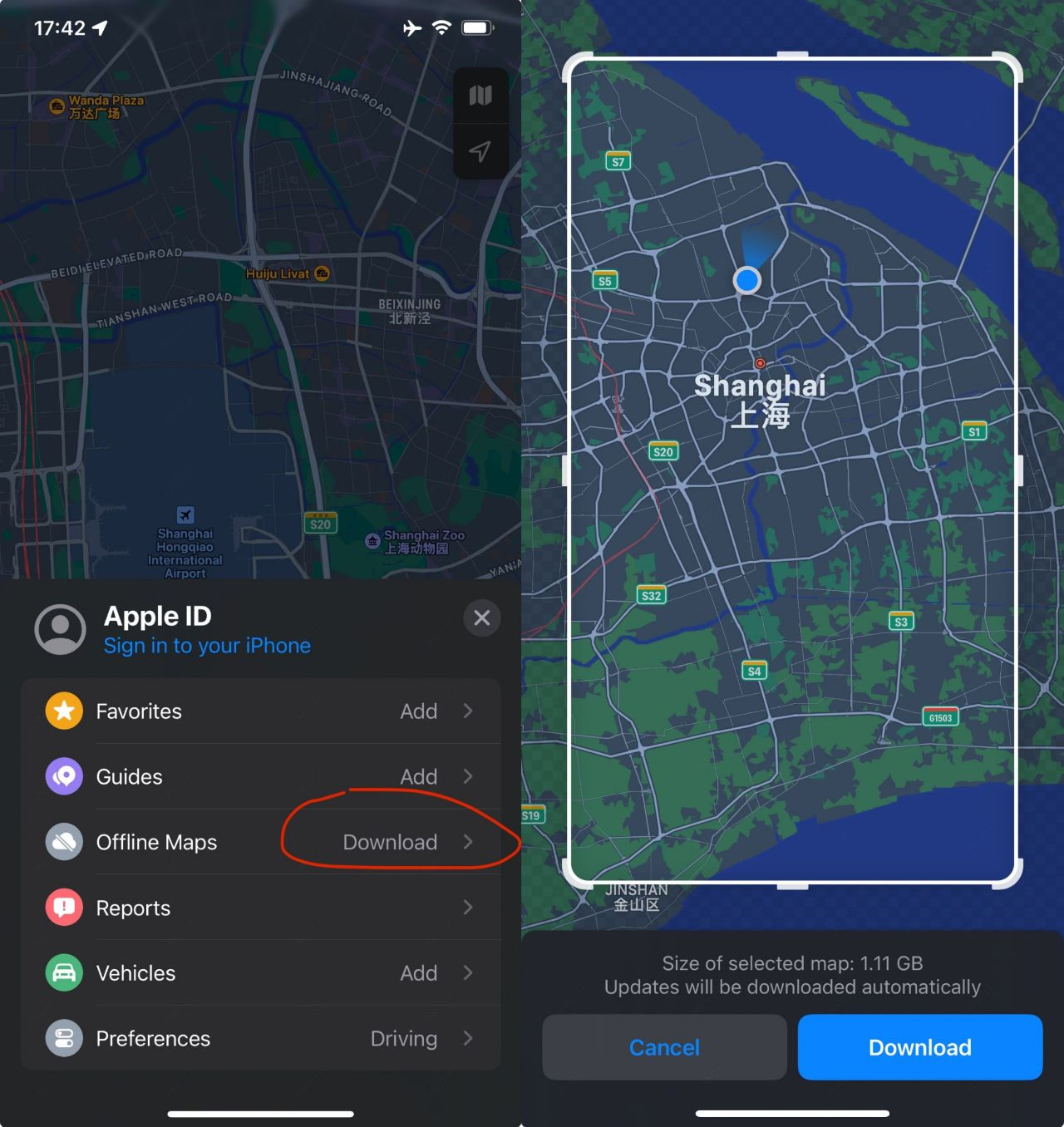
  1. Open Apple Maps → Tap your ​profile picture (top right).
  2. Tap ​​“Offline Maps Download”​.
  3. Search for your city (e.g., “Shanghai”) → Adjust the rectangle to cover the area you need.
  4. Check the ​file size (e.g., “Beijing downtown” ≈ 150MB).
  5. Tap ​​“Download”​ (use Wi-Fi — these files can be big!).

Works in China? ✅ Yes! Offline maps include:

  • Roads, landmarks, subway stations.
  • Saved locations (hotels, restaurants you star).

What’s NOT included offline:

  • Live traffic/public transit updates.

✅Need internet to use map apps in China? I've found the best data plans at cheap prices - no hidden fees, just fast & reliable data!

Lihat Semua Tarikan
633372 ditempah
4.6/521663 ulasan
China Daratan 5G eSIM | Menyokong TikTok & Google Maps | Pelan harian / Pelan jumlah data | 1–365 hari | Pengebilan setiap 24 jam | Kod QR
Kad Telefon
€ 0.19
484120 ditempah
4.6/518702 ulasan
eSIM 5G China Daratan/Hong Kong/Macau | Pelan Harian / Data Jumlah | 1-30 Hari | Caj 24 Jam | Kod QR
Kad Telefon
€ 0.19
306841 ditempah
4.5/58930 ulasan
China Daratan/Hong Kong/Macao/Taiwan | eSIM 5G | Pas Harian/Pakej Jumlah | 24 Jam | 1-30 hari | Kod QR
Kad Telefon
€ 0.09
13086 ditempah
4.5/5621 ulasan
Tanah Besar China/Hong Kong/Macau 4G/5G eSIM | Pas Harian/Pakej Data Keseluruhan | Pengebilan Hari Kalendar | Kod QR
Kad Telefon
€ 0.08
65867 ditempah
4.6/53398 ulasan
eSIM 5G/4G 8 Negara Asia | Pakej Harian/Jumlah | 500MB/hari - Jumlah 50GB | 1-30 hari | 24 jam | Kod QR
Kad Telefon
€ 0.07
🎁 Search Cheapest flights to China & book the best China hotels! Get fast data with China eSIM.

Annoying Problems (and Fixes) for Apple Maps in China

Annoying Problems (and Fixes) for Apple Maps in China

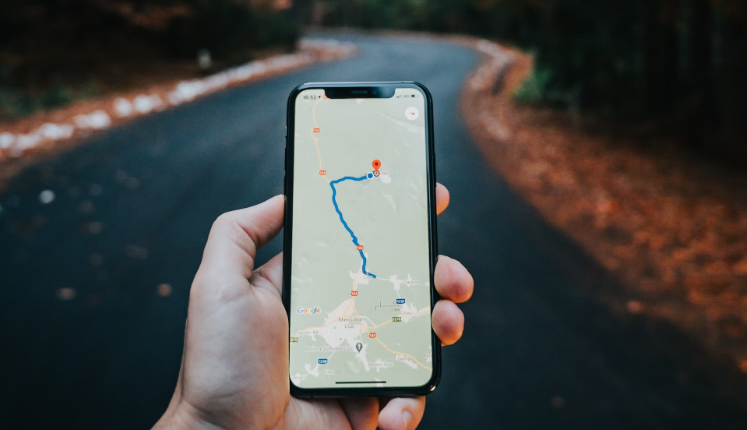
Credit: Unsplash, Antonio Groß

1. “I can’t find this tiny street!”​

  • Why: Gaode uses Mandarin spellings for obscure spots.
  • Fix: Search the ​nearest subway station or big landmark, then ask locals for help (use Google Translate’s camera mode).

2. “Why is my location wrong?”​

  • Why: GPS can glitch in dense cities (blame skyscrapers 🏙️).
  • Fix: Toggle Airplane Mode on/off or restart the app.

3. “The app crashed mid-route!”​

  • Why: Apple Maps sometimes struggles with long routes (e.g., 3-hour drives).
  • Fix: Screenshot your route beforehand or split it into shorter segments.

Apple Maps vs. Local Map Apps for China: What Actually Works?

Apple Maps vs. Other Map Apps for China: What Actually Works?

Credit: Unsplash,Tamas Tuzes-Katai


Apple Maps is the easiest for foreigners who have IOS devices.

1. Apple Maps (BEST, The “Amap in English”)

Why it’s best for iOS users:

  • Uses ​Amap- Gaode Maps data (China’s #1 app) but fully translated into English.
  • No Mandarin needed: Search landmarks (“The Great Wall – Badaling”), streets in Pinyin (“Wangfujing”), or even paste Chinese addresses.
  • Works without VPN and updates live traffic, subway/bus routes, and walking directions.

But…

  • ❌ Less detail on tiny local shops vs. Gaode.

If you have an iPhone, ​use Apple Maps — same accuracy as Gaode/Baidu but zero language stress.

2. Gaode Maps (高德地图) – The OG Local App

Why locals swear by it:

  • Live traffic alerts, ​motorcycle routes, real-time bus tracking.
  • Integrated with Alipay/WeChat for taxi hailing, food delivery, etc.

But for foreigners:

  • ❌ Mandarin-only interface (no English toggle).
  • ❌ Address searches require Chinese characters/Pinyin.

Use Gaode if: You need hyper-local features (e.g., live scooter routes) and have a Mandarin-speaking friend to help.

3. Baidu Maps (百度地图) – Gaode’s Less Cool Sibling

Same issues as Gaode but worse:

  • Clunky English translation (spoiler: it’s barely usable).
  • Ads. So. Many. Ads.

Skip unless: You’re desperate and stuck with an Android phone.

See all the China map apps compared in the following blog 👇

🔥 Hotel Coupons: Exclusive Hotels Deal for New Users

Discover the world with trip.com! Book the perfect hotel anywhere in the world and get an unbeatable 10% discount if you're a first-time user! If this is your second time using it, you will receive a 5% discount! Download our app now and start planning your next trip with ease.

Just click this link and download the Trip.com App, after successfully registering as a member, use it when you place an order!

🔥Save More with Up to 10% Off

Use our promo code to enjoy up to 10% OFF on your attraction tickets, tours and eSIMs! There is also a 5% OFF for new users!

🔥New User Coupon: Save More with an Extra 5% Off

Use our promo code to enjoy an extra 5% off on your attraction tickets, eSIMs, and tours! ⏳Redeem within 3 days of claiming

What to Prepare for a Trip to China?

  • Visa & Entry Tips Malaysians transiting through China to a third country can usually apply for a 24-hour or 240-hour visa-free transit; in addition, a 30-day visa-free period has been implemented between China and Malaysia. Learn more about China Arrival Card to land in China easily.
  • Getting Connected VPNs are vital for accessing Google, WhatsApp, Instagram, etc in China. Set one up before arriving. China eSIMs are the easiest option for data and bypassing restrictions.
  • Money Exchange & Tax Refunds Exchange money in China banks (better rates than airports). ATMs accept foreign cards, but notify your bank first. For tax refunds, spend over ¥500 at stores with a "Tax-Free" sign. Keep receipts and get forms stamped at customs before departure.

Must-Have Apps in China

FAQs about Apple Map in China

  • Is Apple Maps available in China?

    Yes! But only once you’re physically in mainland China. Outside China, Apple Maps shows blocked/outdated data. The second you arrive, it secretly switches to ​Gaode Maps (China’s #1 map app) but translates everything into English. No extra apps or Mandarin skills needed.
  • Which map app is used in China?

    ​For locals: ​Gaode Maps (高德地图) and ​Baidu Maps (百度地图) (both Mandarin-only). ​For foreigners: ​Apple Maps (uses Gaode’s data in English). ​Backup options: Didi (ride-hailing), Maps.me (offline).
  • What’s the best map website for China?

    Don’t use websites — most are blocked or glitchy. Stick to: ​Apple Maps (iOS) or ​Gaode (if you read Mandarin). ​Baidu Maps website (partially works with VPN but still Mandarin-heavy).
  • Can you use Apple Maps in China without VPN?

    Nope! Apple Maps works in China without a VPN. It uses Gaode’s local data, so no need to bypass China’s firewall.
Disclaimer: This article has been provided by an individual contributor or third party platform. If there is any discrepancy regarding the copyright, please contact us directly and we will delete the content immediately.
Amal

Amal

Traveller, Writer, Sea Lover, Travel Guide, Explore the world

Hi, nice to meet u~ I love traveling and exploring the world, and my dream is to travel around the world! Forever free and happy, I'll be sharing some travel tips that I hope will be helpful.

365 artikel
ChinaMalaysiaTravel TipsTravel Guide
>>
Apple Map in China
aaaa