



WhatsApp in China
WhatsApp in China

How to Use WhatsApp in China? Is It Blocked?

Gambar Profil Penulis
Is WhatsApp Reliable in China
Wondering if you can use WhatsApp in China? Discover the ins and outs of China’s WhatsApp restrictions, get tips on how to stay connected, and explore the best alternatives for your travels.
to Shanghai
to Guangzhou
to Beijing
Lihat Semua Penerbangan

Is WhatsApp Reliable in China?

A Traveler’s Guide to Using WhatsApp in China

Direct Answer: No — WhatsApp is not accessible on mainland China’s domestic Internet without official international connectivity. It is restricted under Chinese regulations, as it operates without a local license and does not meet domestic data security and content moderation requirements.

When traveling in China, please be sure to follow local laws and regulations. It’s best to avoid using unauthorized tools to bypass restrictions—they are illegal, risky, and definitely not recommended.

🎁 Search for the cheapest flights to China, book the best hotels in China, and get a fast connection with a China eSIM!

A Traveler’s Guide to Using WhatsApp in China

A Traveler’s Guide to Using WhatsApp in China

Trip.com eSIM: The Safest & Most Convenient Option

Trip.com eSIM is highly recommended for travelers. It offers compliant international data through approved channels, so you can bypass domestic network restrictions and stay connected with ease.

  • How it works:
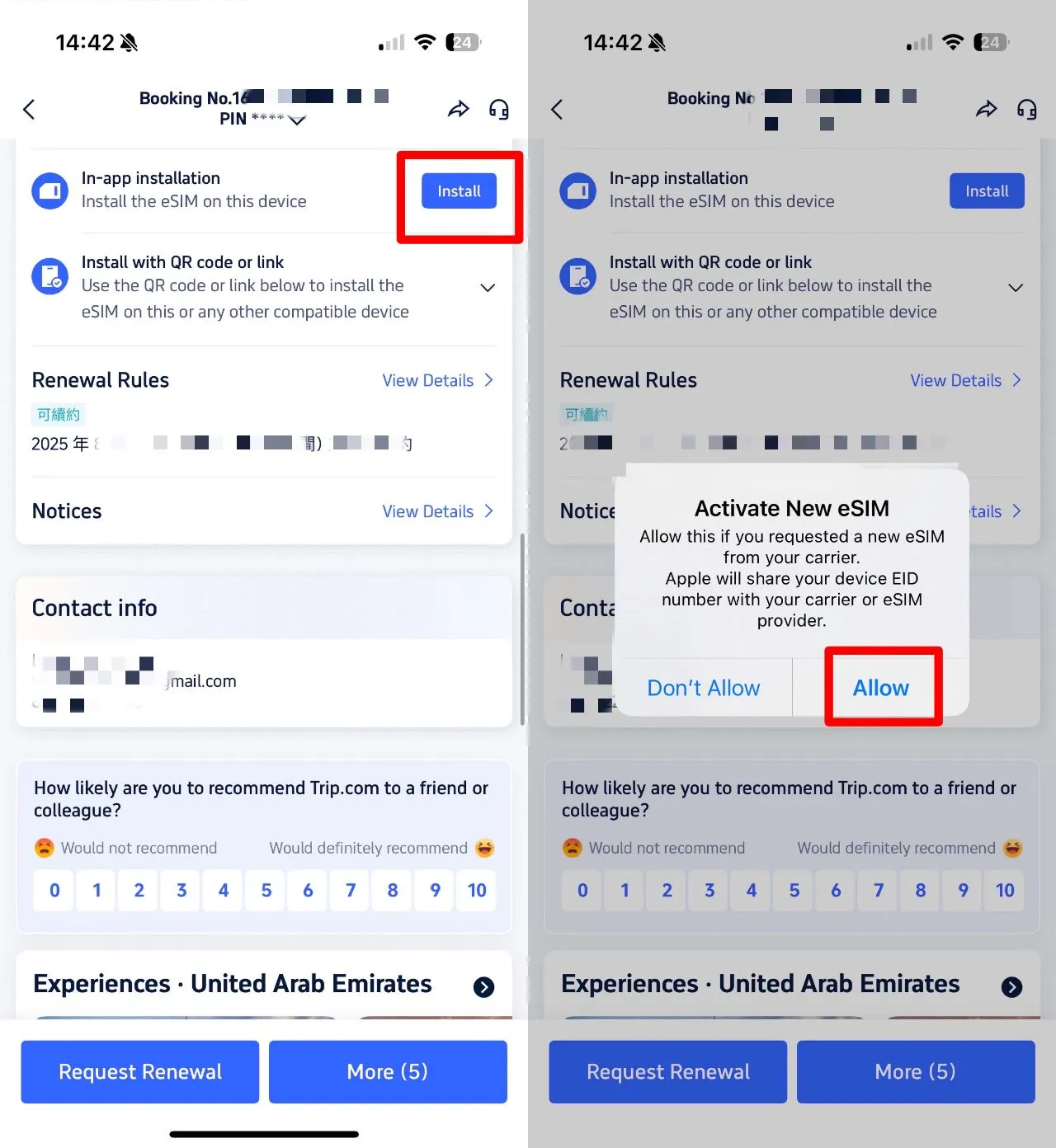
    1. Purchase a Trip.com eSIM plan (short or long-term) via the Trip.com app.
    2. Activate it right on your unlocked phone—no physical SIM card needed!
    3. Connect to international data — WhatsApp works like a charm.
  • Key benefits:
    • ✅ Completely legal: Fully compliant with Chinese telecom regulations.
    • ✅ No VPN required: Completely legal and worry-free.
    • ✅ Stable & affordable: Dependable for all your calls, texts, and media needs.
    • ✅ Traveler-friendly: Full English support and a seamless setup process.
✅ Need Internet in China? Get a China eSIM card to quickly access services like Instagram/YouTube/WhatsApp without the need for a VPN! (Many foreign apps are blocked in China 😱)

International Roaming (via your home carrier)

If your home carrier offers international roaming in China, enabling it allows you to stay connected on WhatsApp using your foreign data plan.

  • How to use:
    1. Activate roaming for China with your home carrier before you head out!
    2. Enable data roaming on your phone in China.
    3. WhatsApp keeps you connected using your international carrier’s network.
  • Considerations:
    • ✅ Legal: Uses approved international roaming agreements.
    • ❌ Expensive: Roaming fees are usually pretty steep.
    • ❌ Coverage gaps: Can be a bit spotty when you're off the beaten path in rural areas.

VPNs: Strictly Regulated — Why You Should Skip Them

Heads up: Unauthorized VPNs are illegal for individual users in China. Only approved enterprises with official telecom authorization are permitted to use dedicated VPNs for business purposes.

  • Why you should skip the VPN:
    • ⚠️ Serious legal risks ahead: You could face heavy fines, have your devices confiscated, or even be deported.
    • ⚠️ High cost: Paid VPNs can be pricey and often don't offer refunds.
    • ⚠️ Not the best experience: The speeds were sluggish, the connection kept dropping, and it just wasn't reliable.
    • ⚠️ Security threats: Malware, data theft, and account hacking.
  • The only legal way to use a VPN: Multinational companies that have official approval from Chinese authorities for cross-border business. Unfortunately, individuals can't apply for this.

Why Is WhatsApp Restricted in China?

Why Is WhatsApp Restricted in China?

Source: Unsplash

When traveling in China, always be sure to follow local laws and regulations. For your international communication needs, such as using WhatsApp, stick to legal options like a Trip.com eSIM or international roaming. It’s best to steer clear of unauthorized circumvention tools—they can be illegal, expensive, and risky.

Reason

Details

Legal Reference

No Domestic License

WhatsApp is not licensed to operate in China’s regulated Internet market.

Mobile Internet Application Information Service Management Regulations

Overseas Data Storage

Because user data is stored outside of China, it’s sparking some important conversations around national security and how we keep our personal information safe.

Cybersecurity Law, Data Security Law

No Local Content Moderation

Doesn't have the necessary systems in place to handle content according to Chinese regulations.

Regulations on the Governance of Network Information Content Ecology

Cross-Border Service Compliance

International apps need to jump through a few hoops to meet strict registration and operational requirements.

Negative List for Cross-Border Trade in Services

The Best WhatsApp Alternatives for Travelers in China

The Best WhatsApp Alternatives for Travelers in China

For staying connected while in China, check out these reliable, traveler-friendly apps:

1. WeChat (Weixin)

  • WeChat is China's ultimate "everything app." From messaging and calls to payments, social media, and even banking, it does it all. If you're heading to China, WeChat is an absolute must-have.
  • English interface is available
  • Heads up: Some features are a bit limited for international accounts (you might notice fewer payment options and a smaller selection of stickers).

Planning for 2026:

  • Make sure to download WeChat from the App Store or Play Store
  • Sign up using your international phone number
  • Add new friends by phone number or QR code
  • Verify by SMS (China +86 or international, both work)

2. Skype

  • Perfect for: Crystal-clear international video calls and seamless screen sharing.
  • Why: It’s owned by Microsoft and legal to use in China, making it a perfect choice for staying connected with family or handling business calls.

3. HelloTalk

  • Perfect for: Swapping languages and connecting with travelers from all over the globe.
  • Why you'll love it: It features built-in translation tools, making it a fantastic resource for travelers learning Chinese!

Practical Tips for 2026

Before you head out:

  • Check if your phone is eSIM-compatible (iPhone 14+, recent Samsung models, Google Pixel 6+, and OnePlus 9+)
  • Buy your eSIM online before you arrive (it's cheaper and guaranteed)
  • Check in with your home carrier about roaming—just to be safe!
  • Make sure to download WeChat before you touch down
  • Make sure to have WhatsApp ready so you can share your WeChat ID with others before you arrive

At the airport:

  • If your phone supports eSIM and you haven't bought one yet: Buy a Trip.com eSIM at the airport
  • If your phone doesn't support eSIM: Buy a roaming or local SIM at the airport
  • Test your connection before you even leave the airport (scan for airport WiFi, then switch over to your data plan)

In China:

  • Add everyone's WeChat ID (it's their username, like @john_smith)
  • For your international family: Use WhatsApp via eSIM, and ask them to download WeChat as well
  • For work: Whatever your company uses (likely DingTalk or WeChat Work)
  • For dating and socializing, stick to WeChat—it's the go-to app for locals!

Leaving China:

  • Keep your eSIM active until you reach the airport—it's great to have as a backup!
  • After you leave: Switch back to your home SIM
  • Switch off data roaming to dodge those unexpected travel bills!
  • If you're holding onto your Chinese number: Just save it for your next adventure (you can easily top up your eSIM later!)

China Hotel Recommendations

🔥 Hotel Coupons: Exclusive Hotels Deal for New Users

Discover the world with trip.com! Book the perfect hotel anywhere in the world and get an unbeatable 10% discount if you're a first-time user! If this is your second time using it, you will receive a 5% discount! Download our app now and start planning your next trip with ease.

Just click this link and download the Trip.com App, after successfully registering as a member, use it when you place an order!

🔥Save More with Up to 5% Off

Use our promo code to enjoy up to 5% OFF on your attraction tickets, tours and eSIMs!

Navigating Specific Situations: Tips for Staying Connected

Foreigner, 1 week in Shanghai:

  1. Buy a Trip.com eSIM at the airport (HKD 50, 7 days, 5 GB)
  2. Activate in 5 minutes
  3. Download WeChat and connect with locals
  4. Use WhatsApp to stay in touch with family back home (it works perfectly on an eSIM)
  5. Cost: $6

Expat moving to Beijing for a year:

  1. Get your eSIM during your first week while you're getting settled
  2. Once you've settled in, head over to sign up for a China Mobile or Unicom plan—just remember to bring your passport and proof of your local address!
  3. Get a Chinese phone number for your daily adventures
  4. Keep your eSIM as a backup for international apps
  5. Cost: eSIM $10/month, Chinese SIM CNY 30–80/month

Business traveler, 3 days in Shanghai:

  1. Enable roaming with your home carrier (give them a quick call before you jet off!)
  2. Check to see if your company has approved a VPN (spoiler alert: they probably haven't!)
  3. Use an eSIM if roaming is too expensive
  4. Set up WeChat anyway (most locals prefer it)
  5. Cost: Roaming $30–50 or an eSIM for just $5–8
Top Shanghai Hotels
Top Beijing Hotels
Top Guangzhou Hotels
Lihat Semua Hotel

What to Prepare for a Trip to China?

  • Visa & Entry Tips Malaysians transiting through China to a third country can usually apply for a 24-hour or 240-hour visa-free transit; in addition, a 30-day visa-free period has been implemented between China and Malaysia. Learn more about China Arrival Card to land in China easily.
  • Getting Connected VPNs are vital for accessing Google, WhatsApp, Instagram, etc in China. Set one up before arriving. China eSIMs are the easiest option for data and bypassing restrictions.
  • Money Exchange & Tax Refunds Exchange money in China banks (better rates than airports). ATMs accept foreign cards, but notify your bank first. For tax refunds, spend over ¥500 at stores with a "Tax-Free" sign. Keep receipts and get forms stamped at customs before departure.

Must-Have Apps in China

FAQs about WhatsApp in China

Disclaimer: This article has been provided by an individual contributor or third party platform. If there is any discrepancy regarding the copyright, please contact us directly and we will delete the content immediately.
Amal

Amal

Traveller, Writer, Sea Lover, Travel Guide, Explore the world

Lihat profil

Hi, nice to meet u~ I love traveling and exploring the world, and my dream is to travel around the world! Forever free and happy, I'll be sharing some travel tips that I hope will be helpful.

517 artikel
China Malaysia Travel Tips Travel Guide
> >
WhatsApp in China