

Best China eSIM for Malaysian Travellers

Oleh Tom
9 November 2026

Planning a trip to China? Trust me, having internet access is a MUST! Whether you're using maps to find your way around, checking restaurant reviews, or sharing your travel photos on Instagram, you'll want a reliable connection throughout your trip.
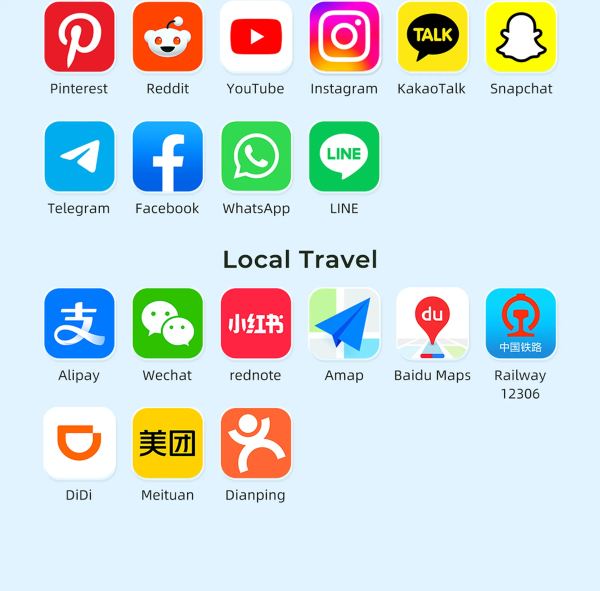
I'd recommend getting a China eSIM from Trip.com before you fly! It's affordable, offers stable internet connectivity and supports popular apps like WhatsApp, Instagram and Facebook, so you can stay connected with family and friends back home. No need to fuss with a physical SIM card either!
Not sure which plan to choose or how to set it up? Don't worry! Here's my guide to buying, installing and activating your China eSIM, plus some handy tips to help you stay connected during your trip.
📲 How to Buy a China eSIM?

If you don't want to waste time looking for a local SIM card after arriving in China, I'd recommend getting your eSIM from Trip.com before departure! It's much more convenient, and you can settle everything from home. Plus, the purchasing process is pretty straightforward. Just follow these simple steps:
Step 1: Open the Trip.com App or Website
Head over to the Trip.com China eSIM page and browse the available eSIM packages.
Step 2: Choose a Suitable Data Plan
Pick a package based on your travel duration and how much internet data you think you'll need each day. For example, if you mainly use the internet for navigation, checking attractions, booking rides and chatting with friends, you probably won't need a super large data package.
Step 3: Check the Package Details
Before making payment, remember to check the package's validity period, data allowance, coverage, network provider and activation rules. Some eSIM packages only start counting their validity after connecting to a network for the first time, so it's worth checking!
Step 4: Complete Your Payment
Once everything looks good, proceed with payment on Trip.com. After your purchase is successful, you can find your eSIM installation details in your booking order. Simply follow the instructions provided, and you're one step closer to staying connected in China!

CMCC China 4/5G eSIM
- CoverageMainland China
- Data0.5G-3GB/day or 1-50GB Total
- Validity1 to 30 Days
- Pricefrom RM1.74

China Mobile 5G eSIM
- CoverageMainland China
- Data0.5G-3GB/day or 1-50GB Total
- Validity1 to 30 Days
- Pricefrom RM1.74

China/HK/Macau eSIM
- CoverageChina(Mainland,HK&Macau)
- Data3-50GB Total or 0.5-100GB/Day
- Validity1 to 30 Days
- Pricefrom RM1.74
📶 Best China eSIM Plans

One thing I like about Trip.com's China eSIM is that the plans are quite flexible! You don't have to stick to just a few fixed packages. Instead, you can choose based on your travel duration and data needs. Whether you're heading to China for a short holiday or planning a longer stay, there's a range of options to consider.
📅 Step 1: Choose Your Travel Duration
First, select how many days you'll need the eSIM. Trip.com offers durations from 1 day up to 365 days, including 25-day, 30-day, 90-day, 180-day and 365-day packages. So, if you're just visiting China for a few days, simply choose the number of days that matches your travel itinerary.
📊 Step 2: Choose Your Data Package
Once you've selected your duration, it's time to decide how much data you need. There are two main types of data packages available:
- Daily Data Plans: Choose from 0.5GB, 1GB, 2GB, 3GB or even 100GB per day, depending on your usage.
- Total Data Plans: Prefer having a fixed data allowance for your entire trip? You can choose from 1GB, 3GB, 5GB, 10GB or 100GB in total.
👥 Step 3: Select Your Purchase Quantity
Lastly, choose how many eSIMs you want to purchase. If you're travelling solo, simply select 1. Going to China with a friend or family member? You can select 2 or more, depending on how many people need their own eSIM.
💡 Quick reminder: Each person needs to install their own eSIM on their phone. One eSIM cannot be shared between two phones, so remember to purchase enough if you're travelling in a group!
✈️Flights to China!
Kuala Lumpur to Chong Qing
Kuala Lumpur to Shang Hai
Kuala Lumpur to Hang Zhou
Lihat Semua Penerbangan


⚙️ How to Install & Activate a China eSIM?
1 Day - 2GB/Day
- Data2GB Daily
- Validity1 Day
- PriceFrom RM3.87
7 Days - 2GB/Day
- Data2GB Daily
- Validity7 Days
- PriceFrom RM24.17
10 Days - 30GB
- Data30GB
- Validity10 Days
- PriceFrom RM59.1
🔍 Things to Check Before Installing Your eSIM
- Check eSIM compatibility: Make sure your phone supports eSIM and isn't carrier-locked.
- Connect to a stable internet connection: You'll need WiFi or mobile data to install your eSIM.
- Choose the right phone: Once installed for the first time, this eSIM will be bound to that device and cannot be transferred to another phone.
💡 Remember: This eSIM is valid for 60 days from the booking date and can only be used once. You can delete and reinstall it on the same device up to 10 times, but transferring it to another device isn't allowed.
📲 Method 1: One-Tap Installation via Trip.com
If your phone supports one-tap installation, this is probably the easiest method! Simply open your Trip.com App, go to your eSIM booking, and tap "Install". Alternatively, you can use the one-tap installation link provided in your booking voucher and follow the instructions.
📱 iPhone users: One-tap installation requires iOS 17.4 or above.
📷 Method 2: Install Using a QR Code or Manual Setup
If your phone doesn't support one-tap installation, don't worry! You can still install your China eSIM using a QR code or manual setup.
Step 1: Get Your QR Code Ready
First, open the QR code attachment in your Trip.com booking. You can save the QR code on another device or print it out for easy scanning. Some iOS 17 or later and Android phones also allow you to scan a QR code directly from an image saved on your phone.
Step 2: Go to Your Phone's eSIM Settings
Head to your phone settings and look for the option to add a new eSIM.
- iPhone: Settings → Cellular / Mobile Service → Add eSIM / Add Cellular Plan
- Android: Settings → SIM Card Manager → Add eSIM
Step 3: Scan the QR Code
Make sure your phone is connected to the internet, then scan the QR code from your Trip.com booking. Follow the on-screen instructions to complete the installation.
Step 4: Can't Scan the QR Code? Try Manual Setup
If the QR code doesn't work, you can also install your eSIM manually. Simply refer to the details provided in your Trip.com booking and enter the SM-DP+ Address and Activation Code when prompted.
Step 5: Still Having Trouble Installing?
If both QR code scanning and manual installation fail, check whether your phone is carrier-locked. If it is, contact your original mobile carrier to request an unlock before trying to install the eSIM again.
🔥 More Handy Features: Personal Hotspot
Here's another useful feature! This China eSIM also supports personal hotspot and internet sharing. So, if your travel buddy runs out of data or needs to check something online, you can simply switch on your hotspot and share your connection. Super convenient when travelling together! 😊
💡 Don't Forget to Activate Your eSIM!
Once you've successfully installed your eSIM, remember to activate it according to the package instructions when you're ready to use it in China. Before connecting, make sure your China eSIM is selected for mobile data and Data Roaming is switched on if required by the package. Keep your Malaysian SIM active if you still need to receive OTPs or calls.

eSIM 5G China Daratan/Hong Kong/Macau | Pelan Harian / Data Jumlah | Caj 24 Jam | Kod QR
4.6/5
22052 ulasanPemasangannya mudah, hampir serta-merta. Selepas mendarat di Hong Kong, isyaratnya sangat stabil dan pantas semasa dalam perjalanan ke Shenzhen. Oleh kerana saya kerap menggunakan eSIM syarikat ini, saya hanya memasangnya di Hong Kong kali terakhir, dan terdapat beberapa masalah dengan isyaratnya. Pengalaman saya sekarang ialah lebih baik memasangnya di Taiwan dahulu, dan kemudian mengaktifkannya di Hong Kong atau tanah besar China; nampaknya terdapat perbezaan yang nyata.

eSIM 5G/4G di 8 negara Asia | Sokongan berbilang rangkaian, menyokong ChatGPT & Peta Google | 500MB/hari - jumlah 50GB | 1-30 hari | Pengebilan 24 jam | Kod QR
4.6/5
6717 ulasanMudah dipasang, mudah digunakan, seperti yang diiklankan. Walau bagaimanapun, saya akui bahawa di Jepun, kadangkala sukar untuk mendapat sambutan yang baik. Tidak pasti sama ada syarikat penerbangan yang dipilih untuk negara ini menawarkan perkhidmatan yang lebih baik. Selain itu, semuanya baik-baik sahaja.



Tanah Besar China 5G eSIM | Pas Harian/Pakej Data Keseluruhan | Pengebilan 24 Jam | 1–365 Hari | Kod QR
4.6/5
67651 ulasanIa sebenarnya agak menakjubkan. Carian berfungsi tanpa masalah langsung dan pantas. TikTok tidak berfungsi dari iPhone saya tetapi siapa yang peduli. Hebat, itulah yang penting!
eSIM China | 1-30 Hari | Sehingga 60GB Data Kelajuan Tinggi | Liputan di Rangkaian Utama
4.3/5
119 ulasanIsyaratnya sangat bagus, ia sangat mudah dibuka dan digunakan. Harganya agak lebih baik daripada membeli kedai biasa. Dan kualiti isyarat jauh lebih baik
📱 Which Phones Are Compatible with China eSIM?
Step 1: Check Whether Your Phone Is Carrier-Locked
First, make sure your phone isn't locked to a specific mobile carrier.
- iPhone users: Go to Settings → General → About and look for Carrier Lock. If it shows "No SIM Restrictions", your phone is unlocked and you can move on to checking eSIM compatibility.
- Android users: Go to Settings → About Phone → Status Information to find your phone's IMEI number. You can then contact your mobile carrier and provide the IMEI to check whether your device is carrier-locked.
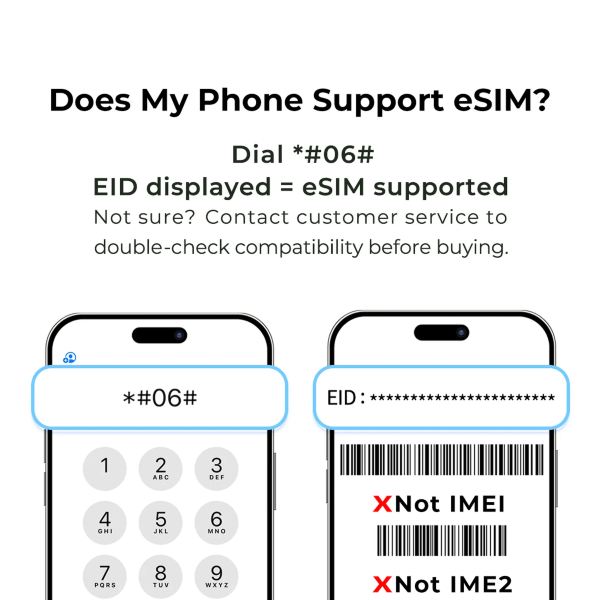
Step 2: Check Whether Your Phone Has an EID Number
Once you've confirmed that your phone isn't carrier-locked, the next step is to check whether it supports eSIM. The easiest way is to open your phone's dial pad and enter *#06#. If an EID number appears on your screen, it means your phone supports eSIM!
However, if you only see an IMEI number without an EID, your device may not support eSIM. It's best to double-check your phone model's specifications before purchasing.
💡 Quick reminder: EID and IMEI are two different things! The EID identifies your phone's eSIM capability, while the IMEI identifies your mobile device. Seeing an IMEI number alone doesn't mean your phone supports eSIM.
🏨 [Get Deals] Best Hotels in China

-
-
-
-
Cari Hotel
🔥 Hotel Coupons: Exclusive Hotels Deal for New Users
Discover the world with trip.com! Book the perfect hotel anywhere in the world and get an unbeatable 10% discount if you're a first-time user! If this is your second time using it, you will receive a 5% discount! Download our app now and start planning your next trip with ease.
Just click this link and download the Trip.com App, after successfully registering as a member, use it when you place an order!
🔥Save More with Up to 5% Off
Use our promo code to enjoy up to 5% OFF on your attraction tickets, tours and eSIMs!
Lihat Semua Tarikan
 41063 ditempah








💡 Tips for Using China eSIM in China
💡 Tips | 🔍 Details |
|---|---|
Check Phone Compatibility | Make sure your phone supports eSIM and isn't carrier-locked before purchasing. |
Buy Before Departure | Get your China eSIM from Trip.com before flying so you don't have to worry about finding a SIM card after landing. |
Install with Stable WiFi | Install your eSIM while you still have a stable internet connection, preferably before leaving Malaysia. |
Check Activation Rules | Different packages may have different activation rules. Check when your validity period starts to avoid activating too early. |
Enable Data Roaming | Remember to turn on Data Roaming for your China eSIM if required by your package, otherwise you might not be able to access the internet. |
Select the Correct SIM | If you're using dual SIM, make sure your China eSIM is selected as the default line for mobile data. |
Save Your eSIM Details | Keep your QR code, activation information and booking details somewhere accessible in case you need to refer to them. |
Lihat Semua Tarikan





What to Prepare for a Trip to China?
- Visa & Entry Tips Malaysians transiting through China to a third country can usually apply for a 24-hour or 240-hour visa-free transit; in addition, a 30-day visa-free period has been implemented between China and Malaysia. Learn more about China Arrival Card to land in China easily.
- Getting Connected VPNs are vital for accessing Google, WhatsApp, Instagram, etc in China. Set one up before arriving. China eSIMs are the easiest option for data and bypassing restrictions.
- Money Exchange & Tax Refunds Exchange money in China banks (better rates than airports). ATMs accept foreign cards, but notify your bank first. For tax refunds, spend over ¥500 at stores with a "Tax-Free" sign. Keep receipts and get forms stamped at customs before departure.
Must-Have Apps in China
- China Payment Apps Forget cash. Chinese use Alipay (I like it better) or WeChat Pay to pay for everything in China. Scan a QR code at noodle stalls, metros, even temples. Link your foreign Visa/Mastercard before landing.
- China Map Apps Amap (Gaode Map) & Baidu Map (limited English) is what locals use, with real-time navigation, metro/bus routes, and traffic updates. Apple Maps does a good job too if you're already an IOS user.
- China Transport Apps Street taxis are cheap, but drivers rarely speak English. Use China Taxi App like DiDi (China’s Uber)—set your destination in English, pay by Alipay.
- China Travel Apps 15+ China trips taught me: Use Trip.com. It's the best English app for booking China trains/flights/hotels + finds Trip.com deals.
- China Dating Apps Locals use Tantan (China’s Tinder) and Momo. WeChat’s “People Nearby” works too, but expect language barriers unless your Mandarin’s decent.
- China Food App Use Meituan (also helps find nearby restaurants) or Ele.me for food delivery—both have English mode. No English menu in restaurants? Scan the QR with Alipay's translator.
Best Places to Visit in China: Top Cities & Travel Guide
Discover the best places to visit in China, from Beijing and Shanghai to Xi’an, Chengdu, Guilin, Hangzhou, and Guangzhou. Plan your first China trip with top attractions, travel tips, halal-friendly areas, and itinerary ideas.
9 November 2026
China Taxi Guide: Fares, Apps, Payment Methods & Travel Tips
Planning a trip to China? This complete guide covers everything first-time visitors need to know about taxis in China.
9 November 2026
How to Exchange Money in China 2026: Payment Tips for China Travel | Trip.com
Traveling to China? Learn where & how to exchange money in China, use Alipay & WeChat Pay, and exchange CNY easily.
9 November 2026
Visa-Free Countries for Chinese Passport Holders 2026 | Complete Guide
Discover where Chinese passport holders can travel visa-free in 2026. Get the full list of countries, entry requirements, and practical travel tips for your next trip.
9 November 2026
❓FAQs: eSIM China
-
1. Can Malaysians use an eSIM in China?
-
2. Can I use WhatsApp, Instagram and Google with a China eSIM?
-
3. When should I buy and install my China eSIM?
-
4. Can I use my Malaysian SIM card and China eSIM at the same time?
-
5. Can I share my China eSIM internet with friends?
Disclaimer: This article has been provided by an individual contributor or third party platform. If there is any discrepancy regarding the copyright, please contact us directly and we will delete the content immediately.