
For many Malaysian travelers visiting Thailand, arriving without mobile data can be a real hassle — especially when roaming charges are steep, local SIM cards involve paperwork, or everyday apps like MAE, Grab, or Touch 'n Go eWallet don’t work as usual. That’s where an eSIM becomes a true game-changer. With the best eSIM options available for Thailand, you can enjoy instant mobile data the moment you land — no more lining up at SIM card counters or fumbling with tricky APN settings. An eSIM offers unbeatable convenience, flexibility, and value, keeping you seamlessly connected to essential tools like Google Maps, Grab, or Thai e-wallets like TrueMoney and LINE Pay.
🔥2025 Years New Customer Coupon
Use our promo code to enjoy an additional 5% discount (up to RM12). Save even more on your attraction tickets and tours!
- 🎉Validity period: From 1 Jan 2025 at 00:00:00 to 30 June 2025 at 23:59:59
- 🤗Voucher validity period: Within 3 days after collection
What is an eSIM?
An eSIM, or embedded SIM, is a digital version of the traditional SIM card that’s built directly into your device. Unlike physical SIM cards, there’s no need to insert or replace anything. With an eSIM, you can activate a mobile data plan for Thailand instantly, switch between networks effortlessly, and even store multiple plans on one device. It’s a hassle-free, flexible way to stay connected — perfect for Malaysian travelers exploring Thailand without the stress of hunting for a local SIM card.
Recommended eSIM Options for Thailand Travel!
1GB 3 Days
- Data1GB Daily
- Validity3 Days
- PriceFrom RM5.93
1GB 5 Days
- Data1GB Daily
- Validity5 Days
- PriceFrom S$3.82
1GB 7 Days
- Data1GB Daily
- Validity7 Days
- PriceFrom RM12.59
5 Days 500MB/Day
- Data500MB Daily
- Validity5 Days
- PriceFrom RM11.36
1 Day 2GB/Day
- Data2GB Daily
- Validity1 Day
- PriceFrom RM4.81
30 Days 1GB/Day
- Data1GB Daily
- Validity30 Days
- PriceFrom RM91.14
Need more flexible options? Customize & choose from our Thailand eSIM products!
Southeast Asia eSIM
- CoverageSoutheast Asia
- Data500M to 100GB
- Validity1 to 30 Days
- PriceFrom RM2.23
- Reviews (3.7 ★)3 reviews
- Bookings100+ bookings
Thailand AIS 5G eSIM
- CoverageThailand
- Data15GB to unlimited
- Validity7 to 10 Days
- PriceFrom RM26.15
- Reviews (4.8 ★)1,583 reviews
- Bookings42,000+ bookings
Thailand eSIM
- CoverageThailand
- Data500M to unlimited
- Validity1 to 30 Days
- PriceFrom RM2.05
- Reviews (4.5 ★)368 reviews
- Bookings8,000+ bookings
Other Popular eSIMs
Must-have Apps for tourists in Thailand

Thailand is a beautiful blend of bustling cities, tropical islands, and rich cultural heritage — and having the right apps on hand can make your trip smoother and more enjoyable. Whether you're navigating Bangkok's busy streets, ordering street food to your hotel, or translating Thai menus, these apps will help you stay connected and make the most of your journey.
| Category | Recommended Apps (Thailand) |
|---|---|
Payment apps | TrueMoney Wallet, LINE Pay, Rabbit LINE Pay, GrabPay |
Transport apps | Grab, Bolt, airasia ride, Bangkok MRT/BTS official apps |
Map/navigation apps | Google Maps, Waze, Moovit |
Translation apps | Google Translate, Microsoft Translator |
Food delivery/discovery | GrabFood, Foodpanda, LINE MAN, Robinhood |
Attraction booking | Trip.com |
Communication apps | WhatsApp, LINE, Telegram |
How To Set Up Your Thailand eSIM?

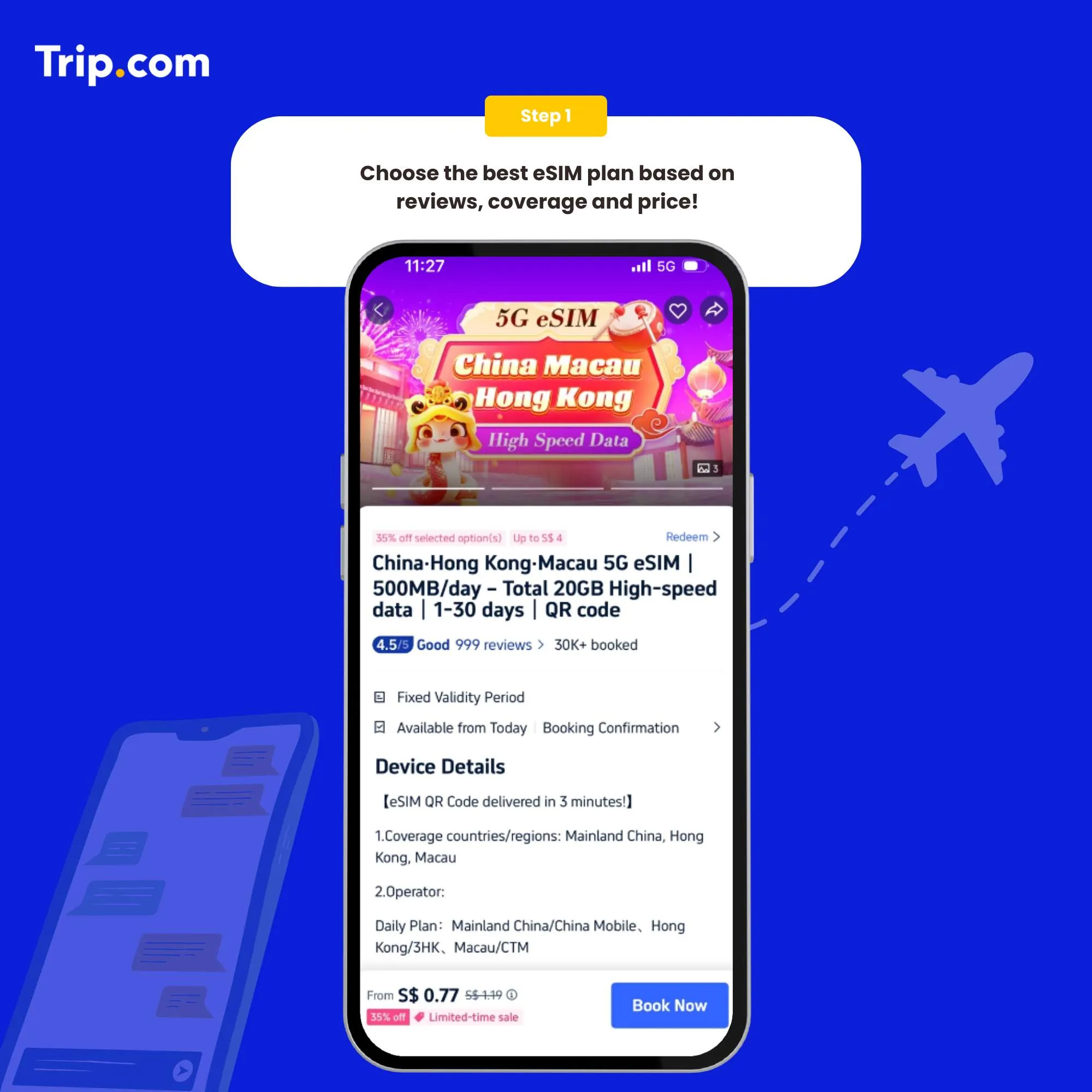
Step 1: Choose the best eSIM plan
There are several providers that offer Thailand eSIMs. Choose the one that best suits your needs.

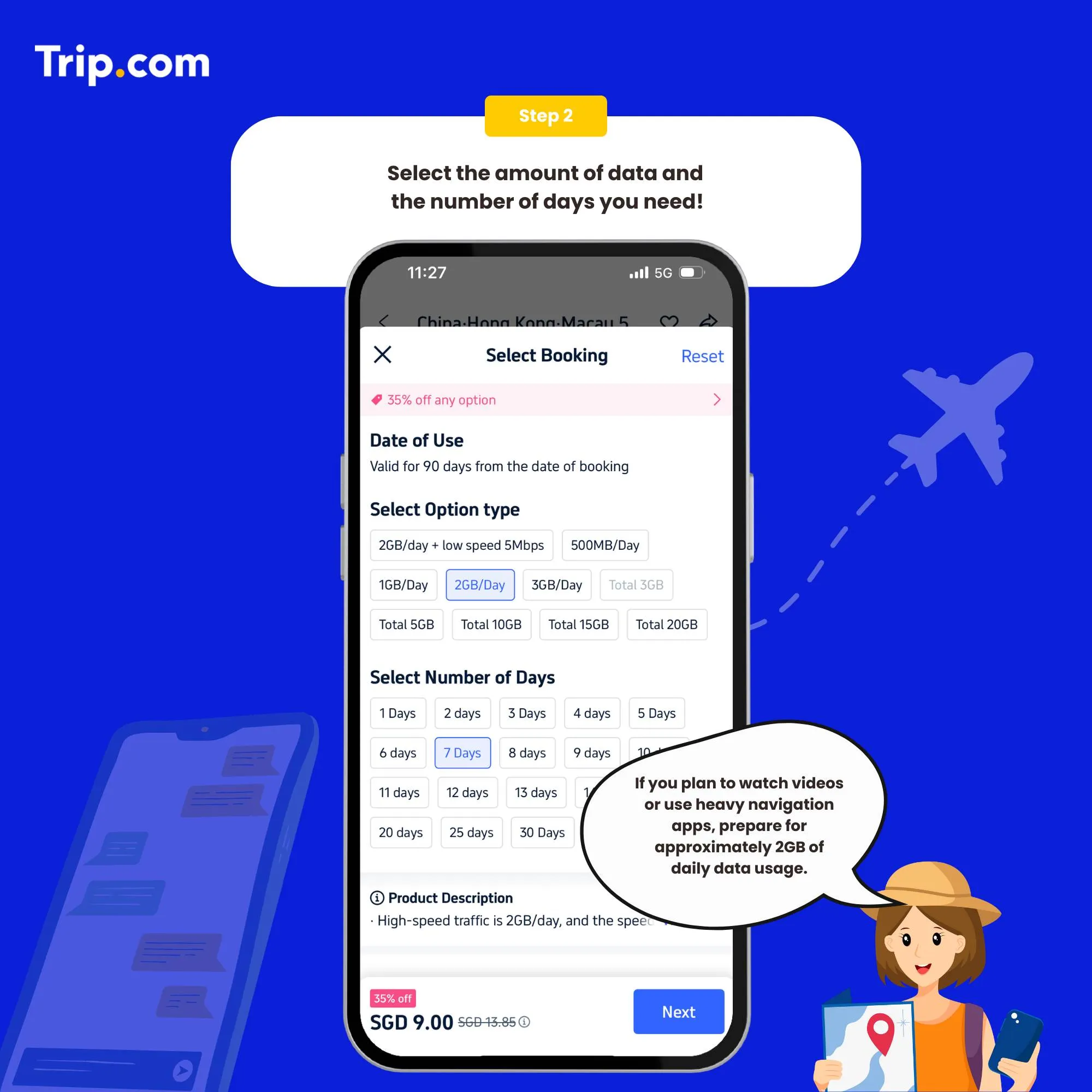
Step 2: Select the data package
Once you've chosen a provider, you'll need to purchase a data plan that suits your needs.

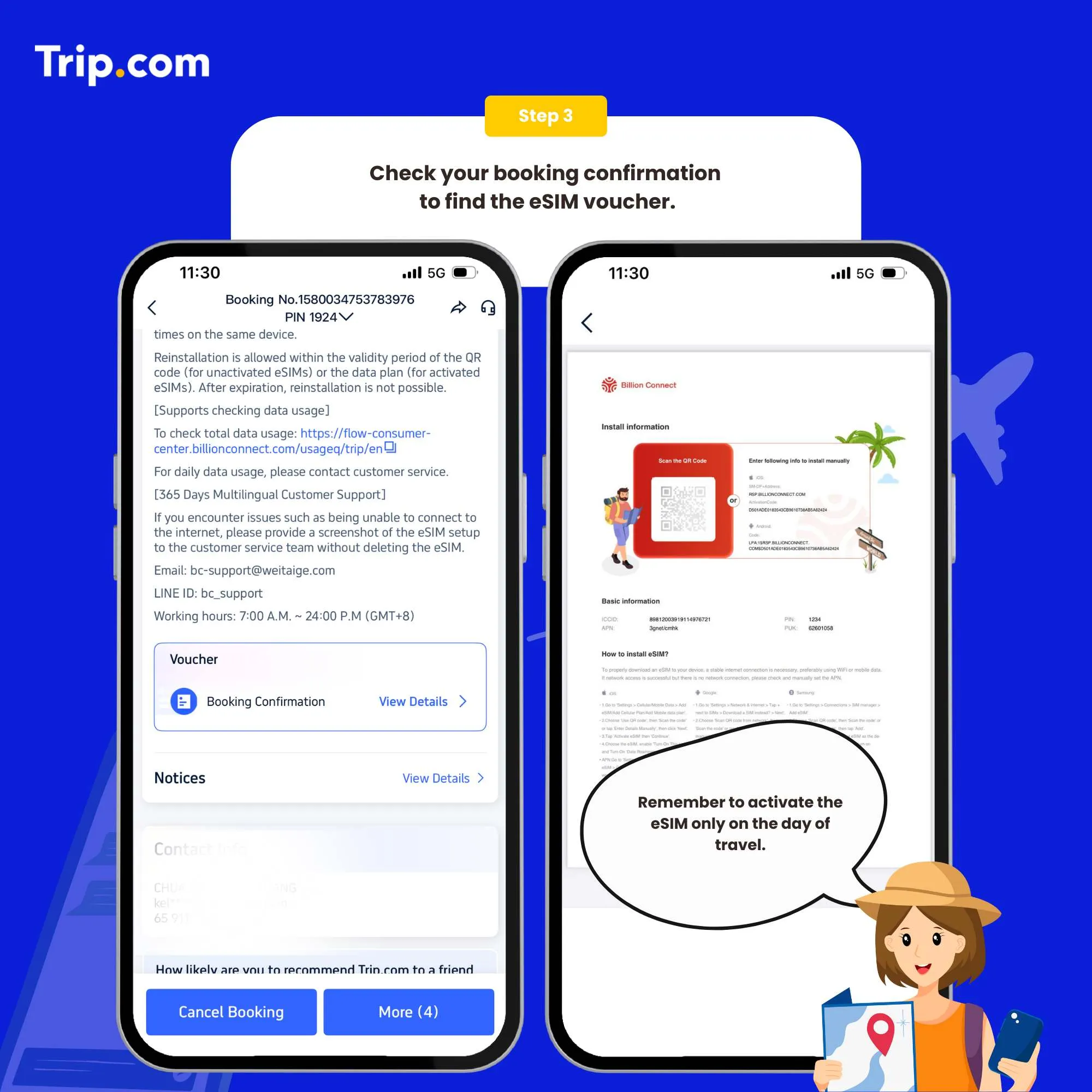
Step 3: Receive your ACTIVATION EMAIL
You will receive an email with installation instructions and a reminder of the latest installation time. Please make sure that there’s available WIFI or connected to networks before installation.

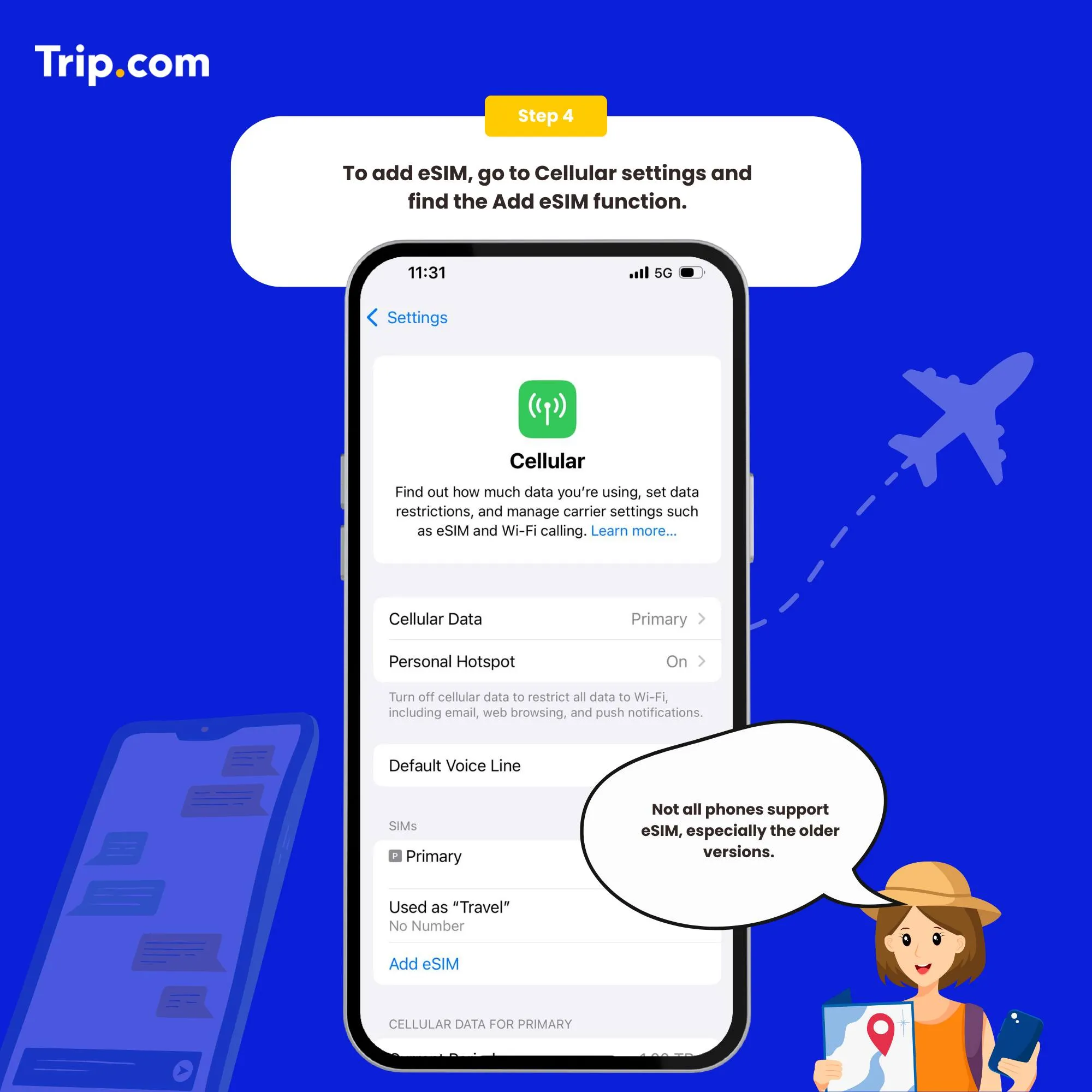
Step 4: Add your eSIM
To activate the eSIM, simply scan the QR code on your phone.
Set as the instructions:
- System - Settings - Cellular (iOS) / SIM Card Management (Andriod).
- Add a Cellular Plan (iOS) / SIM Card (Android).
- Agree to download Cellular Plan (iOS) or SIM Card (Android).
- Scan the QR code in the received email for activation (or enter SM-DP +Address and Activation Code manually).

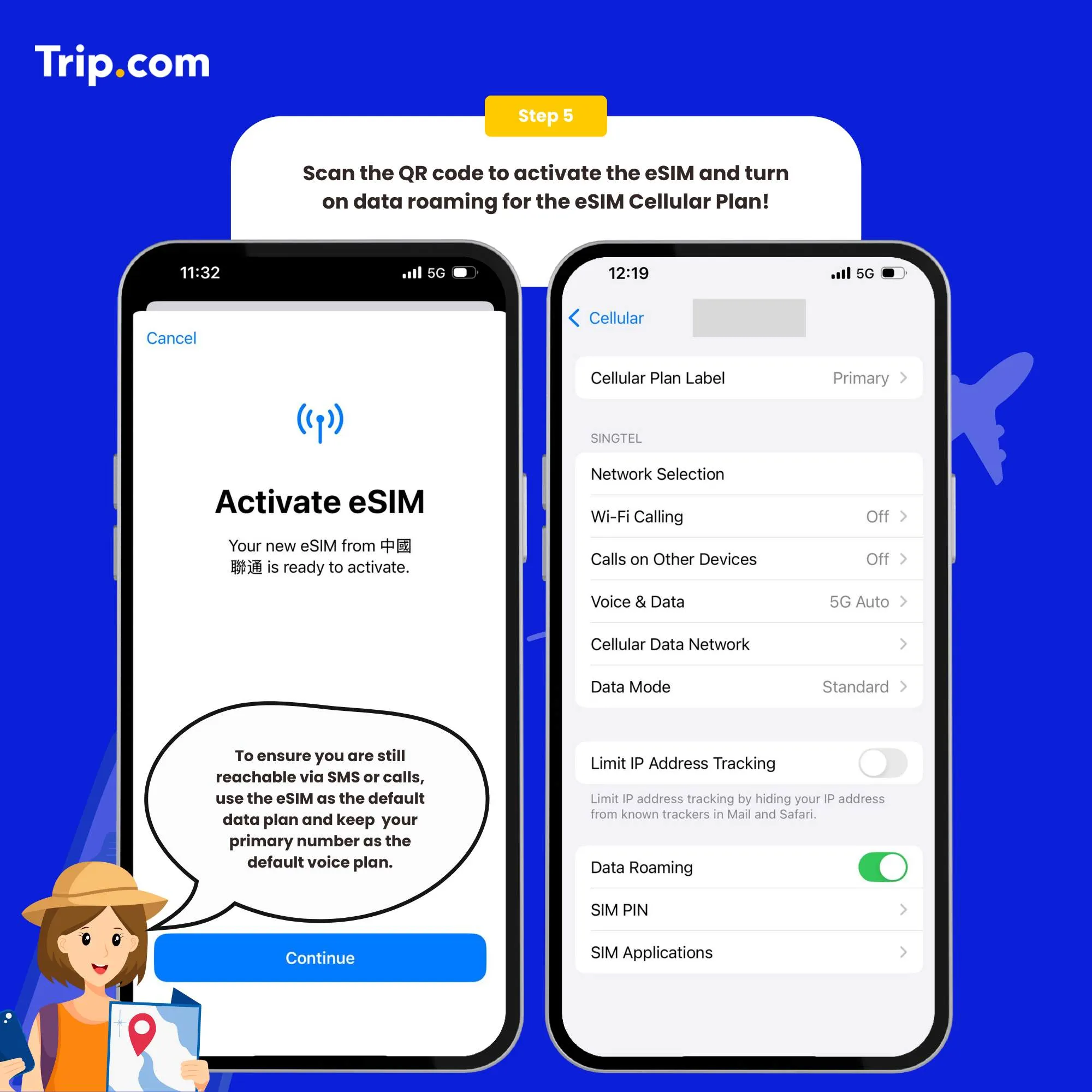
Step 5: Scan the QR code to activate your eSIM
- After the completion of the installation, we recommend that you disable eSIM until you reach your destination.
- After the download is successful, close the primary card if you already have one. Enable the Cellular Plan (iOS) or SIM Card (Android).
- After arriving at the destination, please open your eSIM, and turn on roaming. Then you can access the Internet.
You can now connect to the Internet and enjoy the convenience of Japan eSIM as per your selected plan.

How to close?
Open the open Cellular (iOS) or SIM Card Management (Android), and click to turn off the Cellular Plan (iOS) or SIM Card (Android) (the steps of enabling and disabling are the same).
Who Are the Main Telco Operators in Thailand?

AIS (Advanced Info Service)
AIS is Thailand’s largest mobile network provider, known for its excellent nationwide coverage, fast 4G/5G speeds, and reliable service. AIS offers tourist SIMs and supports eSIM activation for compatible devices, making it a top choice for both short-term visitors and long stays.
TrueMove H
TrueMove H is another major player, popular for its wide 4G/5G coverage, especially in urban areas. It provides convenient eSIM options, competitive prepaid plans, and is well-integrated with the TrueMoney Wallet app, offering extra convenience for digital payments.
DTAC (Total Access Communication)
DTAC is favored for its affordable data packages and user-friendly tourist SIM options. It supports eSIM on a range of devices and is a great choice for travelers looking for budget-friendly connectivity, especially in Bangkok and major tourist zones.
NT (National Telecom)
NT is a state-owned operator with growing infrastructure and services. While not as widely used by tourists, it offers affordable data plans and is working to expand its eSIM and 5G services across the country.
How to Choose the Best Thailand eSIM

Coverage
Pick an eSIM provider with strong coverage in popular destinations like Bangkok, Chiang Mai, Phuket, Krabi, and Pattaya. Look for reliable 4G or 5G networks, and check real user reviews—especially if you're heading to islands or rural areas where coverage can vary.
Usage
If you’re just messaging on WhatsApp, checking emails, or using maps occasionally, a 1GB per day plan should be enough. But for heavier use—like streaming, social media uploads, or frequent app use (e.g., Grab or Google Maps)—go for a 2GB or unlimited plan so you’re not scrambling for data during your adventures.
Pricing
Compare eSIM plans by data amount, duration, and price. Some offer short-term 3-day packs, while others last 15 or 30 days. Choose one that fits your itinerary and usage—no need to overpay for data you won’t use, but don’t skimp if you’ll be online a lot.
Flexibility
Choose a provider that allows easy top-ups or plan extensions. If you decide to extend your trip (or fall in love with Thailand and don’t want to leave!), it’s great to have the freedom to upgrade your plan on the go, without dealing with physical SIM cards.
Services
Look for extras like quick activation, English-language support, and compatibility with key apps like Grab, LINE, or Google Maps. Some eSIMs even offer regional coverage across Southeast Asia, which is handy if you’re also planning to visit countries like Malaysia, Vietnam, or Singapore.
Who Uses Thailand eSIM?

Frequent Travelers
Whether you're flying in for a holiday, a work trip, or a quick getaway, Malaysian travelers will appreciate the ease of reusing an eSIM or activating a new one instantly — no need to swap SIM cards or hunt for a kiosk at the airport.
Business Travelers
Stay connected and efficient during your work trips in Thailand. With an eSIM, you can join video calls, manage emails, and use productivity apps seamlessly — all without racking up costly roaming charges.
Tourists
Exploring Thailand? An eSIM gives you mobile data as soon as you land — perfect for using Grab, navigating with Google Maps, checking restaurant reviews, or sharing your beach photos in real time.
Students
If you’re studying in Thailand short-term or on an exchange program, a travel eSIM helps you stay in touch with classmates, family, and coursework — without needing a long-term mobile contract.
Find the Best Thailand eSIM

Skip the airport SIM card counters and say goodbye to expensive roaming charges. With a Thailand eSIM, getting connected is quick and hassle-free — just purchase online, scan the QR code, and you’re ready to go. No queues, no fuss.
Enjoy fast, affordable mobile data across Thailand — whether you're exploring the Grand Palace in Bangkok, island-hopping in Krabi, or shopping in Chiang Mai’s night markets. Stay fully connected to your favorite apps and services, all without the need to swap physical SIM cards.
FAQs: eSIM Thailand
What is an eSIM?
An eSIM is a built-in digital SIM card that lets your phone connect to the internet without needing a physical SIM. You activate it digitally — usually by scanning a QR code — making it fast and easy to get online.How do I activate my Thailand eSIM?
Buy your eSIM online from a trusted provider, scan the QR code through your phone’s settings, and follow the on-screen steps. Setup takes just a few minutes, and you’re ready to use data as soon as you land.What are the benefits of using an eSIM?
eSIMs offer total convenience — no more searching for local SIM cards or dealing with high roaming charges. You get instant mobile data, simple top-ups, and full control of your plan right from your device.Who are the top eSIM providers in Thailand?
Thailand’s top telcos like AIS, TrueMove H, and DTAC all support eSIM and offer tourist-friendly plans. You can also explore global platforms like Billion Connect or Airalo for easy, instant activation.Can I use my current phone with a Thailand eSIM?
Yes — as long as your phone is unlocked and supports eSIM. Most newer iPhones, Samsung Galaxy models, and Google Pixel phones are compatible. You can check in your phone’s settings to confirm.